















Do I need 1 Gig internet? (& what is it good for?)
1 Gig internet delivers ultra-fast 1000 Mbps fiber or broadband speeds, making it ideal for modern households supporting over 25 devices. It provides enough bandwidth for simultaneous 4K/8K streaming, competitive gaming, and remote work without network congestion. To reach these speeds, households must use modern, compatible hardware like DOCSIS 3.1 modems and WiFi 6 routers.

Key Takeaways:
- 1 Gig internet transfers data at 1000 Mbps using advanced fiber or broadband technology.
- It supports simultaneous high-demand tasks like 4K streaming, online gaming, and video calls.
- The connection is ideal for busy, multi-user households with more than 25 connected devices.
- Upgrading eliminates common network issues like buffering, lag, and slow file transfers.
- Older devices with legacy network cards are physically unable to support 1 Gig speeds.
- Reaching full speeds requires updated equipment, such as a DOCSIS 3.1 modem.
- Mesh WiFi systems are recommended to distribute the gigabit signal and eliminate dead zones.
- Dedicated gaming routers can be paired with 1 Gig to prioritize bandwidth and reduce latency.
How much internet speed do I need? With so many different speeds and plans available, it can be difficult to know which is best for you.
To help you find the right internet speed, we’ll explain what 1 Gig internet is and what it’s best for in this article.
What you'll learn:
- What is 1 Gig internet?
- Is 1 Gig fast enough?
- 1 Gig vs. other internet options
- Is 1 Gig worth it?
- How much does 1 Gig internet cost?
- When is it time to upgrade to a faster internet speed?
- Will my devices be capable of receiving 1 Gig?
- How much speed do I really need?
- 1 Gig internet equipment requirements
- How do I get 1 Gig internet with Astound?
- Bottomline: Is 1 Gig good enough?
- Frequently asked questions
- Looking for more topics?
FIBER-POWERED GIG INTERNET
Gig+ speeds, unbeatable value
Get Gig speeds up to 1500* Mbps starting at $60/mo on Astound’s ultra-reliable fiber-powered‡ network.
What is 1 Gig internet?
1 Gig internet is a lightning-fast internet connection capable of transferring 1000 megabits (or one Gigabit) per second. 1 Gig internet is usually delivered as 1 Gig fiber internet, or 1 Gig broadband.
A single Gigabit contains 1 million bits, meaning 1 Gig transfers data at 1000 million bits per second. Other names for “1 Gig internet” are “1000 Mbps”, “1G” or “1 Gbps”. 1 Gig internet uses advanced fiber optic technology to provide speed and reliability to your household. Whether you’re exploring fiber optic internet plans or upgrading your current setup, 1 Gig can help you do more.
Additionally, unlike other types of internet connections, “fiber-powered” 1 Gig internet uses fiber optic cables to deliver consistent speeds, meaning faster downloads, smoother streaming and more reliable performance.
A 1 Gig internet connection enables you to:
-
- Connect multiple devices and multiple users simultaneously.
- Access cloud services and learning platforms across multiple devices and users.
- Link smart devices and automate your home.
- Have multiple users stream HD, 4K and 8K content across multiple devices on 1 Gig internet.
- Engage in real-time MMORPG games, or other gaming experiences like VR, AR, console, mobile and PC.
- Download large files with more bandwidth than 600 or 300 Mbps.
While most people consider download speeds when choosing internet plans, upload speeds are crucial for tasks like large file uploads, video conferencing and online gaming.
Keep in mind that internet speeds may vary depending on network traffic, device performance and WiFi connection type.
Is 1 Gig internet fast enough?
1 Gig internet is fast enough for most households. However, whether or not the speed is fast enough for your home will depend on the bandwidth consumed by each user and their devices.
Here’s a breakdown of what a 1 Gig internet connection can handle:
For gaming
Wondering what internet speed you need for gaming? Most online games require internet speeds of 5 to 20 Mbps. However, competitive players may want as much as 100 Mbps available at all times.
Gigabit internet provides enough bandwidth for gaming in homes with multiple users across different devices.
With a 1 Gig internet connection, you’ll be able to:
- Play online games with multiple PCs, consoles, or other gaming devices.
- Download large games and version updates.
- Stream 4K or 8K video on platforms like Netflix, YouTube, or Twitch. If you’re a serious gamer who plays and streams in 4K, you’ll want speeds at 1 Gig or higher.
Moreover, consider investing in a dedicated gaming router to optimize your speeds, reduce latency and create high-quality streaming experiences.
For streaming
1 Gig internet is optimized for streaming HD and 4K content, as well as other high-bandwidth activities like VR and AR streaming.
Generally, platforms like Netflix require 15 to 25 Mbps to watch shows in 4K quality. VR streaming can demand up to 100 Mbps of bandwidth.
With a 1 Gig internet connection, you will be able to stream:
-
- 4K videos and high-fidelity music across multiple devices and users.
- Virtual Reality (VR) or Augmented Reality (AR) experiences.
- High-quality gameplay videos to an online audience on YouTube or Twitch.
- High-quality video and audio to viewers on social media platforms like TikTok or Instagram.
The number of people and devices in your home determines the quality of your streaming. Consider looking into speeds higher than 1 Gig if you’re worried about bandwidth.

For working from home
A 1 Gig internet connection will allow you to work online from home. For example, video conference platforms like Zoom require speeds of 3.8 Mbps for HD calls.
With 1 Gig, you’ll be able to:
- Use email and workplace chat solutions like Slack or Teams.
- Download large datasets.
- Access VR apps or AR training resources.
- Use cloud-based development platforms.
- Use online design platforms like Adobe Creative Cloud or Figma.
If you think your work tasks might require more bandwidth, talk with your ISP.
For learning online
1 Gig internet is ideal for remote and online learning, as it can support multiple students and devices accessing online learning systems.
Systems like Canvas and Blackboard require minimum download speeds of 512 kbps and 1.5 Mbps, respectively. Additionally, group calls or panel discussions on Zoom may require as much as 4 Mbps.
With 1 Gig internet, students will be able to:
- Attend and participate in high-quality live video lectures.
- Playback video, audio and other class-related content.
- Upload and download assignments, e-books, videos and other multimedia.
- Participate in high-bandwidth, interactive experiences like online labs or VR and AR learning.
Similarly, if you are teaching, you will be able to provide high-quality experiences for your students with a 1 Gig internet connection.
WiFi that just works!
WiFi plans for any home
Tiny, large or somewhere in between; find WiFi coverage to fit any space. Blanket your entire home with a fast and ultra‑reliable connection.
For your apartment
Whether a 1 Gig connection is enough for an apartment depends on the number of people, devices and internet habits.
Generally, 1 Gig internet provides enough speed for a family to game, work from home and access online learning simultaneously in a large apartment.
If you’ve just moved, find out how to set up internet and WiFi in a new apartment.

For a large home
In most cases, large homes hold more people, personal devices and smart devices.
A 1 Gig connection can host multiple users and devices, including cameras, HVAC systems, smart lights and other WiFi-enabled gadgets.
However, regardless of your speed tier, a sudden surge in users, devices or integrated tech could slow your internet speed.
In addition, large houses may contain dead zones with poor internet coverage, such as hallways, balconies, or stairways. If you’re worried about dead zones, consider using a mesh system to expand coverage.
Astound’s Whole Home WiFi expands WiFi coverage, reduces signal interference and optimizes the performance of your wireless devices.
Moreover, mesh WiFi routers are flexible, modular and moveable. Want more coverage throughout your home? Just place an eero where you want a connection.
Learn more: How to set up your internet in a new home
COMPARE INTERNET SOLUTIONS
Save when you switch to Astound
Looking for smart ways to keep money in your pocket? See how Astound stands above the competition in our side-by-side comparison guides.

1 Gig vs. other internet options
1 Gig internet vs. 2 Gig internet
1 Gig internet and 2 Gig internet may sound similar, but they offer different levels of speed, bandwidth and performance. Each has its own advantages, depending on your household’s Gig internet needs.
1 Gig internet provides speeds up to 1000 Mbps, which is sufficient for most homes. It supports multiple devices streaming, gaming and working remotely. And, most urban and suburban areas already have the infrastructure in place for 1 Gig internet.
On the other hand, 2 Gig internet doubles the bandwidth to 2000 Mbps, ideal for high-demand users. Households with networks of smart devices, 4K streaming, heavy gaming and simultaneous video conferencing may benefit from more bandwidth.
However, upgrading to 2 Gig depends on factors like hardware compatibility, internet service provider availability and cost. 1 Gig is a reliable choice for most users, but 2 Gig offers a solution for households needing even more speed or bandwidth.
1 Gig internet vs. 5G home internet
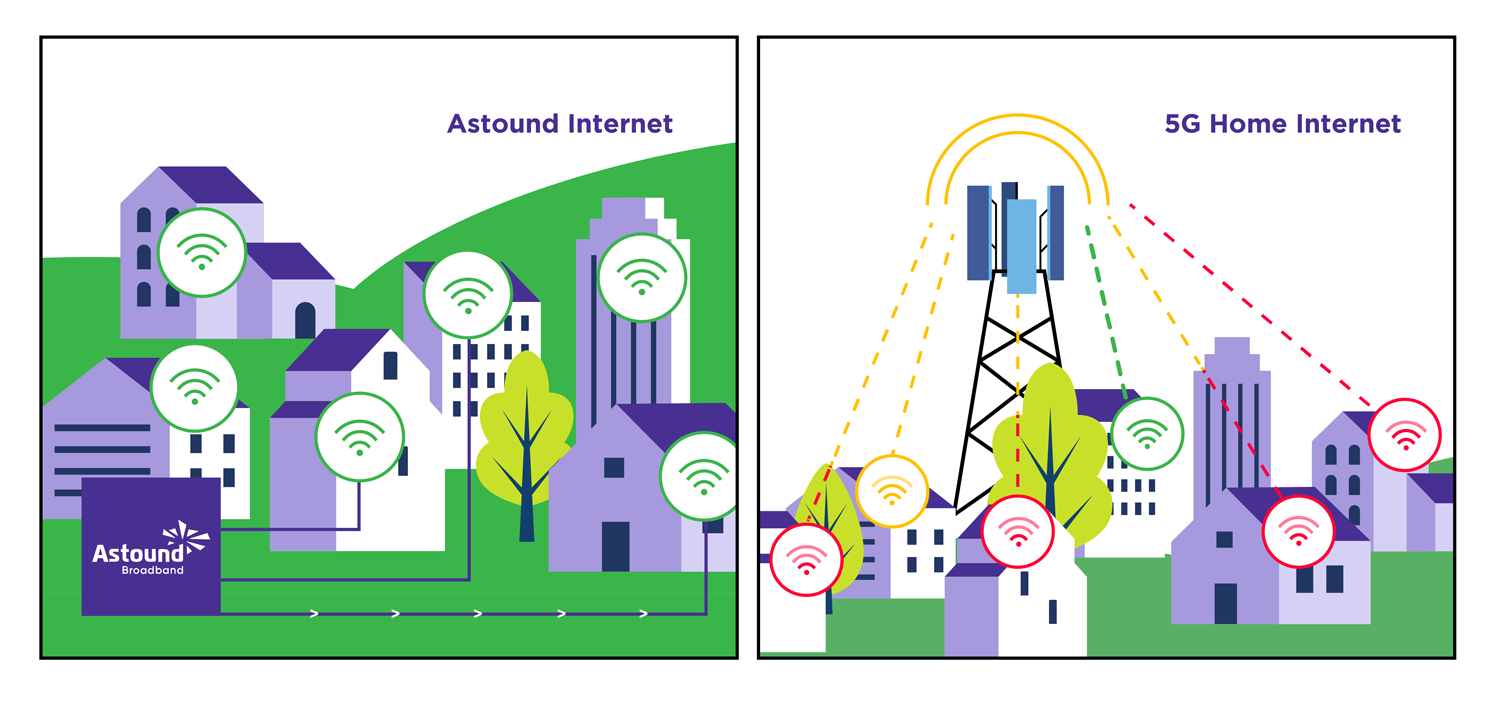
Despite their names, 1 Gig internet and 5G home internet are different technologies. As such, both offer distinct characteristics, advantages and limitations.
Gigabit internet is powered by fiber and cable connections. These connections are wired connections, meaning fewer disruptions. Additionally, most urban and suburban areas already have fiber or cable infrastructure.
1 Gig fiber-rich internet connections offer consistent speeds, reliability and broad coverage. The cost and value of 600 Mbps can vary depending on your ISP, but providers usually bundle internet, mobile data and TV.
On the other hand, 5G home internet is wireless, unlike fiber or cable. It operates on high-frequency bands transmitted by cell towers. 5G home internet is faster and has lower latency than 3G or 4G LTE wireless networks.
However, distances between cell towers, weather events and network congestion cause problems for 5G home internet users.
Also, 5G internet is a newer technology, meaning coverage is limited to urban areas with existing 5G infrastructure.
Is 1 Gig worth it?
Determining the worth of Gigabit internet depends on your personal preferences, the number of users and devices in your home, as well as the activities and tasks you carry out online.

Why would I need that much speed?
1 Gig internet is ideal for homes with high internet usage. In fact, the average household now has more than 25 devices tied to one single network in their home.
These devices can be smart TVs, laptops, smartphones, tablets, printers, home security systems, appliances or game consoles.
Faster internet speeds will offer you an online experience that fits your lifestyle and needs.
How much does 1 Gig internet cost?
Curious about the cost of 1 Gig internet? Pricing varies by provider and location, but with Astound, you get competitive rates starting at an affordable price. It’s a budget-friendly option for households that need high-speed connectivity. Check availability to see exact rates in your area.
Save time shopping.
Everything you need to know about choosing the right speed, securing your network and finding the best value for your home internet.
When is it time to upgrade to a faster internet speed?
You might want to upgrade to a faster internet speed, like Gigabit internet speeds, if you experience any of these issues:
- Network congestion.
- An increase of users in your household.
- An increase of devices in your household.
- Frequent buffering when streaming.
- Long loading times when streaming.
- Latency or lag while gaming online.
- Slow uploads or downloads.
- Internet connectivity issues.
- Poor video or audio call quality.
- Failure of smart or IoT devices.
Make sure to perform regular speed tests to understand the speed your ISP is providing and optimize your WiFi. You’ll improve your network’s performance, minimize channel interference and rebalance your device load.
Before upgrading, evaluate your internet requirements or talk with one of our representatives. To learn more about 1 Gig internet pricing and to build your plan, use our Find Your Speed tool.
Will my devices be capable of receiving 1 Gig?
If your devices are upgraded to the latest version and are 1-Gig speed enabled, then your devices will be able to receive 1 Gig internet speeds.
Smartphones allow you to check WiFi speed capabilities within their network settings. To check for yourself, visit the manufacturer’s website or read the manual. Search for “WiFi” and “Network Settings”.
You won’t be able to connect to the 1 Gig internet connection if you have older devices with outdated hardware or network interface cards.
However, most modern devices that meet the WiFi standards can handle 1 Gig internet.
Find your speed
What speed do you need?
Maybe you just need the essentials—or maybe you need to unleash the ultimate internet speed. Explore your options to get the best experience for every device in your home.
How much speed do I really need?
Trying to determine your internet speed connection needs? Ask yourself the following questions:
-
- How many people in my household will simultaneously access the internet?
Consider how many people will be using the internet. Each user adds to the demand for bandwidth. - What are the online access needs for my household?
Identify the primary online activities people in your home typically perform, such as streaming, gaming, video conferencing, or browsing. - Which devices will be connected?
Determine the number and types of devices used, like smartphones, laptops, IoT devices and gaming consoles. If you will be bringing many devices, consider an internet speed higher than 300 Mbps. - Will anyone be working remotely or learning online?
If anyone in your household works from home or takes classes online, consider the bandwidth required for video conferencing file sharing and other work-related tasks. - Will anyone stream HD or 4K videos?
A faster internet connection is essential for bufferless playback if you frequently stream high-quality videos. - Is gaming a priority for anyone?
Gamers may require faster speeds or improved hardware for increased performance. Look into even higher speeds, like 1500 Mbps, for a richer gaming experience. - Does the house have smart home devices?
IoT devices, like smart thermostats or security systems, will impact your accessible bandwidth. - Are large files frequently downloaded or uploaded?
Consider the need for faster download and upload speeds if you work with large files or use cloud services. - Am I satisfied with my current internet speeds?
Identify any pain points or limitations you may have. - What are my future internet needs?
Do you anticipate potential changes in your internet use? Will you be adding more devices or engaging in more data-intensive activities? - What internet plans are available to me now?
Check with local internet service providers to learn more about plans and speeds near you. Ensure you balance performance, cost and your household’s needs to choose the best plan.
- How many people in my household will simultaneously access the internet?
1 Gig internet equipment requirements
So, what equipment do you need to access Gigabit internet? It’s important to stay connected, and a 1 Gig router or fiber optic modem will allow you to make the most out of your 1 Gig internet speed. Let’s take a look at some of the 1 Gig internet requirements below.
Internet modem
DOCSIS 3.1 internet modems are recommended for high speed internet connectivity. You’ll need compatible equipment in order to get the Gigabit internet speed you pay for. Make sure that your WiFi modem is fiber or DOCSIS-compatible.
To access all the benefits of 1 Gig internet, opt for a fiber optic modem like a DOCSIS 3.1 model. For avid streamers and gamers, the best modem for streaming and gaming ensures low latency and high performance.
Our installation process includes a modem. But you can supply your own modem if it meets our compatibility requirements.
Internet router
A high-quality 1 Gig router is necessary to distribute the internet signal to your wired and wireless devices. Look for a modern router supporting Ethernet ports and modern WiFi standards like 802.11ac or 802.11ax (WiFi 6).
Not sure if you’re getting the speeds you need? Test your internet speeds.

Mesh WiFi with
eero Secure
Enhanced Whole Home WiFi uses multiple routers (or eeros®) to boost range, speed and stability. While eero Secure, included at no extra cost, offers parental controls, ad blocking and internet backup for constant connectivity.
Mesh WiFi router
A single router will enable you to access the internet, but often only in rooms that are near the router’s location. The further you are from the router, the weaker your WiFi signal will be.
A Mesh WiFi system, along with advancements in WiFi technology such as WiFi 6E provide fast, reliable Gig internet speeds throughout your home.
Gaming WiFi router
Computers, laptops, tablets, mobile devices, smart devices and user activity all eat away at your available bandwidth.
If you’re a hardcore gamer and want to ensure your 1 Gig internet connection doesn’t drop while playing online, look into a gaming router.
Going beyond regular WiFi routers, a gaming router allows you to set preferences and prioritize how your bandwidth is allocated, maximizing your performance and improving your gameplay.
How do I get Gig+ speeds with Astound?
Ready to get Gig+ speeds? As one of the top internet providers, we deliver ultra-fast 1 Gig speeds to many locations. Check for internet availability and pricing in your area.
Build your plan
Your perfect plan is just a click away
Get the speeds, WiFi, mobile and TV plans you need all at an affordable price. Bundle your services with Astound and see how much you can save.
Bottomline: Is 1 Gig good enough?
A 1 Gig connection is fast, reliable and cost-effective. It provides enough bandwidth to support multiple users simultaneously streaming HD/4K/8K video, gaming online and downloading large files.
1 Gig internet also offers the bandwidth to:
- Browse the internet on multiple devices with concurrent users.
- Stream 4K and 8K videos.
- Play online multiplayer games in your household.
- Attend live classes or access video learning platforms.
- Host in-person and online events with multiple users.
- Work from home and participate in video conference calls.
- Create a network of in-house smart devices and IoT devices.
- Broadcast HD and 4K video content or gameplay to online audiences.
- Access VR and AR experiences.
Surges in users, however, may affect your speeds. For serious online gamers or households with many people and multiple devices, higher speeds or specific hardware may be necessary.
If you’re worried about maintaining fast speeds on-the-go, switch to Astound Mobile and see what you can save.
And, if you’re searching for the best home internet and phone bundles, combine mobile service with Astound’s ultra-fast 1 Gig internet for maximum value.
Frequently asked questions
Does Astound offer 1 Gig internet plans?
Yes, Astound offers 1 Gig internet plans. Our services vary based on location. Check availability to find the perfect plan for your home.
Is 1 Gig WiFi good?
1 Gig WiFi is good for a home. We recommend using a Mesh WiFi network like eero, to make the most out of your home WiFi. Similarly, to get the most out of your speed, you should connect your device to your router using an ethernet cable.
What is the average upload speed for 1 Gig ?
An average upload speed for Gigabit internet ranges between 20 – 50 Mbps. In select areas, Astound can deliver symmetrical speeds, meaning the upload and download rates are the same. However, due to the limitations of existing WiFi technology, upload speeds on WiFi can be slower depending on the device.
How much does 1 Gig cost?
Gig internet is available to new and existing customers of Astound Broadband. Check prices in your local area, sign up and we’ll even provide rental equipment capable of delivering 1 Gig speeds.
Is 1 Gig internet good for streaming and gaming?
Yes. 1 Gig can handle HD, 4K and 8K streaming and competitive gaming. For the best experience, pair it with a 1 Gig capable router.
What equipment do I need for 1 Gig internet?
To make the most out of your internet plan, you’ll need a DOCSIS 3.1 modem, and a 1 Gig capable router or mesh system.
Related content

Do I need 2 Gig internet?
Do I need 2 Gig internet? Is it enough for my needs? Learn more about 2 Gig internet and what it can offer you.

Do I need 1500 Mbps internet?
Is 1.5 Gig enough for my needs? Learn more about 1500 Mbps internet and what it can offer you.

Find your speed
Maybe you just need the essentials – or maybe you need to unleash the ultimate speed. Explore your options to get the best experience for every device in your home.

Do I need 600 Mbps internet?
Learn what 600 Mbps is and what it’s best for so you can choose the internet speed that's right for you.

Do I need 300 Mbps internet?
What is 300 Mbps internet speed suitable for? Learn more about what 300 Mbps can offer your household.

How fast is eero WiFi? (Max speeds explained)
Explore our guide to learn the true potential of eero router speed and optimize your home WiFi experience.
Create the perfect bundle
Get the speed, WiFi, mobile and TV that’s just right for you.
*Internet speeds vary, not guaranteed. Certain equipment may be required. See astound.com for details. Modem req’d. No contracts. Astound Internet is powered by fiber and connected to the premises via coaxial connection or fiber, where available. Delivery methods may vary by area. Subject to availability. Ltd-time offer; subj. to change without notice. Internet speeds under 1 Gig, pricing valid for 12 mos. Gig+ Internet speeds, pricing valid for 36 mos. Add’l fees apply for taxes, surcharges, & data overages, & are subj. to change. For details visit astound.com/fees. Enhanced WiFi or Whole Home WiFi included with Gig+; $5/mo for lower speeds or add’l devices. Regular rates apply after promo ends. Monthly price shown includes discount for enrolling in autopay & e-bill. $10 off/mo w/ bank acct autopay or $5 off/mo w/ credit/debit card autopay. Valid email & enrollment req’d. Must enroll w/in 30 days of order. Discount appears within 3 bill cycles, ends if autopay/e-bill is canceled, svcs change, or acct isn’t in good standing. ^Astound Mobile req’s Astound Internet service for activation. Max 5 lines. Equip., intl./roaming charges, taxes, fees extra & may change. Astound not liable for svc disruptions or outages. Higher rate applies if Internet not maintained. Mobile svc only in Astound areas. Pricing subj. to change. Data may slow during congestion. After 20GB, Unlimited plans slow to 768 Kbps; 1.5GB/3GB plans capped. No rollover; add’l data $10/GB. Coverage varies. Some features may require specific plans. Mobile svc includes BIAS w/ data, voice, texts & SMS. Other restrictions may apply. See astound.com/mobile for details. Offer valid for new res. customers or former customers in good standing w/out Astound svc in past 60 days. Add’l svcs, equip, premiums & tiers extra & subject to add’l charge & reg. increases. $14.99 one-time activation fee (plus install) applies & may change. Taxes & surcharges extra & subj. to change. WA RESIDENTS: unless otherwise specified, price does not include 2% Regulatory Administration Fee. Cust. responsible for any accrued charges. Subj. to credit check. Not all svcs/speeds avail. in all areas. 30-Day Money-Back Guarantee for new residential customers who cancel within 30 days of install. Maximum refund is equal to one month’s monthly recurring service fee of services & equip. ordered & installed. Refund within 60 days after conditions are satisfied. Refund not applicable to usage-based fees. All svcs are governed by Astound Customer Terms & Conditions found at astound.com/policies-disclaimers. © 2026 Radiate HoldCo, LLC d/b/a Astound Broadband. All rights reserved.
While we have made every attempt to ensure that the information contained in this site has been obtained from reliable sources, Astound is not responsible for any errors or omissions, or for the results obtained from the use of this information. All information in this site is provided “as is”, with no guarantee of completeness, accuracy, timeliness and without warranty of any kind, express or implied, including, but not limited to warranties of performance, merchantability and fitness for a particular purpose. Certain links in this site connect to other websites maintained by third parties over whom Astound has no control. Astound makes no representations as to the accuracy or any other aspect of information contained in other websites.
eero Plus is available for an additional $9.99/month and requires subscription to whole home WiFi powered by eero.