















Is eero a good router? Pros, cons and performance review (2025)

A fast, reliable WiFi connection keeps your home running smoothly. From streaming movies in 4K, working remotely, to gaming or controlling smart devices, your network should work everywhere you need it.
That’s where eero comes in. Its mesh WiFi design replaces a single router with connected units that deliver consistent, whole-home coverage. But with other popular mesh systems like Google Nest WiFi and TP-Link Deco, how does eero compare in 2025?
In this review, we’ll take a closer look at eero performance, reliability, security, ease of use and overall value and how it integrates with Astound’s Whole Home WiFi to deliver fast, consistent coverage and dependable connectivity throughout your space.
What you'll learn:
- Quick answer: Is eero a good router in 2025?
- Performance and speed: How fast is eero WiFi?
- Stability and reliability: How reliable is eero WiFi?
- Setup and ease of use: WiFi that sets itself up
- Pricing and value: How eero compares to other mesh WiFi systems
- Conclusion
- Frequently asked questions
- Looking for more topics?
Quick answer: Is eero a good router in 2025?
Yes. eero is one of the best mesh WiFi systems for 2025. It delivers fast, consistent whole-home coverage with automatic optimization, WPA3 security and effortless app setup. Paired with Astound Gig internet, it supports multi-Gig speeds and reliable performance across all devices.

eero Plus
eero Plus protects your family online with a password manager to safely create, store and share passwords, virus and malware protection and a VPN that lets you browse the web safely and securely.
Performance and speed: How fast is eero WiFi?
When it comes to performance, eero’s advantage is consistency. Unlike a traditional router that broadcasts from a single point, eero’s mesh WiFi system distributes your Astound internet connection across multiple nodes. This design keeps speeds steady from room to room, eliminating dead zones and maintaining strong signal strength even through thick walls or across multiple floors.
Speed and throughput
The newest flagship model, eero Max 7, introduces WiFi 7 tri-band technology capable of multi-Gigabit speeds up to 4.3 Gbps wireless under ideal conditions. Paired with Astound Gig or multi-Gig internet, eero easily handles bandwidth-heavy tasks like 4K streaming, online gaming and high-resolution video calls with minimal buffering or lag.
With eero, even earlier models deliver impressive results.
Coverage and WiFi range
How much area can eero cover? Each eero node typically covers about 1,500 square feet. An eero Max 7 covers 2,500 square feet and and a three-pack of eero Max 7 could extend coverage up to 7,500 square feet.
The system’s TrueMesh routing automatically directs data along the fastest, least congested path, optimizing throughput and minimizing latency. Need more range? Simply add another eero.
Low latency and real-world stability
To ensure smooth performance, eero automatically prioritizes traffic, even with dozens of devices online. Whether you’re streaming on the patio or gaming upstairs, the network dynamically adjusts to deliver consistent, low-latency coverage across your home.
Across all models, eero offers fast, reliable and balanced WiFi performance with minimal setup. Its combination of dual- and tri-band technology, Gigabit compatibility and intelligent mesh routing makes it one of the best routers for everyday households in 2025.
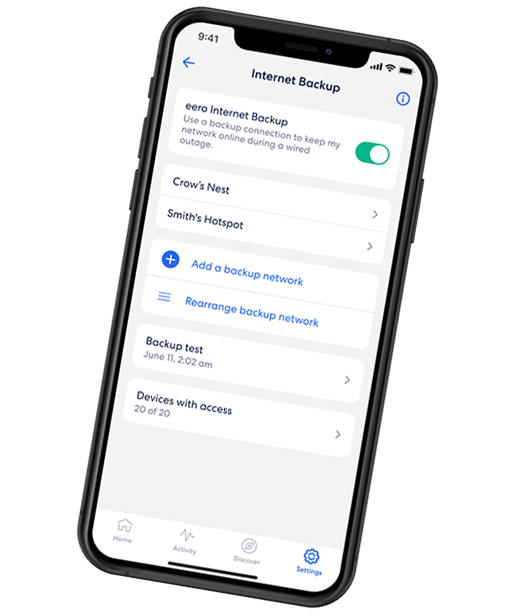
EERO INTERNET BACKUP
We’ve got your back(up)
eero Internet Backup lets you add alternative wireless connections – like a personal hotspot – to keep your WiFi up and running even when your wired connection is disrupted.
Stability and reliability: How reliable is eero WiFi?
Speed is important, but reliability and security are what keep your network running smoothly day after day. For dependable uptime and built-in protection, choose eero to secure every device on your network.
Always-on reliability
eero mesh design maintains your network stability, even if one node weakens. Each unit communicates with the others, rerouting traffic automatically to maintain a strong signal throughout your home.
In addition, in the eero app, you’ll get full network visibility and control. You can check signal strength, monitor connected devices and test speeds in real time.
Automatic updates and self-maintenance
Unlike standard routers that need manual firmware downloads, eero handles updates automatically. These background updates install new features, performance improvements and security patches overnight, keeping your system fast, stable and secure with minimal effort.
Advanced security with WPA3 and eero secure
With Astound Whole Home WiFi, eero security starts at the network level and grows with your needs. eero Secure is included at no extra cost and adds tools like malicious site blocking, SafeSearch, ad and tracker filtering, WiFi scheduling, multi admin access and profile based parental controls you manage in the eero app.
If your household needs a stronger safety net, eero Plus is an optional upgrade that adds VPN service for safer browsing away from home, a Malwarebytes subscription for device level threat scanning, a 1Password Family plan for shared password storage, dynamic DNS for remote access and WiFi radio analytics so you can see how your network is performing over time.
For homes powered by Astound Gig internet, eero forms a unified system of managed hardware, smart software and dedicated support for secure, uninterrupted WiFi.
Setup and ease of use: WiFi that sets itself up
Setting up a reliable home network doesn’t need to be complicated. The eero setup process is guided through the eero app, making it easy for anyone to get online in minutes.
Getting started is simple:
- Plug your primary eero into your modem.
- Open the eero app to create your network name and password.
- Add additional eero units where coverage drops.
With eero, there’s no manual IP entry or confusing router menus. After setup, eero will automatically configure itself and balance traffic across your home.
Once your network is active, the app verifies signal quality in each room and suggests adjustments if needed, so you can fine-tune coverage without guesswork.
Simple, intuitive app interface
The eero app acts as your control center for everything. The clean, easy-to-navigate user interface shows connected devices, bandwidth usage and WiFi health at a glance. With just a tap, you can pause WiFi, prioritize a device or create a guest network.
Smart home and Alexa integration
Because eero is part of the Amazon ecosystem, it integrates with Alexa. You can pause WiFi for the kids, run speed tests or enable guest access using simple voice commands. Additionally, eero also supports Matter and Thread and is compatible with a wide range of smart-home devices from Google, Apple, TP-Link and more.
Remote app management
Because eero is cloud-connected, you can manage your Astound Whole Home WiFi network from anywhere. Whether you’re at home or traveling, the app lets you monitor device activity or restart nodes from your smartphone.
eero’s app-guided setup and automatic optimization make it one of the simplest WiFi systems to install and manage.

Mesh WiFi with
eero Secure
Enhanced Whole Home WiFi uses multiple routers (or eeros®) to boost range, speed and stability—while eero Secure, included at no extra cost, offers parental controls, ad blocking and internet backup for constant connectivity.
Pricing and value: How eero compares to other mesh WiFi systems
For premium-grade performance, reliability, easy setup and maintenance, consider investing in eero in 2025. We’ll break down some of the most popular mesh WiFi systems like TP‑Link Deco BE63 and Google Nest WiFi Pro so you can choose with confidence.
eero pricing overview
eero pricing reflects its combination of plug-and-play simplicity and powerful mesh technology. Customers may be eligible to bundle eero hardware through Astound’s Whole Home WiFi. Availability, pricing and equipment options vary by service area and plan. Whole Home WiFi is available with select 1 Gig and higher internet plans and may also be offered as a monthly add-on for an additional fee.
eero vs. TP-Link Deco and Google Nest WiFi
eero sits comfortably between budget routers and high-end enterprise gear. It’s more affordable than professional systems like Ubiquiti UniFi, yet far more stable and user-friendly than entry-level options, like TP-Link Deco and Google Nest WiFi.
TP-Link Deco: Great value and strong performance
TP-Link’s Deco lineup is known for offering powerful throughput at competitive prices. Models like the Deco XE75 (WiFi 6E) and BE95 (WiFi 7) support high data rates, wide coverage and detailed control through the TP-Link app.
However, Deco routers may require more manual configuration, including channel selection and firmware management. While this appeals to tech-savvy households, it can lead to inconsistent performance if updates aren’t applied regularly. Firmware rollouts also tend to be less frequent, meaning security patches and performance improvements may lag behind systems like eero.
For power users who want to tweak every setting, Deco is an excellent value. But for families or small businesses that prefer a “set it and forget it” experience, it may demand more hands-on upkeep than desired.
Google Nest WiFi Pro: Simple smart home integration
Google’s Nest WiFi Pro is designed for seamless integration with the Google Home ecosystem. Setup through the Google Home app is straightforward and it works well for users already invested in Google Assistant smart speakers, Chromecast devices or Android-based smart homes.
Its main advantages are its clean design, solid coverage and ease of setup for Google users. However, Nest WiFi lacks the adaptive routing and mesh intelligence found in eero routing technology, which dynamically redirects traffic between nodes to maintain the strongest possible connection.
eero: The perfect balance of simplicity and power
eero stands out for striking the right balance between performance and usability. Its network routing, automatic optimization and WPA3 security ensure strong, consistent coverage without requiring user maintenance
The eero app makes setup effortless, giving users full control over connected devices, parental controls and guest access in just a few taps. Unlike other mesh systems, eero updates itself automatically, installing new firmware, security patches and performance improvements overnight.
When paired with Astound’s Gig-speed internet and Whole Home WiFi, eero becomes a fully managed, professionally supported network solution. Customers benefit from optimized node placement, proactive updates and technical assistance that all work together to deliver fast, secure and reliable WiFi to every room.
- TP-Link Deco: Great value and strong raw performance, but requires more hands-on setup and less frequent firmware updates.
- Google Nest WiFi Pro: Excellent for Google Home users but lacks the adaptive routing and reliability of eero TrueMesh.
- eero: Balances performance and simplicity. Its automatic optimization, app-based control and secure ecosystem make it ideal for households that want WiFi that works.
For most homes in 2025, eero remains one of the best values in mesh WiFi, offering premium performance without the complexity of traditional networking gear.
most popular resource
Optimize your internet speed
Is WiFi interference slowing your internet speeds? Here are a few tips to optimize and maximize your home’s high speed internet performance.

Conclusion
So, is eero a good router in 2025?
Yes. Especially for homes that want fast, consistent coverage without the hassle. Features including mesh design, automatic security updates and simple app controls make eero a reliable, future-ready choice for streaming, gaming and smart-home use.
For the best experience, pair eero with Astound’s Whole Home WiFi and Gig or multi-Gig internet to get professional setup, optimized node placement and support from a single provider.
Frequently asked questions
How fast is eero WiFi?
eero Max 7 supports WiFi 7 tri-band technology with wireless speeds up to 4.3 Gbps under ideal conditions. Paired with Astound Gig or multi-Gig internet, it easily handles 4K streaming, online gaming and high-resolution video calls with minimal lag.
How much area does eero cover?
Each eero node covers about 1,500 square feet. An eero Max 7 node covers about 2,500 square feet and a three-pack of eero Max 7 nodes can extend coverage up to 7,500 square feet. TrueMesh automatically directs data along the fastest, least-congested path to keep performance consistent across your home.
How reliable is eero WiFi?
eero has a mesh design to reroute traffic automatically if one node weakens and so maintains a strong, steady signal for streaming, video calls and gaming. Features including self-healing connectivity, WPA3 security and automatic updates support dependable, always-on performance.
Is eero easy to set up?
Yes. The eero app walks you through installation step by step. From connecting your primary unit to adding nodes and testing signal strength, there’s no manual IP entry or router menus; eero configures itself automatically for balanced, optimized coverage.
Related content

How eero Internet Backup works to keep you online
Explore how to manage eero parental controls, content filters and how to block or apps to safeguard your family online.

eero Secure vs. eero Plus
Compare eero Secure vs. eero Plus to find the best WiFi security and parental control for your household.

Managing parental controls with eero
Explore how to manage eero parental controls, content filters and how to block or apps to safeguard your family online.

eero 7 vs. eero Pro 6E
Compare the eero 7 and eero Pro 6E mesh WiFi systems. See specs, performance, coverage and value to find the right setup for your home network.

Mesh WiFi vs. standard routers
Discover the differences between mesh and traditional routers to make an informed decision for your home. Find the perfect solution for your home.

what is mesh wifi?
Explore mesh WiFi. Learn what it is, how it works and why it's better than traditional WiFi. Get tips for setting up and enjoying better connectivity today!

How to add eero to an existing network
We step you though easy eero integration so you can expand your WiFi coverage range, eliminate dead zones and improve your network stability and security.
Create the perfect bundle
Get the speed, WiFi, mobile and TV that’s just right for you.
*Internet speeds vary, not guaranteed. Certain equipment may be required. See astound.com for details. Modem req’d. No contracts. Astound Internet is powered by fiber and connected to the premises via coaxial connection or fiber, where available. Delivery methods may vary by area. Subject to availability. Ltd-time offer; subj. to change without notice. Internet speeds under 1 Gig, pricing valid for 12 mos. Gig+ Internet speeds, pricing valid for 36 mos. Add’l fees apply for taxes, surcharges, & data overages, & are subj. to change. For details visit astound.com/fees. Enhanced WiFi or Whole Home WiFi included with Gig+; $5/mo for lower speeds or add’l devices. Regular rates apply after promo ends. Monthly price shown includes discount for enrolling in autopay & e-bill. $10 off/mo w/ bank acct autopay or $5 off/mo w/ credit/debit card autopay. Valid email & enrollment req’d. Must enroll w/in 30 days of order. Discount appears within 3 bill cycles, ends if autopay/e-bill is canceled, svcs change, or acct isn’t in good standing. ^Astound Mobile req’s Astound Internet service for activation. Max 5 lines. Equip., intl./roaming charges, taxes, fees extra & may change. Astound not liable for svc disruptions or outages. Higher rate applies if Internet not maintained. Mobile svc only in Astound areas. Pricing subj. to change. Data may slow during congestion. After 20GB, Unlimited plans slow to 768 Kbps; 1.5GB/3GB plans capped. No rollover; add’l data $10/GB. Coverage varies. Some features may require specific plans. Mobile svc includes BIAS w/ data, voice, texts & SMS. Other restrictions may apply. See astound.com/mobile for details. Offer valid for new res. customers or former customers in good standing w/out Astound svc in past 60 days. Add’l svcs, equip, premiums & tiers extra & subject to add’l charge & reg. increases. $14.99 one-time activation fee (plus install) applies & may change. Taxes & surcharges extra & subj. to change. WA RESIDENTS: unless otherwise specified, price does not include 2% Regulatory Administration Fee. Cust. responsible for any accrued charges. Subj. to credit check. Not all svcs/speeds avail. in all areas. 30-Day Money-Back Guarantee for new residential customers who cancel within 30 days of install. Maximum refund is equal to one month’s monthly recurring service fee of services & equip. ordered & installed. Refund within 60 days after conditions are satisfied. Refund not applicable to usage-based fees. All svcs are governed by Astound Customer Terms & Conditions found at astound.com/policies-disclaimers. © 2026 Radiate HoldCo, LLC d/b/a Astound Broadband. All rights reserved.
While we have made every attempt to ensure that the information contained in this site has been obtained from reliable sources, Astound is not responsible for any errors or omissions, or for the results obtained from the use of this information. All information in this site is provided “as is”, with no guarantee of completeness, accuracy, timeliness and without warranty of any kind, express or implied, including, but not limited to warranties of performance, merchantability and fitness for a particular purpose. Certain links in this site connect to other websites maintained by third parties over whom Astound has no control. Astound makes no representations as to the accuracy or any other aspect of information contained in other websites.
eero Plus is available for an additional $9.99/month and requires subscription to whole home WiFi powered by eero.