















Home phone features

In addition to clear calls and increased reliability, your Astound home phone service includes 17 free calling features! With call waiting, Caller ID, 3-way calling, voicemail and more, now it costs even less to stay connected.
We’ve outlined phone features to give you an overview of what is available to you. You can also view all phone features in the Astound support portal.
Visit the support portal
Features outlined In this article:
Voicemail
Get set up and activate your voicemail.
You don’t need an answering machine — we provide digital voicemail. Receive up to 20 messages that are saved for 30 days or until deleted.
Call logs
Log in to the customer center and view your call logs. You can track phone calls or find a number recently dialed.
Call forward options
Call forward busy
When your line is busy, your calls will be forwarded to a designated number.
Call forward don't answer
If you don’t answer after 6 rings, your calls will be forwarded to a designated number.
Call forward remote activation
Activate and deactivate the call forward feature when you are away from home.
Call forward variable
dial *72 and the area code and phone number you want your calls forwarded to.
Call forward variable forwards incoming calls to a number of your choice, when your line is busy or unanswered.
Selective call forwarding
Dial *63 and follow the prompts to get set-up.
Re-route incoming calls to another phone. If you’re expecting an important call and want to leave home or go out of town, forward calls to a cell phone.
Call waiting and call waiting with Caller ID
Call waiting
dial *70 to turn the feature off on a per-call basis.
You’ll hear a short beep if someone calls you while you’re on the phone. Know who’s calling you and decide whether or not to answer the incoming call while the first caller holds.
Call waiting with Caller ID
The Caller ID and Call Waiting features on your Home Phone work together. When you are on the phone and another caller tries to reach you, a special tone or beep alerts you to the waiting call, and the name and number of the person phoning is displayed on your Caller ID screen or telephone handset.
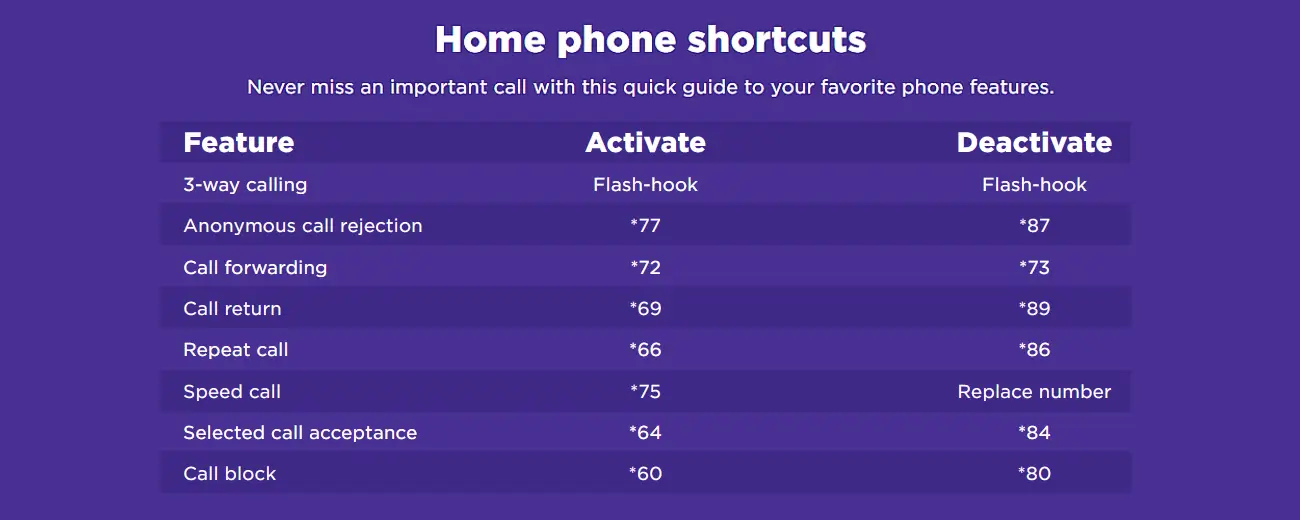
Dialing features and commonly used dialing shortcuts
Three-way calling
Three people, three phones, one conversation. No problem. Add a third party to a traditional two‑way phone call by briefly pressing and releasing the receiver button, or “Flash” button, to generate a split‑second break in the connection.
Speed dial
dial *74 and program up to 8 numbers
dial *75 and program up to 30 numbers.
Call your mom frequently? Program up to 8 numbers on speed dial and press only 1 digit to make the call.
Call return
dial *69 to get the number of your last incoming.
Get the number of the last incoming call you received. Also get time/date information and return the call instantly by pressing only one button.
Repeat call
Dial *66 to redial a number every 40 seconds.
Outsmart busy signals. Your phone can automatically redial a number every 40 seconds (for up to 30 minutes) and alert you when the call goes through.
Distinctive Ring
Distinctive Ring allows you to have up to 2 additional phone numbers while having only one physical line. Each number has a special ring cadence which lets you determine what number is being called. You may have one free directory listing for each Distinctive Ring number.

See who called, from anywhere
Whether you’re home or away, you can manage all your home phone settings from your smart devices or online with your computer, from anywhere.
Screening calls and Caller ID
Anonymous call rejection
dial *77 to reject Private, Blocked or Anonymous callers.
Program your phone to reject Private, Blocked or Anonymous callers and/or callers who use Caller ID blocking.
Caller ID
Your friends will think you’re a good sleuth. Know the name and number of the telephone you’re being called from before you answer the call.*
*Must provide caller ID box or have phone with Caller ID functionality.
Caller ID for TiVo®
If you have Digital Phone and TiVo® service from Astound, you can now get Caller ID on your TV. Simply turn on the feature and you’ll see the name and phone number of incoming calls on your main TV.
Nomorobo
Find out more about Nomorobo.
Block unwanted calls from telemarketers and robo-callers. This feature uses a list of phone numbers from the FCC Do Not Call list to block suspected calls.
Selective call rejection
dial *60 and follow the tutorial for setup.
Enter numbers that you don’t want to receive incoming calls from and they will be blocked.
Upgrade with the Ultra Feature Package
Beyond these standard phone features, upgrades are possible with the Ultra Feature Package — available only to customers with MetaSwitch phone service. All new incoming customers have MetaSwitch phone installed unless the location is unable to accommodate.
If you are an existing Astound customer and want to find out about upgrading to the Ultra Feature Package, call 1‑800‑427‑8686.
Quick links


Looking for something else?
Check out Astound Support Center for all help and support related information.
Not all services, speeds, packages, equipment, channels, tiers, pricing, streaming services, product offerings and product features are available in all areas. Offers valid only for new residential customers or previous customers with account in good standing who have not had our service within the last 30 days. All names, logos, images and service marks are property of their respective owners. Other restrictions may apply.
Not all phone services are available in all areas. Calls to international countries will be rated on a per-minute basis. Astound does not provide Caller ID equipment. Additional charges apply to new or moved phone jacks and may apply to additional cable jacks as well as custom or non-standard installation work. Other restrictions may apply.