















How fast is eero WiFi? (Max speeds explained)
An eero mesh WiFi system leverages patented TrueMesh technology to dynamically route online traffic across multiple nodes, systematically eliminating household dead zones and signal drop-offs. Max performance scales by hardware generation, topping out at 1 Gbps for the eero Pro 6, climbing to 2.3 Gbps for the tri-band eero Pro 6E, and hitting a theoretical maximum of 9.4 Gbps wired and 4.3 Gbps wireless on the WiFi 7-enabled eero Max 7. To ensure peak wireless speeds, users must evaluate network variables such as client device standard compatibility, local node density, and proper physical placement. Network management utilities including Quality of Service (QoS) bandwidth prioritizing, parental controls via eero Secure, and eero Internet Backup hotspots provide automated failsafes and traffic management to maximize the utility of high speed ISP data tiers.

Key Takeaways:
- eero systems utilize dynamic TrueMesh routing protocols to link multiple hardware nodes into a singular, unified home network that reduces signal interference.
- Real-world network output spans from legacy 1 Gbps baselines up to Multi-Gigabit WiFi 7 capabilities on the eero Max 7 to support bandwidth-intensive 4K streaming and gaming.
- Selecting an ideal mesh system requires aligning household size and device counts with specific node square-footage coverage ratings and integrated QoS traffic rules.
- Proper node deployment requires keeping units out in the open, elevated at midpoint room height, and separated by a maximum distance of 50 feet to sustain proper wireless backhaul link speeds.
- Dense physical obstructions like brick walls, large metal appliances, and devices using overlapping 2.4 GHz frequencies will actively degrade inter-node communication and overall network speeds.
- The eero Internet Backup feature uses automated cellular hotspot failovers to preserve core smart home functionality and video communication if the primary wired ISP connection fails.
Understanding internet speed and its connection with your WiFi can be a complex topic. When you connect to WiFi, you are using a wireless connection to access the internet speed that your ISP provides. For the most part, WiFi is a reliable, popular alternative to wiring into your modem through an Ethernet cable.
However, WiFi signals or connected devices may not always reach exactly where you want them. If you’re dealing with a bad connection, dead zones or other connectivity issues, you might want to consider how an eero router or mesh network, like eero Pro, can help you get the most out of your WiFi.
If you’re still confused about the difference between internet and WiFi speeds or want to explore the impact of mesh technology on your home network, read on.
WiFi that just works!
WiFi plans for any home
Tiny, large or somewhere in between; find WiFi coverage to fit any space. Blanket your entire home with a fast and ultra‑reliable connection.
What is eero’s max download and upload speed?
The maximum download and upload speeds you’ll get with your eero system depend on the model you choose.
With eero Pro 6, you can enjoy speeds up to 1 Gbps over both wired and wireless connections, which is ideal for homes on a Gig-speed plan. The eero Pro 6e supports up to 2.5 Gbps wired and up to 1.3 Gbps over WiFi, great for multi-gig plans and WiFi 6e devices. For the ultimate performance, the eero Max 7 delivers up to 9.4 Gbps wired and 4.3 Gbps wireless.
Actual speeds may vary based on your home layout, connected devices and internet plan. However, no matter the model you choose, you’ll get fast, reliable coverage throughout your home.
eero WiFi speed comparison
With an eero mesh WiFi system, multiple eeros work together to create a Whole Home WiFi network, connecting dozens of devices. Patented TrueMesh technology intelligently routes traffic to reduce drop-offs and dead spots.
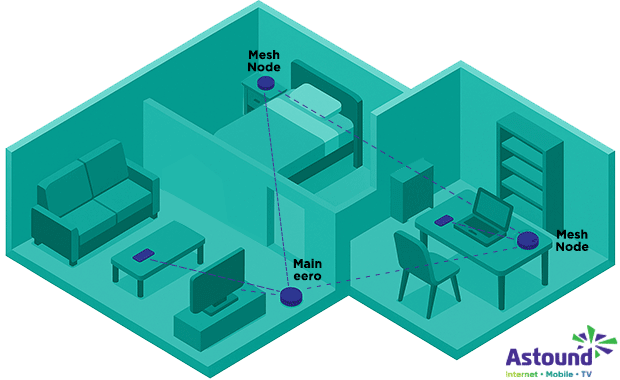
Every wireless eero router performs differently based on device model and internet plan. By using the latest standards, eero ensures that you’re getting the speed and performance you pay for in every corner of every room.
Let’s take a look at what speed tiers specific eero routers are capable of supporting.
| Device | Highest ISP speed |
|---|---|
| eero Max 7 | 9.4 Gbps |
| eero Pro 6E | 2.3 Gbps |
| eero 6+ | 1 Gbps |
| eero 6 Pro | 1 Gbps |
| eero 6 | 1 Gbps |
| eero Pro | 1 Gbps |
| eero | 1 Gbps |
|
Device
eero Max 7 |
Highest ISP speed
9.4 Gbps |
|
Device
eero Pro 6E |
Highest ISP speed
2.3 Gbps |
|
Device
eero 6+ |
Highest ISP speed
1 Gbps |
|
Device
eero 6 Pro |
Highest ISP speed
1 Gbps |
|
Device
eero 6 |
Highest ISP speed
1 Gbps |
|
Device
eero Pro |
Highest ISP speed
1 Gbps |
|
Device
eero |
Highest ISP speed
1 Gbps |
These are the maximum speeds eero has reported per device. When choosing the plan or eero device, consider that WiFi speed is more useful depending on how much bandwidth is available to you.
If you perform bandwidth-heavy activities such as gaming online or streaming HD or 4K content, you’ll want a plan with a high rate of Gbps.
Learn more: eero 6 vs eero 6e: What’s the difference?
Understanding WiFi speeds
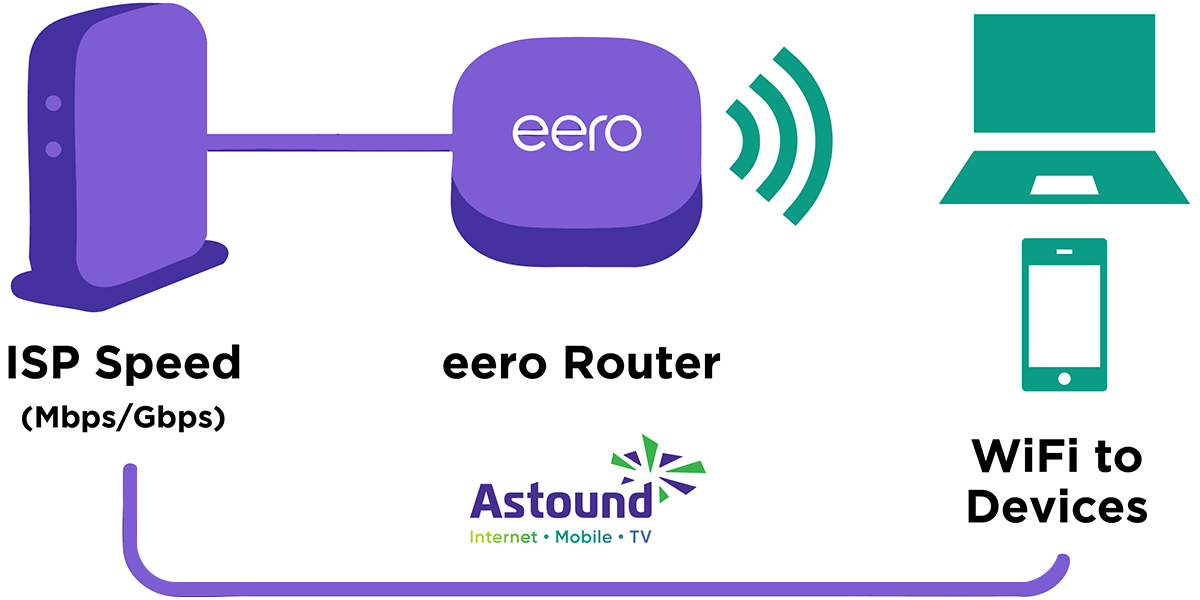
Compared to WiFi speeds, internet speed is based on how quickly your internet connection can download and upload data (bits).
This speed performance is measured in megabits per second (Mbps) or Gigabits per second (Gbps) — one Mbps is 1,000,000 bits being transferred per second and 1 Gbps (or 1 Gig internet) is 1,000,000,000 bits being transferred per second.
If your internet speed is disrupted and you think your ISP might be to blame, you may need to:
- Check your type of internet connection, whether cable, DSL, 5G home internet or fiber.
- Take stock of the number of concurrent users on your network.
- Review the types of devices in use.
- Log activities, such as streaming video or playing online games.
- Perform an internet speed test to assess the quality of your area’s internet connection.
- Perform a speed test using the eero app for your home network.
Though internet speeds can be affected by many factors, the type of internet connection is the biggest factor that influences your online experience.
Even if you have a high speed internet plan, capable of multi-Gigabit speeds, certain external factors can slow down your WiFi network too. You’ll want to be mindful of the following when optimizing your WiFi speeds:
- Make sure your devices support your current WiFi standard.
- Certain materials or physical barriers can affect WiFi signals.
- Every device connected to your WiFi network can slow down your speed.
- Keep your devices near your router when using the internet.
If you feel as if you’ve done as much as you can and still aren’t seeing the coverage results you want, look into mesh WiFi systems like the eero Pro.
Which eero model should I choose?
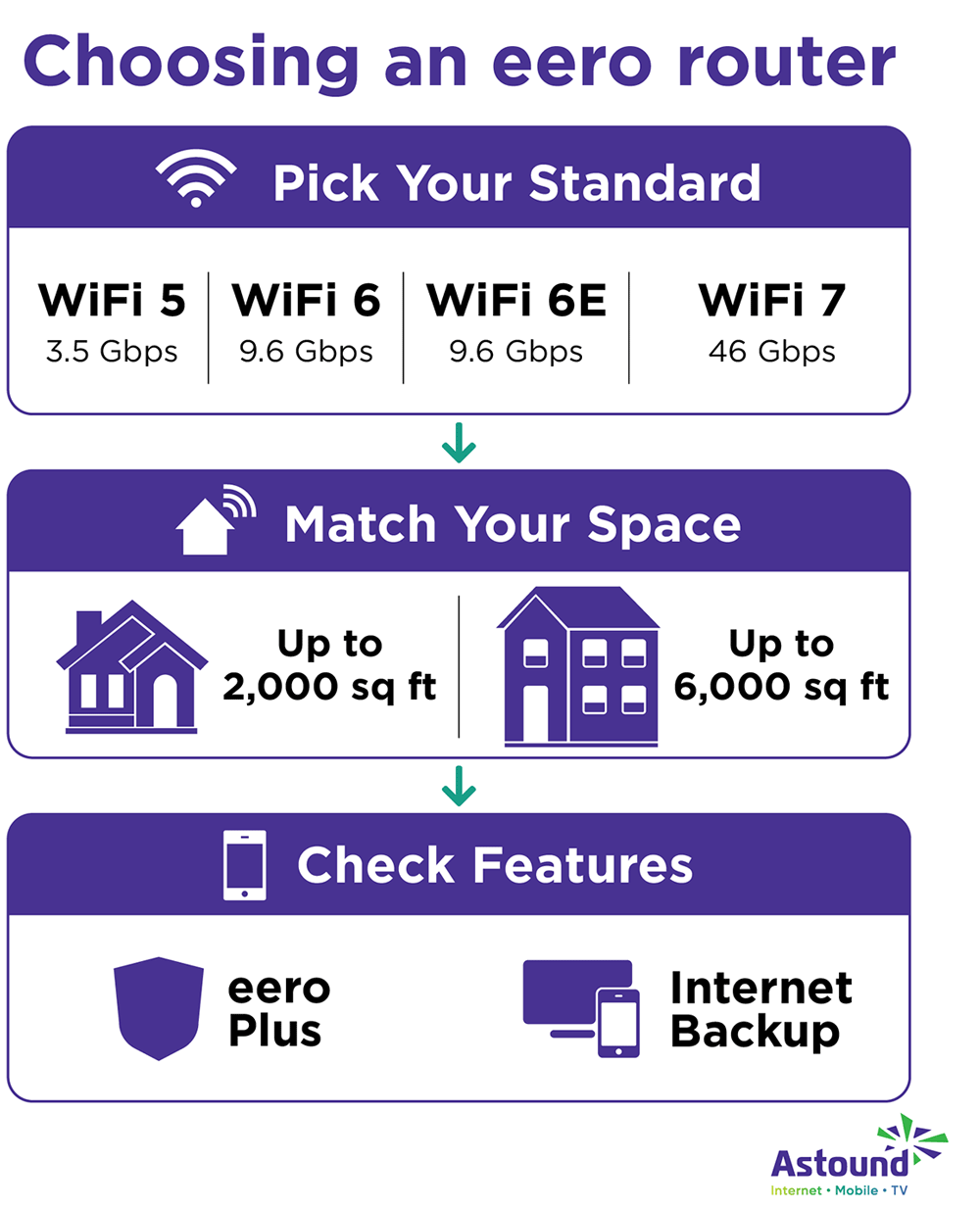
It can be difficult to choose the right network technology or mesh WiFi router, like eero Pro, to provide you with optimized WiFi speeds and whole home coverage. Check out our list of best practices and what to look for when choosing your mesh WiFi routers.
1. Pick the WiFi standard for your needs.
- WiFi 5: Common and affordable, offering speed for general home use.
- WiFi 6: Faster and more efficient, ideal for homes with many devices.
- WiFi 6e: Additional 6 GHz spectrum, offering improved speeds and less interference for connected devices.
- WiFi 7: Harnesses all capabilities of the latest WiFi standards.
2. Research your node design and coverage
Different models of mesh WiFi systems, such as the eero Pro or eero Pro 6e, specify different square footage of coverage per node and have a variation of appearances. Choose the system or combination of nodes that will cover the entire area and connected devices used throughout your household.
3. Look for network management & other features
- Find a mesh system that includes an app for easy setup and network management.
- If you want parental controls, make sure they allow you to monitor and limit the access of specific devices. Astound’s basic Whole Home WiFi with eero subscription includes eero Secure, which has content filtering and other networking technology features, at no additional charge.
- If you’d like to add secure guest networks, find a system that allows separate network access.
- If you’re looking for the ability to manage many connected devices, check that your nodes are QoS-enabled.
By following these guidelines, you can compare eero models and understand which mesh network will provide you with an optimized, secure whole-home WiFi experience.

eero Plus
eero Plus protects your family online with a password manager to safely create, store and share passwords, virus and malware protection and a VPN that lets you browse the web safely and securely.
Factors that impact eero speeds
As with any technology, it can be frustrating to not know why your eero WiFi slows down. If your eero seems slow or unresponsive, you should troubleshoot the device to confirm that it’s working properly. Here is a list of some of the common factors that affect eero speeds, and how to solve them:
-
- Subpar positioning: Position the main node (the one connected to your modem) in a central location within your home, near your connected devices. This helps distribute the WiFi signal more evenly throughout your space.
- Physical or digital interference: Place nodes away from large metal objects and appliances like refrigerators and microwaves, which can cause interference. Avoid thick barriers such as brick walls, as they can weaken the WiFi signal.
- Mounting too low or too high: Mount your nodes halfway between the floor and ceiling to improve signal distribution, as the signal can radiate from this height more effectively.
- Nodes too far or too close to one another: Nodes should be no more than 50 feet apart to maintain a strong wireless connection between them. This distance might need adjustment based on the specific layout and construction materials of your home.
- Hidden nodes: Keep nodes out in the open rather than hidden in cabinets or behind other objects to allow for better signal transmission.
- Internet Backup: With eero Pro and a single Ethernet connection, eero Internet Backup ensures that your network stays online even when your wired connection goes down. While connected to a backup, eero speeds may be slower depending on your hotspot’s signal strength and bandwidth, but core activities like streaming, video calls and smart home functions will stay up and running until your full-speed wired connection is back.
As every home is unique, you may need to experiment with different placements to find the optimal spots for your mesh nodes or router placement. The system’s app can guide you through this process to help ensure you’re getting the best coverage possible.

Remember!
Different eero models cater to different needs, offering speed tiers up to 9.4 Gbps with the eero Max 7. Consider your home’s layout, internet plan and devices to choose the right eero router or mesh network.
Conclusion
eero routers and eero Plus offer a reliable solution to enhance your WiFi coverage and deliver fast Gigabit speeds throughout your home. While your internet speed primarily depends on your ISP, an eero mesh network can help optimize the distribution of that speed, minimizing dead zones and ensuring efficient connectivity across your space.
By considering factors such as device compatibility, physical barriers and optimal placement of mesh nodes, you can achieve an optimized WiFi experience that supports bandwidth-heavy activities like gaming and streaming.
Remember: Different eero models cater to different needs, offering speed tiers up to 9.4 Gbps with the eero Max 7.
Regardless of your specific requirements, careful consideration of your home’s layout, internet plan and device usage will help you choose the right eero router or mesh network.
Build your plan
Your perfect plan is just a click away
Get the speeds, WiFi, mobile and TV plans you need all at an affordable price. Bundle your services with Astound and see how much you can save.

Frequently asked questions
Can eero handle 2 Gig internet?
Yes, eero Pro 6E users with a 2 Gig or 2.5 Gbps internet plan can experience network speeds up to 2.3 Gbps when using both a wired client device connected to the remaining 1 Gb Ethernet port and with wireless client devices connected to their WiFi network. However, internet connection speeds and availability depend on your internet service provider.
Why is my eero WiFi speed so slow?
A range of factors may be responsible for slow WiFi speeds with eero. By using troubleshooting methods, such as checking your devices, checking your speed, power-cycling your eeros, restarting your modem or calling your ISP, you should be able to resolve the problem.
How can I speed up my eero router?
If the issues are with the hardware, follow troubleshooting steps in order to restore your speed. If you want a faster internet speed for more available eero bandwidth, contact your ISP and talk about a higher speed plan.
Does eero make your WiFi faster?
eero will not make your WiFi faster, as WiFi speed depends on what is provided by your ISP. However, eero can bring faster speeds to every corner of your space, increase your internet’s efficiency and reduce network congestion.
Related content

Is eero a good router?
Wondering if eero is a good router? We examine WiFi speed, reliability, setup and features supported by eero to help you decide if it’s right for your home.

What speed do you need? Find your speed
Maybe you just need the essentials—or maybe you need to unleash the ultimate speed. Explore your options to get the best experience for every device in your home.

Does a router or modem affect internet speed?
Discover how routers and modems can impact your internet speed. Learn about their roles, issues and tips for optimizing your network performance.

11 steps to make your WiFi faster
Slow internet speeds are frustrating. We've outlined 11 ways to improve your WiFi speeds — from checking your modem to troubleshooting connection issues.

What is Mesh WiFi?
Explore mesh WiFi. Learn what it is, how it works and why it's better than traditional WiFi. Get tips for setting up and enjoying better connectivity today!

How to set up a mesh WiFi network
Discover how to set up a Mesh WiFi network. Learn how to optimize coverage and performance with our expert tips and step-by-step instructions.

How eero Internet Backup keeps you connected
Learn how eero Internet Backup keeps your house connected during internet outages, providing seamless, reliable backup connectivity to all your devices.
Create the perfect bundle
Get the speed, WiFi, mobile and TV that’s just right for you.
*Internet speeds vary, not guaranteed. Certain equipment may be required. See astound.com for details. Modem req’d. No contracts. Astound Internet is powered by fiber and connected to the premises via coaxial connection or fiber, where available. Delivery methods may vary by area. Subject to availability. Ltd-time offer; subj. to change without notice. Internet speeds under 1 Gig, pricing valid for 12 mos. Gig+ Internet speeds, pricing valid for 36 mos. Add’l fees apply for taxes, surcharges, & data overages, & are subj. to change. For details visit astound.com/fees. Enhanced WiFi or Whole Home WiFi included with Gig+; $5/mo for lower speeds or add’l devices. Regular rates apply after promo ends. Monthly price shown includes discount for enrolling in autopay & e-bill. $10 off/mo w/ bank acct autopay or $5 off/mo w/ credit/debit card autopay. Valid email & enrollment req’d. Must enroll w/in 30 days of order. Discount appears within 3 bill cycles, ends if autopay/e-bill is canceled, svcs change, or acct isn’t in good standing. ^Astound Mobile req’s Astound Internet service for activation. Max 5 lines. Equip., intl./roaming charges, taxes, fees extra & may change. Astound not liable for svc disruptions or outages. Higher rate applies if Internet not maintained. Mobile svc only in Astound areas. Pricing subj. to change. Data may slow during congestion. After 20GB, Unlimited plans slow to 768 Kbps; 1.5GB/3GB plans capped. No rollover; add’l data $10/GB. Coverage varies. Some features may require specific plans. Mobile svc includes BIAS w/ data, voice, texts & SMS. Other restrictions may apply. See astound.com/mobile for details. Offer valid for new res. customers or former customers in good standing w/out Astound svc in past 60 days. Add’l svcs, equip, premiums & tiers extra & subject to add’l charge & reg. increases. $14.99 one-time activation fee (plus install) applies & may change. Taxes & surcharges extra & subj. to change. WA RESIDENTS: unless otherwise specified, price does not include 2% Regulatory Administration Fee. Cust. responsible for any accrued charges. Subj. to credit check. Not all svcs/speeds avail. in all areas. 30-Day Money-Back Guarantee for new residential customers who cancel within 30 days of install. Maximum refund is equal to one month’s monthly recurring service fee of services & equip. ordered & installed. Refund within 60 days after conditions are satisfied. Refund not applicable to usage-based fees. All svcs are governed by Astound Customer Terms & Conditions found at astound.com/policies-disclaimers. © 2026 Radiate HoldCo, LLC d/b/a Astound Broadband. All rights reserved.
While we have made every attempt to ensure that the information contained in this site has been obtained from reliable sources, Astound is not responsible for any errors or omissions, or for the results obtained from the use of this information. All information in this site is provided “as is”, with no guarantee of completeness, accuracy, timeliness and without warranty of any kind, express or implied, including, but not limited to warranties of performance, merchantability and fitness for a particular purpose. Certain links in this site connect to other websites maintained by third parties over whom Astound has no control. Astound makes no representations as to the accuracy or any other aspect of information contained in other websites.
eero Plus is available for an additional $9.99/month and requires subscription to whole home WiFi powered by eero.