What is eero Pro 7? Features, specs and who it’s for

When everyone is online across multiple rooms, a single router can struggle to keep up. That’s where mesh networking comes in. Instead of relying on one box tucked under a desk, a mesh system spreads several compact routers (called nodes) around the house to blanket every corner with fast, reliable internet.
Amazon’s eero brand was an early pioneer of mesh networking and the company now offers a range of systems to suit different budgets and needs. The eero Pro 7 is its latest flagship and in this guide we’ll explain what the eero Pro 7 is, how WiFi 7 technology works, the hardware specs you get for the price and who will benefit most from investing in eero Pro 7.
What you'll learn:
- What is eero Pro 7?
- How mesh WiFi works
- WiFi 7 technology explained
- eero Pro 7 product diagram
- Performance, coverage and specs
- Comparison: eero Pro 7 versus earlier models
- Who should buy eero Pro 7?
- Do you need WiFi 7 devices?
- Mesh WiFi versus single routers
- Is eero Pro 7 worth it?
- Conclusion
- Frequently asked questions
- Looking for more topics?
What is eero Pro 7?
eero Pro 7 is a tri‑band WiFi 7 router designed to serve as the main node in a mesh system. Each unit combines the functions of a router and a node, so you can start with one for a small home and add more units to expand coverage.
A key advantage of the Pro 7 is that it supports all three major wireless bands: 2.4 GHz for extended range, 5 GHz for high speed connectivity and the new 6 GHz band with additional channels reserved for WiFi 6E and WiFi 7 devices.
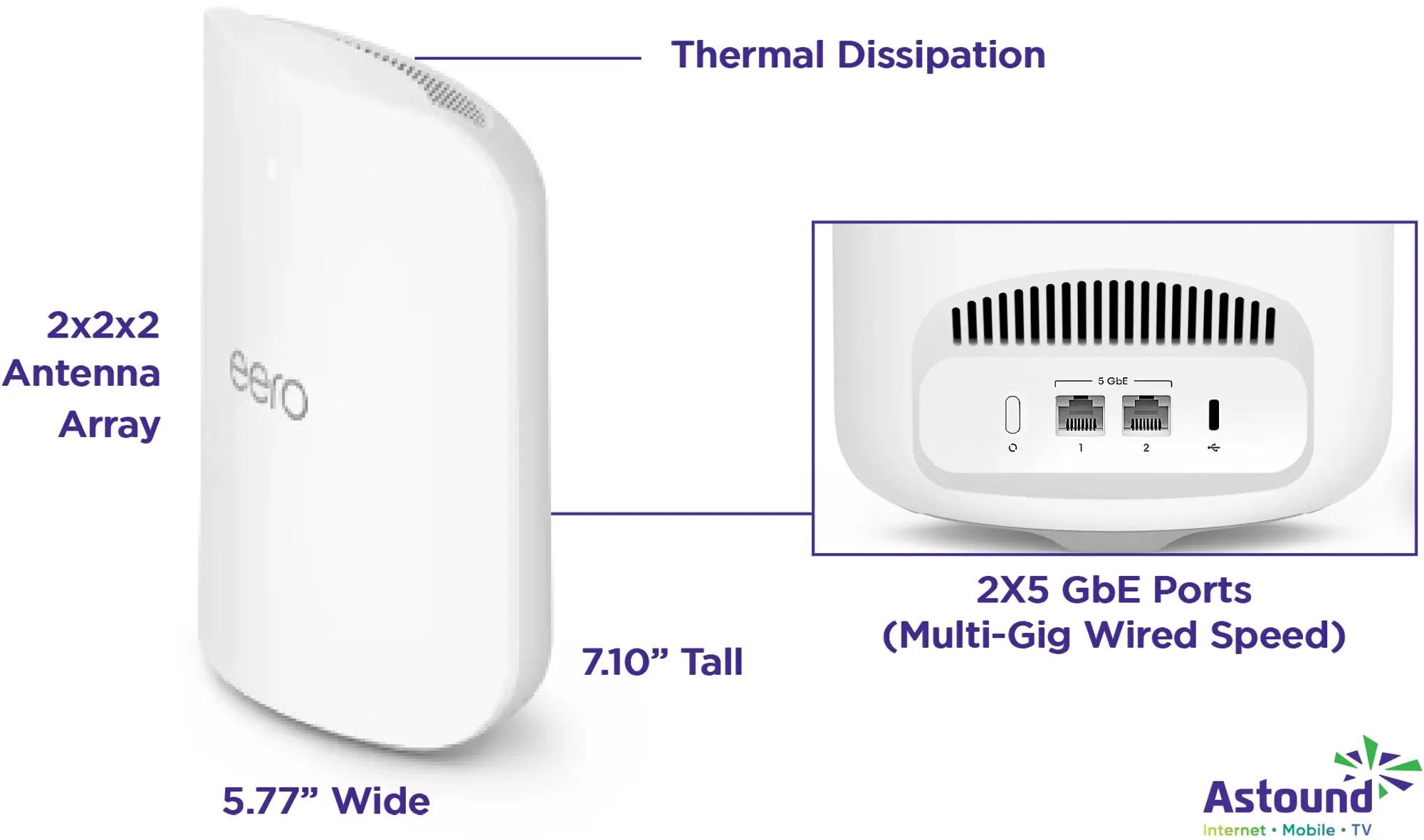
Hardware: The hardware includes two auto‑sensing 5 GbE Ethernet ports that can connect to your modem or wired devices such as gaming PCs and media servers. According to eero’s specifications, each eero Pro 7 unit delivers wireless speeds up to 3.9 Gbps and wired speeds up to 4.7 Gbps. That’s more than enough bandwidth for a multi‑Gig internet plan and should accommodate households streaming 4K and 8K video while gaming or running home offices.
Capacity & coverage: The Pro 7 is rated for up to 2,000 square feet of coverage per unit and can support over 200 connected devices without noticeably slowing down, although layout and the materials your home is made of can affect this. This capacity makes it suitable for smart home enthusiasts who have thermostats, cameras, sensors and lights alongside phones, laptops and consoles.
Design: Visually, the device has a sculpted design with vents along the top for heat dissipation. Inside, it uses a 2×2×2 antenna array that broadcasts on each of the three bands. A single unit measures roughly 5.77 inches wide, 7.10 inches tall and 3.10 inches deep, small enough to sit on a bookshelf or countertop.
Compatibility: Like other eero products it’s compatible with earlier models, so you can upgrade part of an existing network gradually. It also functions as a smart home hub thanks to built‑in Zigbee, Matter and Thread support, meaning you can connect compatible lights, locks and sensors without buying a separate hub.
How mesh WiFi works
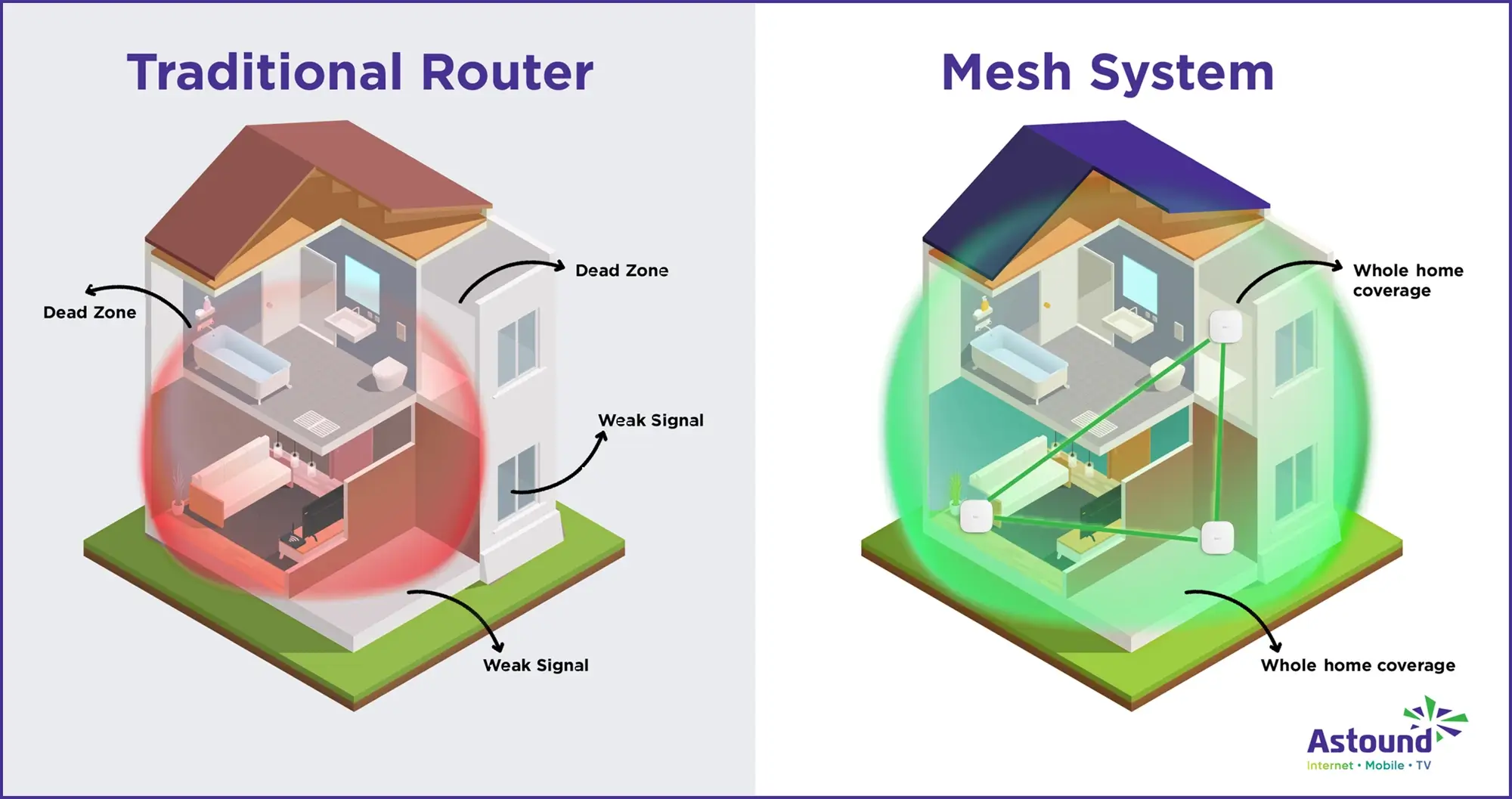
Traditional routers broadcast from one location and create a single coverage radius. If your home is large or has thick walls, signal strength drops as you move away, leading to dead zones or buffering.
Mesh WiFi solves this by combining several small routers into a single network. One node plugs into the connection provided by your ISP and the others wirelessly communicate with it to extend the signal. All nodes share the same network name and password so your devices roam automatically. This allows you to move around your house without losing your connection.
Unlike traditional routers, these nodes work together to distribute the signal evenly, maintain consistent speeds and eliminate dead zones across your home network. Your phone or laptop always connects to the nearest node with the strongest signal. The system constantly monitors network traffic, rerouting data via the most efficient path, reducing packet loss and latency.
WiFi 7 technology explained
The eero Pro 7 gets its name from WiFi 7, also known as IEEE 802.11be. This standard takes the principles of WiFi 6 and 6E and pushes them further. Key improvements include wider channels, more efficient modulation, multi‑link operation and lower latency.
Channel and modulation efficiencies
The official IEEE amendment for 802.11be introduces modifications to both the physical and MAC layers to support maximum throughput of at least 30 Gbit/s while operating between 1 GHz and 7.25 GHz, and requiring at least one mode of operation that improves worst‑case latency and jitter.
One way WiFi 7 achieves these gains is by doubling channel bandwidth from 160 MHz to 320 MHz in the 6 GHz band. This allows multiple data streams to travel side by side without interference. WiFi 7 also introduces 4K Quadrature Amplitude Modulation (4K QAM), which packs more data into each signal by representing information with 4096 different amplitude and phase combinations. Combined with more spatial streams, this can deliver speeds up to four times faster than WiFi 6E under ideal conditions.
eero Pro 7 product diagram
Multi‑Link Operation (MLO)
Another defining feature is Multi‑Link Operation (MLO). Traditional WiFi devices send and receive data on one channel or band at a time. MLO enables devices to aggregate two or more channels across different bands (such as 2.4 GHz, 5 GHz and 6 GHz) and use them simultaneously.
MLO essentially allows two wireless devices to communicate on multiple channels, where packets are assigned in parallel to both channels and the receiving device aggregates traffic to achieve higher throughput. By using two channels, MLO can boost data rates up to 7.2 times those of WiFi 6 and lower latency because traffic can shift to a secondary channel when the primary is congested.
OFDMA and TWT
In addition to MLO, WiFi 7 expands on features introduced in WiFi 6, such as Orthogonal Frequency‑Division Multiple Access (OFDMA) and Target Wake Time (TWT). OFDMA subdivides a channel into smaller sub‑channels to serve multiple devices at once, improving efficiency for networks with many devices. TWT schedules communication with low‑power devices like sensors so they can sleep longer and conserve battery.
Reduced latency
WiFi 7 pairs these with advanced interference management and scheduling algorithms to reduce latency and maintain consistent performance under heavy load.

Mesh WiFi with
eero Secure
Enhanced Whole Home WiFi uses multiple routers (or eeros®) to boost range, speed and stability. While eero Secure, included at no extra cost, offers parental controls, ad blocking and internet backup for constant connectivity.
Performance, coverage and specs
eero built the Pro 7 for households and businesses demanding multi‑Gigabit performance. The hardware uses a quad‑core processor and dedicated network accelerators to manage simultaneous data streams. With WiFi 7 and a tri‑band design, the Pro 7 can allocate bandwidth intelligently across bands. For example, older devices may connect on 2.4 GHz while modern laptops or smart TVs use 5 GHz and new WiFi 7 phones leverage the 6 GHz band.
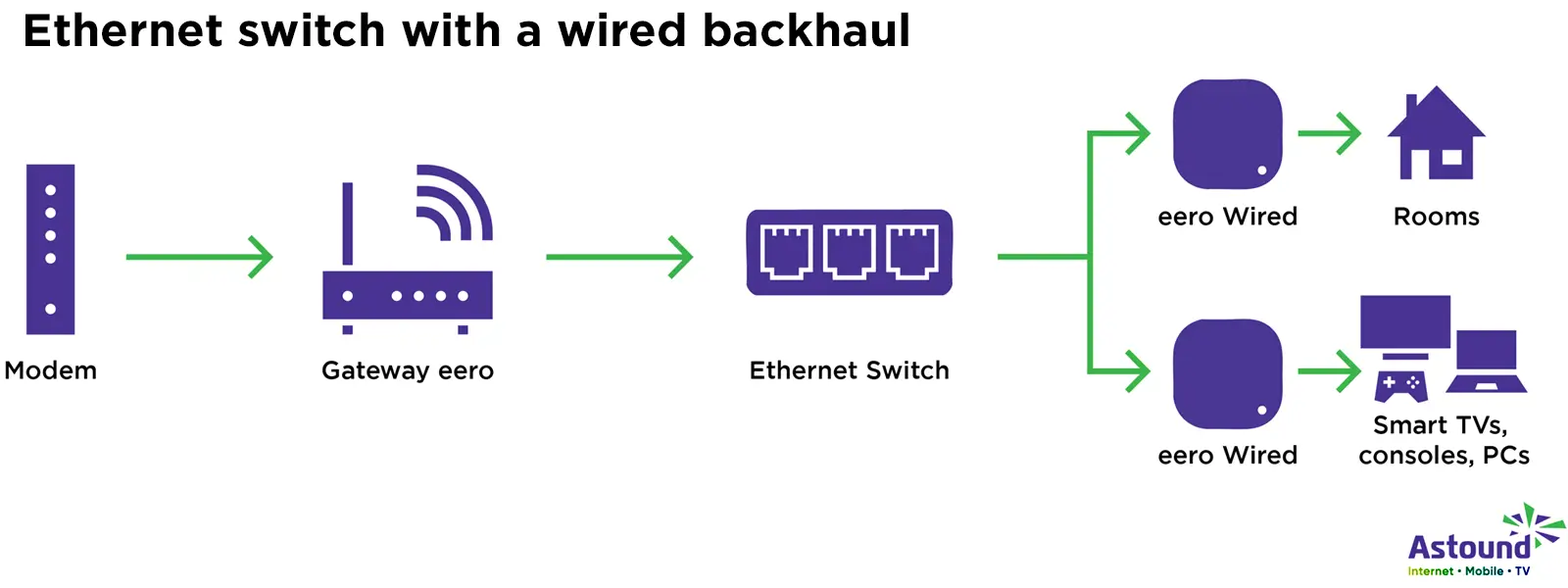
Speed: On paper, each Pro 7 unit supports wireless speeds up to 3.9 Gbps and wired speeds up to 4.7 Gbps. Two auto‑sensing 5 GbE ports allow you to connect high‑bandwidth devices directly or chain multiple nodes using wired backhaul. Wired backhaul is especially useful in large homes where walls or floors might attenuate wireless signals; running an Ethernet cable between nodes allows them to use their full wireless capacity to serve devices rather than relaying data between nodes.
Bandwidth: Because the Pro 7 has a 2×2×2 antenna array on each band, it operates two spatial streams on 2.4 GHz, two on 5 GHz and two on 6 GHz. This configuration is labeled “BE10800,” indicating the total theoretical bandwidth available across all streams. While real‑world speeds are lower, this rating reflects the router’s capacity to handle many devices simultaneously. Pro 7 supports WPA3 security, ensuring the network uses modern encryption.
Coverage: How many square feet can a single eero Pro 7 cover? In practical terms, a single Pro 7 covers around 2,000 square feet. For larger homes you can add more units, two will usually cover a two‑story home and three can handle bigger houses or small offices. Each node can handle over 200 devices and monitors which nodes are under heavy load, shifting connections accordingly.
TrueMesh software
Hardware is only part of the equation. eero’s signature feature is its patented TrueMesh software, which allows nodes to communicate with each other and dynamically route traffic.
Instead of following a fixed path, the mesh analyzes signal strength, congestion and interference in real time, then picks the best route for each data packet.
This means that even if one node is temporarily overloaded or a neighbor’s network is causing interference on a particular channel, your traffic automatically reroutes through another node, connecting to the strongest node as you move around. This dynamic routing helps sustain steady network throughput and reduces packet loss. Combined with WiFi 7’s MLO, TrueMesh can transmit and receive across multiple bands, improving both speed and signal reliability.
The system also supports eero Secure and eero Plus subscription services, which add parental controls, ad blocking, malware protection and VPN features for home network security. Astound includes the standard eero Secure plan at no additional cost with its Whole Home WiFi service. If your home relies on fast, safe and flexible internet for work, school or entertainment, eero Plus offers a serious upgrade. From bundled tools like VPN, antivirus and password management to dynamic DNS features and smart WiFi, Plus turns your eero system into a robust digital safety net.

eero Plus
eero Plus protects your family online with a password manager to safely create, store and share passwords, virus and malware protection and a VPN that lets you browse the web safely and securely.
Comparison: eero Pro 7 versus earlier models
| eero Pro 6 | eero Pro 6E | eero 7 | eero Pro 7 | |
|---|---|---|---|---|
| WiFi Standard | WiFi 6 | WiFi 6 | WiFi 7 | WiFi 7 |
| Speed | 1 Gbps | 2.3 Gbps | 2.5 Gbps | 5 Gpbs |
| Bands | Tri | Tri | Dual | Tri |
| Ideal for | Basic user | Basic user | Standard user | Power user |
| Transmission Frequencies | 2.4 + (2) 5GHz | 6 GHz | 2.4Gbps + (2) 5Gbps ports | 6 GHz band, two 5 GbE ports and tri‑band WiFi 7 |
| WiFi Standard |
eero Pro 6
WiFi 6 |
eero Pro 6E
WiFi 6 |
eero 7
WiFi 7 |
eero Pro 7
WiFi 7 |
| Speed |
eero Pro 6
1 Gbps |
eero Pro 6E
2.3 Gbps |
eero 7
2.5 Gbps |
eero Pro 7
5 Gpbs |
| Bands |
eero Pro 6
Tri |
eero Pro 6E
Tri |
eero 7
Dual |
eero Pro 7
Tri |
| Ideal for |
eero Pro 6
Basic user |
eero Pro 6E
Basic user |
eero 7
Standard user |
eero Pro 7
Power user |
| Transmission Frequencies |
eero Pro 6
2.4 + (2) 5GHz |
eero Pro 6E
6 GHz |
eero 7
2.4Gbps + (2) 5Gbps ports |
eero Pro 7
6 GHz band, two 5 GbE ports and tri‑band WiFi 7 |
When choosing a router, it helps to understand how the Pro 7 differs from previous generations. eero has offered several models over the years: the base eero, eero 6, eero 6+, eero Pro 6, eero Pro 6E and eero 7. Each generation brings improvements in WiFi standards and hardware capabilities.
eero Pro 6
This model uses WiFi 6, which introduced OFDMA and improved multi‑user performance. It offers tri‑band connectivity on 2.4 GHz and two 5 GHz radios, with support for internet plans up to around 1 Gbps. It has a Gigabit WAN port and two Gigabit LAN ports. eero Pro 6 is suitable for smaller households that want reliable whole‑home coverage but don’t require multi‑Gig speeds.
eero Pro 6E
Released after WiFi 6E, the eero Pro 6E adds support for the 6 GHz band, providing access to wider 160 MHz channels. It includes a 2.5 GbE port but still tops out around 2.3 Gbps of wireless throughput. It’s a good fit for Gigabit internet plans and early adopters wanting access to 6 GHz before WiFi 7 devices were widely available.
eero 7
Introduced alongside the Pro 7, eero 7 is a dual‑band WiFi 7 router that uses 2.4 GHz and 5 GHz bands. It supports internet plans up to 2.5 Gbps and features two 2.5 GbE ports. This model is ideal for apartments and smaller homes with fewer high‑bandwidth demands but still gives you WiFi 7 readiness and MLO support.
eero Pro 7
The Pro 7 stands out by adding the 6 GHz band, two 5 GbE ports and tri‑band WiFi 7 functionality. It’s designed for internet plans up to 5 Gbps, making it ideal for multi‑Gigabit fiber connections. The higher antenna count and tri‑band design manage many devices across a large area with less congestion.
Who should buy eero Pro 7?
If you’re experiencing dead spots or poor performance, eero Pro 7 can help. If you’re thinking about upgrading your home network, eero pro 7 is built for people who are already pushing their WiFi to the limit. It’s a strong fit for larger and multi-story homes, busy households and anyone on a fast internet plan who wants consistent speed with lower lag and fewer slow spots as they move room to room.
Since eero Pro 7 uses the latest WiFi spectrum, it’s great for crowded WiFi environments like dense apartment buildings or urban areas.
Below are the types of homes and use cases that tend to get the biggest real-world benefit from eero pro 7.
Large families and multi‑device households
Homes with several family members often have dozens of connected devices: phones, laptops, tablets, game consoles, smart TVs, thermostats, cameras and more. The Pro 7’s ability to support over 200 devices ensures that everyone stays connected with minimal buffering. The added 6 GHz band provides extra capacity for newer devices, reducing strain on the 2.4 GHz and 5 GHz bands.
Remote workers and creative professionals
If you work from home and rely on video conferencing, cloud storage, large file transfers or remote desktops, consistent low‑latency connectivity is essential. WiFi 7’s MLO and high throughput reduce lag and deliver more stable upload speeds. The two 5 GbE ports allow you to wire in workstations or network‑attached storage for even faster and more reliable performance.
Gamers and streamers
Online gaming and live streaming demand both high bandwidth and low latency. The Pro 7’s tri‑band architecture means you can dedicate the 6 GHz band to latency‑sensitive devices while letting other household activities use the 2.4 GHz and 5 GHz bands. Moreover, mesh systems stabilize speeds and balance signal distribution to reduce packet loss and support faster upload and download speeds. Pairing the Pro 7 with a multi‑Gig fiber plan will minimize ping times and offer streaming at 4K or even 8K resolutions.
Smart home enthusiasts
Smart lights, thermostats, locks and sensors may not require much bandwidth individually, but they do add up. The Pro 7’s support for Zigbee, Thread and Matter means it doubles as a central smart home hub, eliminating the need for extra hubs cluttering up your living room. You can control compatible devices with voice assistants like Alexa and manage routines through your phone.
Small businesses and home offices
For entrepreneurs running a small office or creative studio, a reliable internet connection is non‑negotiable. The Pro 7’s ability to handle many devices and maintain consistent high speeds helps ensure that cloud backups, file sharing and VoIP calls run smoothly. Its 2,000 square feet coverage per node scales easily with additional units, allowing you to expand as your business grows.
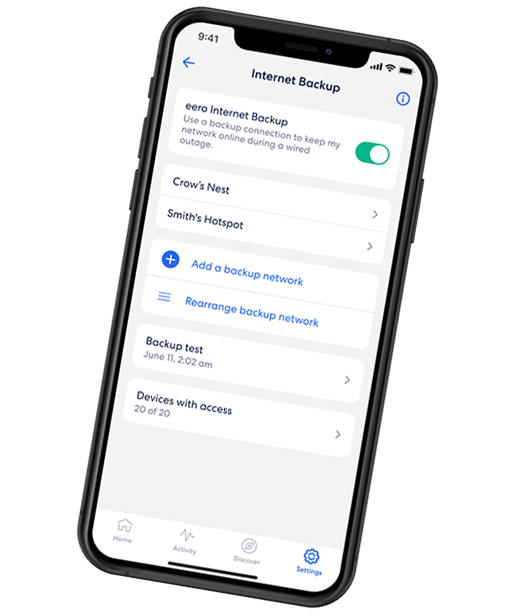
EERO INTERNET BACKUP
We’ve got your back(up)
eero Internet Backup lets you add alternative wireless connections – like a personal hotspot – to keep your WiFi up and running even when your wired connection is disrupted.
Do you need WiFi 7 devices?
You don’t need WiFi 7 devices to use the eero Pro 7. The router is fully backward‑compatible with WiFi 6E, WiFi 6 and other devices on older standards, so your existing devices will connect at their maximum supported speed.
However, to unlock the full potential of WiFi 7, particularly features like 320 MHz channels and MLO, you’ll need devices built to the 802.11be standard. These are just starting to enter the market in the form of flagship smartphones, laptops and motherboards.
By upgrading to WiFi 7 devices, you are future-proofing your network so all your devices will perform better.
Even without WiFi 7 devices, the Pro 7 makes sense if you have a multi‑Gig internet plan through Astound or plan to switch or upgrade soon. Its multi-Gig ports and tri‑band architecture ensure that your wired and wireless devices aren’t bottlenecked by the router.
As more WiFi 7 devices become available, you’ll have the infrastructure to support them already set. If you don’t need multi‑Gig speeds and mostly use streaming, browsing and smart home devices, the dual‑band eero 7 or eero 6+ may still provide performance at a lower price.
Mesh WiFi versus single routers
When weighing whether to upgrade, it helps to compare mesh systems to traditional single routers. A standard router broadcasts from one point and is limited by the physical environment. Walls, floors and distance reduce signal strength, creating dead zones.
Even if you add a range extender to improve coverage, it often operates on a single radio and halves the available bandwidth. In contrast, mesh systems place several nodes around your home to create a unified network. Mesh nodes work together to create unified whole‑home coverage and proper placement helps maintain faster speeds and minimize performance drops.
Access points can deliver strong, stable signals in specific zones but require running Ethernet cables to each access point and more hands‑on network management.
Mesh systems like the eero Pro 7 also have a simpler setup process. The eero app walks you through connecting your modem, placing the nodes and configuring network settings. You can monitor speeds, assign devices and set parental controls from your phone. Traditional access points often require logging into each device’s admin interface and manually configuring SSIDs, channels and security settings.
WiFi that just works!
WiFi plans for any home
Tiny, large or somewhere in between; find WiFi coverage to fit any space. Blanket your entire home with a fast and ultra‑reliable connection.
Is eero Pro 7 worth it?
The answer depends on your internet plan, home size and performance expectations. If you have a Gigabit or multi‑Gig fiber connection and want a network that can grow with new devices and demands, the Pro 7 offers a compelling combination of speed, coverage and simplicity. Its tri‑band WiFi 7 design and dual 5 GbE ports position it well for the next several years of future internet upgrades.
If you’re on a slower plan (under 1 Gbps) or live in a small apartment, you may not notice improvement over the more affordable eero 7 or eero Pro 6E. Those models still provide excellent coverage and support for dozens of devices. The Pro 7’s premium price makes the most sense for households that already push their network to its limits or for users who want to invest now rather than upgrade again in a few years.
Conclusion
eero Pro 7 is a significant step forward in home networking. With WiFi 7’s wider channels, Multi‑Link Operation, 4K QAM and improved latency, it brings performance previously reserved for enterprise equipment into living rooms and home offices. The tri‑band design, dual 5 GbE ports and robust TrueMesh software ensure that your network remains fast and reliable, even as the number of connected devices grows.
Each node covers about 2,000 square feet and supports over 200 devices, making it well‑suited for large families, smart homes, gamers and small businesses. Though WiFi 7 devices are still emerging, investing in the Pro 7 now will allow you to take full advantage of multi‑Gig internet plans.
For households that need the highest performance and want an easy‑to‑use system, the eero Pro 7 is a strong contender. Those with more modest needs can consider less expensive models like the eero 7 or eero Pro 6E, which still deliver excellent coverage and reliability. In any case, choosing a mesh networking system built on WiFi 7 and TrueMesh technology sets you up for a smoother online experience for the future.
Frequently asked questions
What is WiFi 7?
WiFi 7 is the marketing name for IEEE 802.11be, the next generation of wireless networking. It introduces 320 MHz channels, 4K QAM modulation, improved scheduling and Multi‑Link Operation to deliver peak throughput of at least 30 Gbit/s and lower latency.
Do I need WiFi 7 devices to use eero Pro 7?
No. The eero Pro 7 works with all existing WiFi devices, including those using WiFi 4, 5 and 6. You’ll enjoy better coverage and stability thanks to its tri‑band design and TrueMesh software. However, to see the full benefits of WiFi 7, such as aggregated throughput across multiple bands and extremely low latency, you’ll need devices that support WiFi 7.
Is the eero Pro 7 better than the eero Pro 6?
Yes, but the difference matters most to users with high speed internet or many connected devices. The Pro 7 adds the 6 GHz band, supports Multi‑Link Operation, includes two 5 GbE ports and can handle wireless speeds up to 3.9 Gbps. The Pro 6 uses WiFi 6 and tops out at around 1 Gbps, making it sufficient for most 1 Gbps plans. If you have a multi‑Gig plan or want to future‑proof your network, the Pro 7 is the better choice. For smaller homes with lower bandwidth needs, the Pro 6 or Pro 6E may offer better value.
Related content

What is WiFi 7?
Find out why WiFi 7 is a game‑changer. Learn features and benefits of this latest WiFi standard including speed, security and improvements over previous standards.

Mesh WiFi nodes explained
Learn what mesh WiFi nodes are, where to place nodes in your home for best coverage and how to estimate how many nodes you need throughout your home.

eero Internet Backup
Learn how eero Internet Backup keeps your house connected during internet outages, providing seamless, reliable connectivity to all your devices.

eero parental controls
Explore how to manage eero parental controls, content filters and how to block or apps to safeguard your family online.

Best eero Ethernet switch
Looking for the best Ethernet switch for eero? Learn how to choose an eero network switch, see top picks by use case and wire devices the right way.

eero Secure vs. eero Plus
Compare eero Secure vs. eero Plus to find which WiFi security features, parental controls and plan is best for your home.
Create the perfect bundle
Get the speed, WiFi, mobile and TV that’s just right for you.
*Internet speeds vary, not guaranteed. Certain equipment may be required. See astound.com for details. Modem req’d. No contracts. Astound Internet is powered by fiber and connected to the premises via coaxial connection or fiber, where available. Delivery methods may vary by area. Subject to availability. Ltd-time offer; subj. to change without notice. Internet speeds under 1 Gig, pricing valid for 12 mos. Gig+ Internet speeds, pricing valid for 36 mos. Add’l fees apply for taxes, surcharges, & data overages, & are subj. to change. For details visit astound.com/fees. Enhanced WiFi or Whole Home WiFi included with Gig+; $5/mo for lower speeds or add’l devices. Regular rates apply after promo ends. Monthly price shown includes discount for enrolling in autopay & e-bill. $10 off/mo w/ bank acct autopay or $5 off/mo w/ credit/debit card autopay. Valid email & enrollment req’d. Must enroll w/in 30 days of order. Discount appears within 3 bill cycles, ends if autopay/e-bill is canceled, svcs change, or acct isn’t in good standing. ^Astound Mobile req’s Astound Internet service for activation. Max 5 lines. Equip., intl./roaming charges, taxes, fees extra & may change. Astound not liable for svc disruptions or outages. Higher rate applies if Internet not maintained. Mobile svc only in Astound areas. Pricing subj. to change. Data may slow during congestion. After 20GB, Unlimited plans slow to 768 Kbps; 1.5GB/3GB plans capped. No rollover; add’l data $10/GB. Coverage varies. Some features may require specific plans. Mobile svc includes BIAS w/ data, voice, texts & SMS. Other restrictions may apply. See astound.com/mobile for details. Offer valid for new res. customers or former customers in good standing w/out Astound svc in past 60 days. Add’l svcs, equip, premiums & tiers extra & subject to add’l charge & reg. increases. $14.99 one-time activation fee (plus install) applies & may change. Taxes & surcharges extra & subj. to change. WA RESIDENTS: unless otherwise specified, price does not include 2% Regulatory Administration Fee. Cust. responsible for any accrued charges. Subj. to credit check. Not all svcs/speeds avail. in all areas. 30-Day Money-Back Guarantee for new residential customers who cancel within 30 days of install. Maximum refund is equal to one month’s monthly recurring service fee of services & equip. ordered & installed. Refund within 60 days after conditions are satisfied. Refund not applicable to usage-based fees. All svcs are governed by Astound Customer Terms & Conditions found at astound.com/policies-disclaimers. © 2026 Radiate HoldCo, LLC d/b/a Astound Broadband. All rights reserved.
While we have made every attempt to ensure that the information contained in this site has been obtained from reliable sources, Astound is not responsible for any errors or omissions, or for the results obtained from the use of this information. All information in this site is provided “as is”, with no guarantee of completeness, accuracy, timeliness and without warranty of any kind, express or implied, including, but not limited to warranties of performance, merchantability and fitness for a particular purpose. Certain links in this site connect to other websites maintained by third parties over whom Astound has no control. Astound makes no representations as to the accuracy or any other aspect of information contained in other websites.
eero Plus is available for an additional $9.99/month and requires subscription to whole home WiFi powered by eero.