















eero 6 Plus vs. eero Pro 6E: Which mesh WiFi system should you buy?

Your home WiFi should deliver dependable coverage and consistent speeds whether you’re streaming 4K, joining a video call, gaming online or managing a smart home. That’s exactly what eero mesh systems, like the eero 6 Plus and eero Pro 6E, are designed for. In this article, we’ll break down the key differences in specs, real-world performance and value so you can choose the eero model for your home.
What you'll learn:
- Quick verdict: Which eero should you get?
- At a glance comparison: eero 6 Plus vs. eero Pro 6E
- Understanding eero specifications
- Real-world performance: What reviews found
- Which model matches your home and internet setup?
- eero: Pros and cons all in one place
- Upgrade or skip? Is the Pro 6E worth it?
- Setup tips and best practices
- Use our decision tree to guide your choice
- Final thoughts
- Frequently asked questions
- Looking for more topics?
Quick verdict: Which eero should you get?
If your household has Astound’s Gigabit or multi-Gig internet, many connected devices or you already use (or plan to use) WiFi 6E-capable tech, choose the eero Pro 6E. It adds tri-band support (2.4 GHz, 5 GHz and 6 GHz) and includes a 2.5 Gbps Ethernet port, making it great for demanding networks.
For a smaller household with a few smart devices and no immediate plan for 6 GHz WiFi, eero 6 Plus might be a better fit. It’s a dual-band WiFi 6 system that supports speeds up to one Gigabit, delivering coverage and performance at a lower cost.
At a glance comparison: eero 6 Plus vs. eero Pro 6E
Both systems share eero modern design, app-based setup and automatic firmware updates. Where they differ is speed, capacity and wireless flexibility.
The eero 6 Plus offers fast, reliable WiFi 6 performance for everyday homes, while the eero Pro 6E adds a 6 GHz band and multi-Gig support for households looking for extra capacity and long-term headroom.
| Feature: | eero 6 Plus | eero Pro 6E |
|---|---|---|
| WiFi standard | WiFi 6; Dual-band (2.4 GHz, 5 GHz) | WiFi 6E; Tri-band (2.4 GHz, 5 GHz, 6 GHz) |
| Max supported speed | Up to 1 Gig | Up to 2.3 Gig |
| Coverage per unit | 1,500 sq. ft. | 2,000 sq. ft. |
| Device support | 75 connected devices | 100 connected devices |
| Ethernet ports | Two 1 GbE ports | One 2.5 GbE port; One 1 GbE port |
|
Feature:
WiFi standard |
eero 6 Plus
WiFi 6; Dual-band
(2.4 GHz, 5 GHz)
|
eero Pro 6E
WiFi 6E; Tri-band
(2.4 GHz, 5 GHz, 6 GHz)
|
|
Feature:
Max supported speed |
eero 6 Plus
Up to 1 Gig |
eero Pro 6E
Up to 2.3 Gig |
|
Feature:
Coverage per unit |
eero 6 Plus
1,500 sq. ft. |
eero Pro 6E
2,000 sq. ft. |
|
Feature:
Device support |
eero 6 Plus
75 connected devices |
eero Pro 6E
100 connected devices |
|
Feature:
Ethernet ports |
eero 6 Plus
Two 1 GbE ports |
eero Pro 6E
One 2.5 GbE port;
One 1 GbE port
|

Mesh WiFi with
eero Secure
Enhanced Whole Home WiFi uses multiple routers (or eeros®) to boost range, speed and stability—while eero Secure, included at no extra cost, offers parental controls, ad blocking and internet backup for constant connectivity.
Understanding eero specifications
For those unfamiliar with mesh networking technology, product specs can feel overwhelming. Here’s a simple breakdown of what each feature means and how it impacts performance in a typical home.
WiFi standard and 6 GHz band
WiFi 6 and WiFi 6E are closely related. Both introduce OFDMA and MU-MIMO for higher efficiency and lower latency, but 6E unlocks an entirely new 6 GHz frequency band. On the eero Pro 6E, that band is wide open, with no interference from legacy devices and supports 160 MHz channels for extremely fast data bursts. However, 6 GHz has a shorter range and can’t penetrate walls as well as 2.4 or 5 GHz.
Dual-band vs. tri-band
What bands does the eero 6 Plus use? The eero 6 Plus uses two bands (2.4 and 5 GHz). The eero Pro 6E adds a third (6 GHz). That extra band can be used either for dedicated traffic or for newer 6 GHz devices. In a busy household with dozens of smart devices streaming and syncing simultaneously, tri-band designs help keep traffic flowing smoothly.
Ethernet and wired backhaul
What is the advantage of the eero Pro 6E? Its dedicated 2.5 Gbps Ethernet port. That port supports multi-Gig internet plans and provides ultra-fast wired backhaul between nodes. This is helpful if you run Ethernet through your home or want a direct connection into a NAS (network-attached storage) or a desktop PC. On the other hand, the eero 6 Plus has two standard 1 Gbps ports, which may be enough on a 1 Gig plan from Astound.
Home size and device load
According to eero, the eero 6 Plus can cover up to 1,500 sq. ft. per device (4,500 sq. ft. for a 3-pack) and is designed to support 75+ connected devices. The eero Pro 6E increases coverage to up to 2,000 sq. ft. per device and is built to handle 100+ devices, with additional capacity for high-bandwidth activities. Both systems can be expanded by adding more eero devices.
Build your plan
Your perfect plan is just a click away
Get the speeds, WiFi, mobile and TV plans you need all at an affordable price. Bundle your services with Astound and see how much you can save.

Smart home hub features
Both systems include built-in Zigbee and Thread radios to connect compatible smart bulbs, sensors and locks without a separate hub. This means either eero model can act as the center for Alexa or Matter-enabled devices, simplifying your smart home setup and reducing the number of extra boxes plugged in.
Price and value
The 6 Plus costs $299, while the Pro 6E is $549. The $250 price difference makes the Pro 6E nearly double the price of the 6 Plus. That price gap can be meaningful for many households, particularly when evaluating long-term value versus upfront cost. If you’re a budget-sensitive homeowner, the 6 Plus offers powerful value for everyday use.
If you subscribe to Astound and prefer minimal upfront costs, renting may make the Pro 6E accessible without the full purchase premium, especially if you need multi-Gig support or have high device density.
Real-world performance: What reviews found
Independent reviews and user discussions consistently highlight that both eero 6 Plus and eero Pro 6E deliver fast, stable and easy-to-manage WiFi, but their advantages materialize differently depending on your setup.
In testing, reviewers found that the eero 6 Plus handled most home environments with ease, delivering strong, consistent speeds and coverage across multiple rooms. When switching to the eero Pro 6e, performance improved mainly in homes with multi-Gig internet plans or 6 GHz-capable devices, which could take advantage of the additional wireless band and 2.5 GbE port. In standard setups using typical WiFi 6 or WiFi 5 devices, the overall difference in throughput was modest.
Community feedback echoes these results: everyday users report that the eero 6 Plus feels just as fast for streaming, work and smart home devices, while enthusiasts with next-gen hardware appreciate extra headroom from Pro 6E for multi-Gig and WiFi 6E devices.
Find your speed
What speed do you need?
Maybe you just need the essentials—or maybe you need to unleash the ultimate internet speed. Explore your options to get the best experience for every device in your home.
Which model matches your home and internet setup?
Internet plan speed
If you have an internet plan of 500 Mbps or less, the eero 6 can handle your daily online activities. It offers fast and stable WiFi 6 speeds for streaming, online gaming, remote work and web browsing.
For households with Gigabit plans, such as Astound’s 1 Gig option, the eero 6+ is more suitable. Its broader 160 MHz channel offers extra bandwidth that increases data throughput, especially for newer devices that support it.
Compare Astound’s internet plans to find the speed tier that best fits your home and aligns with the right eero mesh WiFi system for your setup.
Home size and device count
Both mesh WiFi systems cover about 1,500 square feet per node and can handle up to 75 connected devices. For homes under 4,000 square feet using a three-pack setup, the eero 6 delivers reliable coverage and performance.
In homes with a higher device count or experiencing heavier network traffic, the eero 6+ provides slightly better throughput under heavy load for a consistent connection. You can also extend coverage even further by adding additional eero nodes to your mesh network for a broader, whole-home WiFi experience.
Wired devices and Ethernet ports
Both models feature two 1GbE Gigabit Ethernet ports. However, the eero 6 restricts these ports to the gateway router only. This setup works well if you mainly use a wireless backhaul for most of your devices.
On the other hand, each eero 6+ unit has two Ethernet ports that allow you to create wired connections for devices needing faster, consistent speeds and low latency, such as gaming consoles, PCs or a smart TV. Additionally, you can establish a wired backhaul between nodes for stronger and lower-latency connections.
Future-proofing and upgrades
If you plan to upgrade your internet plan beyond 500 Mbps, need additional wired connections or own devices that support 160 MHz channels, the eero 6+ mesh system is the right choice. It offers future-proofing with higher throughput potential.
If you anticipate future advanced needs, such as multi-Gig internet speeds, bandwidth- and data-intensive activities or connecting more than 75 devices, consider advanced eero mesh systems like the eero Pro 6E or eero Max 7. These support the latest WiFi 6E or WiFi 7 standards, providing even more headroom and speed flexibility.
Budget and value
The eero 6 offers reliable performance at a lower cost, making it ideal for families on a tight budget who depend on Whole Home WiFi.
While the eero 6+ mesh system offers more flexibility for wired connections and support for higher speeds, it costs $50 to $100 above the standard model. Choose the eero 6+ if you want a mesh WiFi network that supports faster internet speeds and next-generation devices.
eero: Pros and cons all in one place
eero: Pros and cons all in one place
| eero 6 Plus | eero Pro 6E | |
|---|---|---|
| Best for | Most homes with up to Gig internet | Multi-Gig homes and future-ready networks |
| Pros | ● Excellent value for performance
● Fast WiFi 6 with 160 MHz support ● Quick app setup plus automatic updates |
● WiFi 6E with 6 GHz band for next-gen devices
● Tri-band design handles heavy device loads ● 2.5 Gbps Ethernet for multi-Gig and wired backhaul |
| Cons | ● No 6 GHz band
● Limited to Gigabit ports ● Less headroom for very dense device setups |
● Higher price point
● Limited benefit without multi-Gig or 6E devices |
| Best for |
eero 6 Plus
Most homes with up to Gig internet |
eero Pro 6E
Multi-Gig homes and future-ready networks |
| Pros |
eero 6 Plus
● Excellent value for performance
● Fast WiFi 6 with 160 MHz support ● Quick app setup plus automatic updates |
eero Pro 6E
● WiFi 6E with 6 GHz band for next-gen devices
● Tri-band design handles heavy device loads ● 2.5 Gbps Ethernet for multi-Gig and wired backhaul |
| Cons |
eero 6 Plus
● No 6 GHz band
● Limited to Gigabit ports ● Less headroom for very dense device setups |
eero Pro 6E
● Higher price point
● Limited benefit without multi-Gig or 6E devices |
Upgrade or skip? Is the Pro 6E worth it?
Unless you’ve recently switched to a multi-Gig internet plan or purchased multiple WiFi 6E devices, you’ll only see a slight difference. Reviewers agree that performance gains do exist, but are subtle and need WiFi 6E devices capable of harnessing all of the benefits.
For most homes, upgrading the placement of nodes or adding Ethernet for wired backhaul may offer a better boost. If you are a network enthusiast who plans to keep equipment for five years or more, the Pro 6E is worth the premium for future-proofing.
Setup tips and best practices
Both eero systems share the same mobile app and ecosystem, so setup takes only minutes. You can mix eero 6 Plus and eero Pro 6E nodes in a single mesh; the system will automatically balance connections and use the best available band.
For optimal WiFi coverage, place nodes in open spaces, avoid metal obstructions and connect one unit directly to your modem via Ethernet. If possible, use wired backhaul between nodes, especially in homes with thick walls or multiple floors, to eliminate signal loss.
Security and parental controls with eero Secure and eero Plus
Whether you choose eero 6 Plus or eero Pro 6E with Astound’s Whole Home WiFi, you start with eero Secure included at no extra cost. That baseline layer adds network-level threat blocking for known malicious and phishing sites, SafeSearch and content filters, ad and tracker blocking, WiFi scheduling, multi-admin control, guest networks and profile-based parental controls. You can group devices by person, set bedtimes or offline windows, filter categories like adult content or gambling and review high-level activity trends, all from the eero app, so your new mesh system is easier to manage and safer out of the box.
For homes that need more than the basics, eero Plus is an optional upgrade that builds on Secure rather than replacing it. It adds a full Malwarebytes subscription for device-level malware protection, Guardian VPN for safer browsing away from home, a 1Password Family Plan for shared password management, dynamic DNS for remote access and WiFi Radio Analytics for deeper insight into how your network is performing.
If you have remote workers or students, teens with lots of screen time, a dense smart home setup or you often use public WiFi, eero Plus can be a cost-effective way to bundle these tools into one subscription and manage them alongside your eero 6 Plus or eero Pro 6E network.
The technology gap
You deserve better internet
5G Home Internet Fixed Wireless Access uses radio waves which are impacted by obstacles like buildings and trees, resulting in reduced reliability.

Use our decision tree to guide your choice
Choosing between the eero 6 Plus and eero Pro 6E ultimately comes down to how you use your network today and how much performance headroom you want for the future. Use the quick decision guide below to match your home setup to the right system.
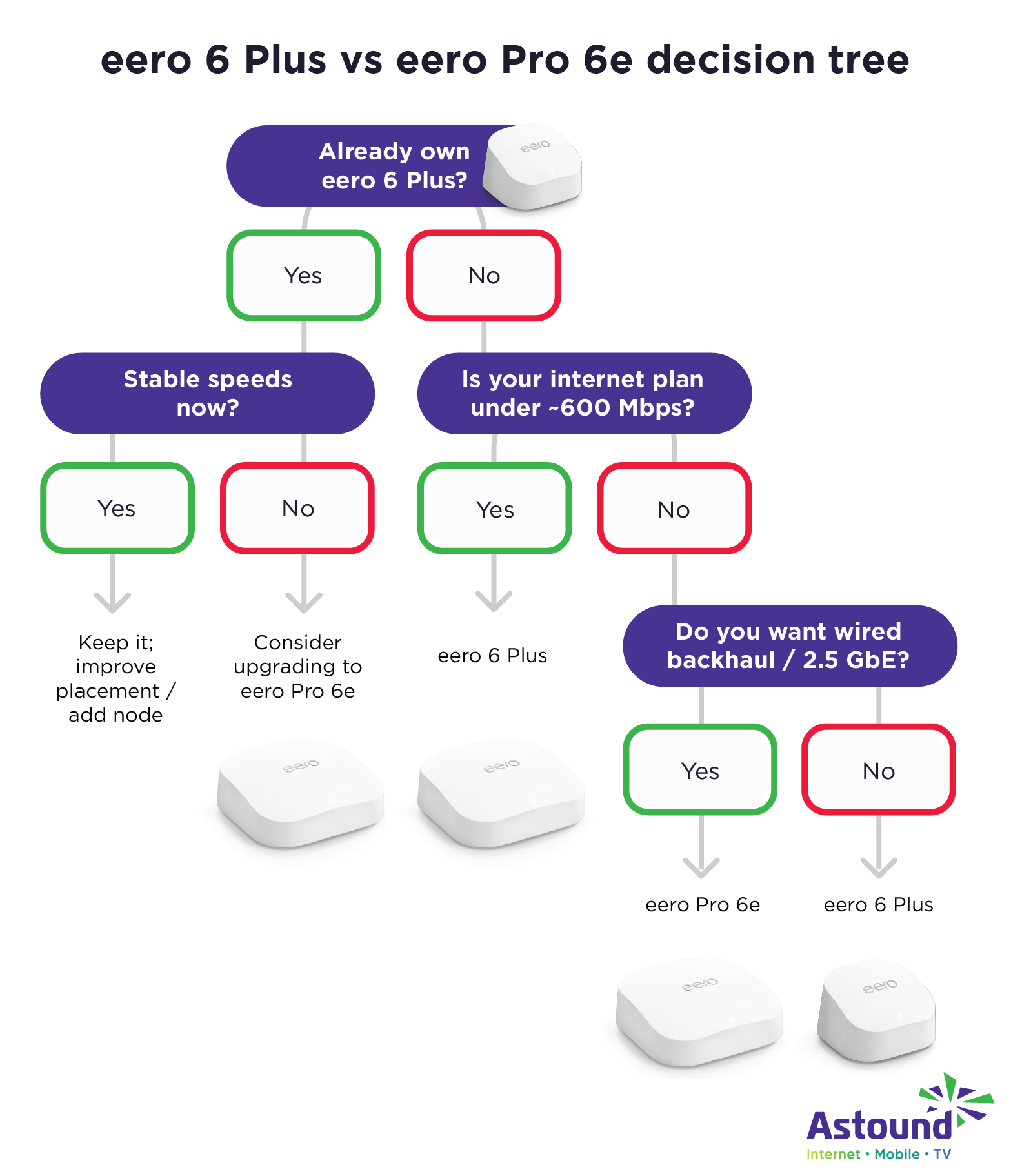
For most homes with typical broadband speeds and everyday connected devices, the eero 6 Plus offers reliable performance and strong value. If you’re planning for multi-Gig service, adding WiFi 6E devices or need extra capacity for a busy smart home network, the eero Pro 6E provides room to grow.
Final thoughts
Both eero systems deliver fast, reliable whole-home WiFi, so the right choice depends on how you use your network. For most households, the eero 6 Plus strikes the ideal balance of performance and value for everyday streaming, work and smart home use.
If you’re toward multi-Gig service, adding WiFi 6E devices or simply want the most headroom long-term, the eero Pro 6E gives you extra capacity and future flexibility. With either option, you’ll get a simple setup, consistent coverage and an upgrade that makes your home internet experience smoother across every room.
Frequently asked questions
Does the eero Pro 6E really need 6 GHz devices to be worthwhile?
Mostly yes. The 6 GHz band only benefits devices that support WiFi 6E, so older devices will still connect via 5 GHz. Without 6 GHz devices, the Pro 6E behaves like a high-end WiFi 6 router.
Can I mix eero 6 Plus and eero Pro 6E nodes in one network?
Yes. eero mesh ecosystem is backward compatible, so you can combine models. The network will use the best shared features between them.
Is the 2.5 Gbps Ethernet port on the Pro 6E useful for most homes?
Only if you have multi-Gig internet or use wired backhaul.
What home size benefits from tri-band mesh routers?
Tri-band models help in large homes with many simultaneous users or devices that compete for bandwidth. For smaller homes, dual-band WiFi 6 usually suffices.
Will I see full Gigabit speeds with eero 6 Plus vs. Pro 6E?
Yes, the eero 6 Plus can easily handle Gigabit service on wired connections and delivers real-world wireless speeds close to 600 – 800 Mbps under ideal conditions. The Pro 6E can exceed that, especially on 6 GHz, but only if your devices and ISP support it.
Related content

eero Secure vs. eero Plus
Compare eero Secure vs. eero Plus to find the best WiFi security features and parental controls and which plan is right for your home.

eero 7 vs. eero Pro 6E
Compare the eero 7 and eero Pro 6E mesh WiFi systems. See specs, performance, coverage and value to find the right setup for your home network.

eero Pro 6 vs. eero 6e
Compare eero Pro 6 and eero 6E to find your perfect mesh WiFi system. Learn about performance and features to make an informed choice.
Create the perfect bundle
Get the speed, WiFi, mobile and TV that’s just right for you.
*Internet speeds vary, not guaranteed. Certain equipment may be required. See astound.com for details. Modem req’d. No contracts. Astound Internet is powered by fiber and connected to the premises via coaxial connection or fiber, where available. Delivery methods may vary by area. Subject to availability. Ltd-time offer; subj. to change without notice. Internet speeds under 1 Gig, pricing valid for 12 mos. Gig+ Internet speeds, pricing valid for 36 mos. Add’l fees apply for taxes, surcharges, & data overages, & are subj. to change. For details visit astound.com/fees. Enhanced WiFi or Whole Home WiFi included with Gig+; $5/mo for lower speeds or add’l devices. Regular rates apply after promo ends. Monthly price shown includes discount for enrolling in autopay & e-bill. $10 off/mo w/ bank acct autopay or $5 off/mo w/ credit/debit card autopay. Valid email & enrollment req’d. Must enroll w/in 30 days of order. Discount appears within 3 bill cycles, ends if autopay/e-bill is canceled, svcs change, or acct isn’t in good standing. ^Astound Mobile req’s Astound Internet service for activation. Max 5 lines. Equip., intl./roaming charges, taxes, fees extra & may change. Astound not liable for svc disruptions or outages. Higher rate applies if Internet not maintained. Mobile svc only in Astound areas. Pricing subj. to change. Data may slow during congestion. After 20GB, Unlimited plans slow to 768 Kbps; 1.5GB/3GB plans capped. No rollover; add’l data $10/GB. Coverage varies. Some features may require specific plans. Mobile svc includes BIAS w/ data, voice, texts & SMS. Other restrictions may apply. See astound.com/mobile for details. Offer valid for new res. customers or former customers in good standing w/out Astound svc in past 60 days. Add’l svcs, equip, premiums & tiers extra & subject to add’l charge & reg. increases. $14.99 one-time activation fee (plus install) applies & may change. Taxes & surcharges extra & subj. to change. WA RESIDENTS: unless otherwise specified, price does not include 2% Regulatory Administration Fee. Cust. responsible for any accrued charges. Subj. to credit check. Not all svcs/speeds avail. in all areas. 30-Day Money-Back Guarantee for new residential customers who cancel within 30 days of install. Maximum refund is equal to one month’s monthly recurring service fee of services & equip. ordered & installed. Refund within 60 days after conditions are satisfied. Refund not applicable to usage-based fees. All svcs are governed by Astound Customer Terms & Conditions found at astound.com/policies-disclaimers. © 2026 Radiate HoldCo, LLC d/b/a Astound Broadband. All rights reserved.
While we have made every attempt to ensure that the information contained in this site has been obtained from reliable sources, Astound is not responsible for any errors or omissions, or for the results obtained from the use of this information. All information in this site is provided “as is”, with no guarantee of completeness, accuracy, timeliness and without warranty of any kind, express or implied, including, but not limited to warranties of performance, merchantability and fitness for a particular purpose. Certain links in this site connect to other websites maintained by third parties over whom Astound has no control. Astound makes no representations as to the accuracy or any other aspect of information contained in other websites.
eero Plus is available for an additional $9.99/month and requires subscription to whole home WiFi powered by eero.