














eero vs. Ubiquiti: Which mesh WiFi system performs best in 2025

A fast, reliable WiFi connection keeps everything running smoothly: remote work, streaming and smart home devices. But standard routers can struggle to deliver consistent coverage, especially in multi-story homes or buildings with thick walls.
That’s where mesh WiFi systems like eero and Ubiquiti (UniFi) come in. Using multiple access points, they eliminate dead zones and keep every device connected to a stable signal.
In this guide, we compare eero vs. Ubiquiti across four key areas:
- Performance
- Coverage
- Ease of setup
- Value
By the end, you’ll know which system fits your space and how to optimize your WiFi performance.
What are eero and Ubiquiti?
What is mesh WiFi? Mesh WiFi technology, available through Astound’s Whole Home WiFi powered by eero, connects multiple access points (or nodes) into one network to extend coverage and eliminate weak spots.
Unlike a traditional router, mesh systems route traffic dynamically between nodes so your devices always stay connected to the strongest signal, even in basements, upstairs rooms or other hard-to-reach areas.
eero mesh WiFi: Simple setup and control
Every eero generation, from eero 6 and 6 Pro to eero Max 7, delivers a quick, app-based setup using a guided self-install – just scan a QR code, place your nodes and link your network. Its TrueMesh technology automatically routes data along the fastest path between nodes, reducing congestion and interference for better coverage.
Additionally, as part of the Amazon smart home ecosystem, eero works seamlessly with Alexa voice controls, Matter-enabled devices and automated home tech
Ubiquiti UniFi WiFi system: Built for custom networks
Ubiquiti UniFi is designed for users that need advanced network visibility and configuration control. Its centralized UniFi Network Controller, accessible locally or through the cloud, allows you to create separate networks, adjust channel width and transmit power, monitor real-time traffic and manage all access points from one dashboard.
UniFi scales easily across offices, multi-building properties and enterprise environments. It’s a more hands-on system built for power users comfortable with in-depth network management.
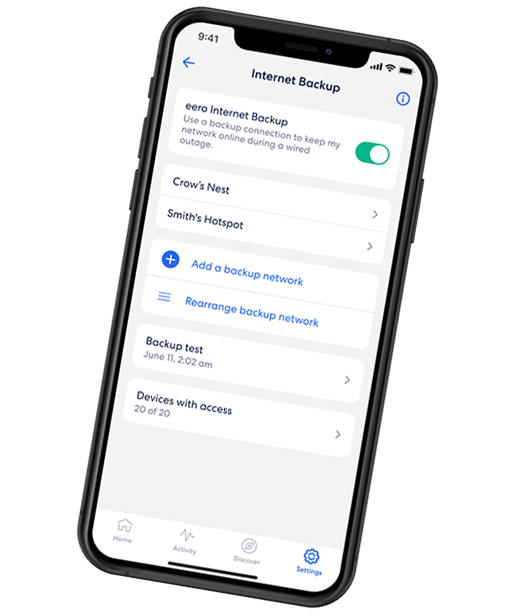
EERO INTERNET BACKUP
We’ve got your back(up)
eero Internet Backup lets you add alternative wireless connections – like a personal hotspot – to keep your WiFi up and running even when your wired connection is disrupted.
eero vs. Ubiquiti performance comparison: WiFi range, speed and stability
Speed and signal strength
With TrueMesh, eero reroutes traffic in real time to avoid congestion between nodes. The result is seamless handoffs between nodes with minimal buffering or drops.
The eero Max 7 adds WiFi 7 tri-band for higher capacity and multi-Gigabit performance with Astound Gig internet. Dual- and tri-band radios balance device traffic, so every connected phone, laptop and smart device gets steady performance without manual setup.
Ubiquiti’s WiFi 6 and WiFi 6E access points deliver strong throughput across large or complex properties. The controller enables granular control – channels, power, interference – to fit studios, multi-tenant sites or outdoor areas
WiFi range and multi-device performance
Both eero and Ubiquiti UniFi can cover large spaces, but they scale in very different ways. A three-pack of eero Max 7 units covers roughly 7,500 sq. ft., ideal for mid- to large-size homes. UniFi, by contrast, uses individual Ethernet-powered (PoE) access points that can be installed wherever coverage is needed.
eero has intelligent load balancing that manages bandwidth across dozens of devices to keep video calls, streaming and online gaming sessions stable. UniFi handles high-density deployments with VLANs/QoS and many simultaneous APs and clients.
Latency and gaming
If you want to prioritize your internet connection for gaming, both eero and Ubiquiti UniFi include QoS settings that improve latency and consistency.
eero can minimize jitter and interference on its own, maintaining stable, low-latency connections when paired with Astound’s Gig internet. UniFi can be slightly lower latency with tuning but requires more technical setup.
For most homes, eero keeps games and streams smooth. UniFi fits competitive or high-density setups.
Optimization and placement tips
Good placement is key to an optimized mesh WiFi system. Place the gateway centrally, space nodes evenly and use Ethernet backhaul, especially in multi-floor or thick-walled buildings.
eero guides placement in-app. UniFi requires manual planning with heat maps and analytics.

Mesh WiFi with
eero Secure
Enhanced Whole Home WiFi uses multiple routers (or eeros®) to boost range, speed and stability—while eero Secure, included at no extra cost, offers parental controls, ad blocking and internet backup for constant connectivity.
eero vs. Ubiquiti setup and management
For most users, ease of setup matters as much as speed. Both eero and Ubiquiti UniFi perform well once installed but differ in how they’re managed.
eero simplifies setup through its mobile app. UniFi, by contrast, requires manual configuration in the Network Controller to access advanced options like segmentation, monitoring and multi-network management.
eero: Setup in minutes, managed by app
eero is designed for fast, frustration-free setup. Using the eero app for iOS or Android, plug in your gateway, connect it to your modem and place nodes where coverage is weakest. The system automatically links and optimizes each device for a balanced, consistent signal across your space.
Nodes should be placed one to two rooms apart for smoother roaming. Once connected, firmware and security updates install automatically, keeping the network protected with no extra steps.
The eero dashboard centralizes key features, including device-level bandwidth and usage monitoring, real-time speed tests and network health alerts, parental controls and guest network management.
Ubiquiti UniFi: More steps, more control
To set up Ubiquiti UniFi, you’ll have to use the UniFi Network Application, hosted locally or through the cloud. Each access point must be adopted into the controller before users define SSIDs, VLANs and performance settings.
While eero automates optimization, UniFi exposes every setting. The centralized dashboard provides real-time analytics, client lists and performance graphs. Firmware updates are manual or scheduled, requiring regular attention.
Parental controls, guest access and device management
eero Secure, included with a subscription to Astound’s Whole Home WiFi, simplifies family management through built-in parental controls. Parents can pause WiFi, block categories or schedule downtime with a few taps. Guest networks can be created instantly and remain securely isolated from main household devices.
UniFi offers similar parental control and guest network features; however, they have to be configured manually. Power users can define custom policies, set firewall rules and apply Deep Packet Inspection (DPI) for detailed bandwidth and content control. These tools provide greater flexibility but take more effort to configure.

eero Plus
eero Plus protects your family online with a password manager to safely create, store and share passwords, virus and malware protection and a VPN that lets you browse the web safely and securely.
WiFi security and privacy
Want better home WiFi security? eero uses WPA3 encryption and applies firmware updates automatically. Users can enable extra protection through eero Plus, adding real-time threat blocking, ad filtering, VPN services and password management. It’s a simple way to strengthen home-network privacy.
UniFi offers advanced security management through its controller, including firewall configuration, geo-IP filtering and manual firmware oversight. When maintained properly, it provides enterprise-grade protection, but it depends on consistent user involvement to stay secure.
If you want a WiFi system that’s simple to install, easy to maintain and nearly invisible in daily use, eero is the clear winner. It’s ideal for families, renters and anyone who wants professional-grade performance without manual upkeep.
Ubiquiti UniFi, meanwhile, excels where control and scalability matter most. It’s the better fit for technical users, enthusiasts or business environments that need multiple VLANs, detailed monitoring and fine-tuned performance
Price, value and which user type fits best
eero: Simple, integrated and cost-effective with Astound
For eero, the strength lies in its bundled simplicity. Hardware, software and support work together to deliver professional-grade coverage without complex setup.
Astound offers Whole Home WiFi powered by eero with select internet tiers, included with 1 Gig and higher plans and available for a monthly fee on other speeds. Additional eero devices may carry an extra charge.
An eero system replaces both your router and extender, minimizing clutter and ensuring compatibility with Astound’s Gigabit and multi-Gig plans. Customers can also lease or bundle to avoid large hardware purchases, while keeping everything under one provider.
Together, Astound and eero create a home ecosystem that’s simple, reliable and supported end-to-end; no more juggling between modem, router and ISP vendors.
Ubiquiti UniFi: Modular control for power users
Ubiquiti UniFi takes a build-your-own approach. Each component is purchased separately and integrated into one system. This modular design offers flexibility but comes with higher upfront cost and more hands-on maintenance.
There are no monthly fees, but users must manage firmware updates, controller backups and network expansion manually. For tech-savvy homeowners, small offices or multi-building properties, UniFi provides long-term scalability unmatched by most consumer systems.
Which delivers the best value?
For most households, the eero and Astound bundle delivers the best total cost of ownership. You’ll benefit from a one-time setup, consistent coverage and direct customer support if issues arise, all without worrying about firmware schedules or controller maintenance.
For advanced users or small business operators, Ubiquiti UniFi remains the system of choice for fine-grained control and enterprise-style scalability. It’s less plug-and-play but far more customizable.
| Category | eero | Ubiquiti |
|---|---|---|
| Performance | Whole-home coverage with auto-optimized speed | High-capacity WiFi for larger or complex networks |
| Setup and management | App-based, quick, automated | Manual setup via UniFi Controller |
| Value | Bundled with select Astound plans | Higher upfront costs |
| Scalability | Expands easily with plug-and-play nodes | Modular system for multi-site networks |
| Best for | Homes, renters, families | Power users, IT pros, offices |
|
Category
Performance |
eero
Whole-home coverage with auto-optimized speed |
Ubiquiti
High-capacity WiFi for larger or complex networks |
|
Category
Setup and management |
eero
App-based, quick, automated |
Ubiquiti
Manual setup via UniFi Controller |
|
Category
Value |
eero
Bundled with select Astound plans |
Ubiquiti
Higher upfront costs |
|
Category
Scalability |
eero
Expands easily with plug-and-play nodes |
Ubiquiti
Modular system for multi-site networks |
|
Category
Best for |
eero
Homes, renters, families |
Ubiquiti
Power users, IT pros, offices |
Conclusion
Choosing between eero and Ubiquiti UniFi depends on how you want to manage your network. Both deliver fast, stable coverage, but they’re designed for very different users.
For homes that value simplicity, automation and reliability, eero is the clear winner. Setup takes minutes, updates run automatically and coverage stays consistent from room to room.
Ubiquiti UniFi, by contrast, suits power users and professionals who want total visibility and fine-grained control. It takes more time to configure but rewards that effort with scalability and deep customization across large or multi-building networks.
For most households, eero and Astound deliver the strongest balance of coverage, convenience and support.
Build your plan
Your perfect plan is just a click away
Get the speeds, WiFi, mobile and TV plans you need all at an affordable price. Bundle your services with Astound and see how much you can save.

Frequently asked questions
What’s the difference between eero and Ubiquiti?
eero is app-based and automated for home use. Ubiquiti UniFi is manual and customizable for advanced users who want full network control.
Which mesh WiFi system performs better?
Both deliver fast, stable coverage. eero excels in homes with automatic optimization, while UniFi offers higher scalability and tuning for complex networks.
Is Ubiquiti worth it for home users?
Only if you want hands-on setup and detailed management. Most households will find eero easier and just as reliable.
Does eero work better with Alexa or Google Home?
eero integrates best with Alexa and the Amazon ecosystem but also supports other smart-home platforms.
Which is easier to set up, eero or UniFi?
eero setup takes minutes in the app and updates run automatically. UniFi requires manual configuration through its controller.
Related content

Mesh WiFi vs. standard routers
Discover the differences between mesh and traditional routers to make an informed decision for your home. Find the perfect solution for your home.

Mesh WiFi vs. WiFi extenders
If you’ve looked into improving your WiFi network or increasing your WiFi speed, you might have looked into mesh WiFi or WiFi extenders. In this article, we’ll explain the differences.

WiFi vs. Internet Speeds
What are the differences between WiFi and internet speeds and how do they affect one another? In this article, we’ll explain how WiFi and internet speeds diverge.

Gaming router vs. normal router
Standard and gaming routers have different features and benefits for users. We cover what those differences are and why might you choose one or the other to power your home network.

How many eeros do I need?
Discover the number of eeros needed to enhance your mesh network. Learn how to assess your home's layout and internet usage to ensure seamless WiFi coverage.

How to add eero to an existing network
We step you though easy eero integration so you can expand your WiFi coverage range, eliminate dead zones and improve your network stability and security.
Create the perfect bundle
Get the speed, WiFi, mobile and TV that’s just right for you.
*Internet speeds may vary & are not guaranteed. Certain equipment may be required to reach advertised speeds. DOCSIS 3.1 modem with 2.5GE physical LAN port is required for 1 Gigabit speeds and higher. See astound.com/yourspeed for why speeds may vary. To view Astound’s FCC Network Management Disclosure see astound.com/policies-disclaimers. Limited time offer, subject to change without notice. Advertised promotional price valid for duration of the stated promotional period from time of service activation. Regular rates apply after promotional period ends. Equipment not included and is extra. Modem required for Internet service. Enhanced Wi-Fi or Whole Home Wi-Fi (eero) not included and is add’l. Offer includes a monthly discount for enrollment in both automatic payments (autopay) & paperless billing (e-bill). Discount of $10 applies with automated bank account deduction or a discount of $5 applies with automated credit/debit card payment. Valid email address required. Must complete enrollment in autopay and e-bill within 30-days of placing the order. Without enrollment, the discount does not apply. Discount appears on bill within 3 bill cycles after enrolling. If either autopay or e-bill is canceled, services are changed, or the account is not in good standing, then the monthly discount will be discontinued. Offer valid only for new residential Astound customers or previous customers with an account in good standing who have not had Astound service within the last 60 days. Any add’l services, equipment, premium channels & other tiers of service are subject to an add’l charge & regular increases. A one-time activation fee of $14.99 (in addition to any installation fees) will be charged & is subject to change. Add’l fees apply for taxes & surcharges, and are subject to change. WA RESIDENTS: unless otherwise specified, price does not include a 2% Regulatory Administration Fee. For details about taxes, fees & surcharges visit astound.com/fees. No early termination fees apply in the event service is terminated in advance of the promotional end date. Customer is responsible for any accrued service charges in the event service is canceled. Subject to credit check. Not all services & speeds are available in all areas. A multi-product discount may be available to qualifying addresses with a subscription to mobile, TV, and 600 Mbps Internet or higher. Discounts will be reflected in your order cart at time of purchase, if available. Other restrictions may apply. All services are governed by the Astound Customer Terms & Conditions that can be found at astound.com/policies-disclaimers. © 2025 Radiate HoldCo, LLC d/b/a Astound Broadband. All rights reserved.
While we have made every attempt to ensure that the information contained in this site has been obtained from reliable sources, Astound is not responsible for any errors or omissions, or for the results obtained from the use of this information. All information in this site is provided “as is”, with no guarantee of completeness, accuracy, timeliness and without warranty of any kind, express or implied, including, but not limited to warranties of performance, merchantability and fitness for a particular purpose. Certain links in this site connect to other websites maintained by third parties over whom Astound has no control. Astound makes no representations as to the accuracy or any other aspect of information contained in other websites.
eero Plus is available for an additional $9.99/month and requires subscription to whole home WiFi powered by eero.