The best internet security package: The ultimate WiFi & home network security bundle

As more families adopt smart devices, keeping the household safe has become complicated. Homeowners, remote workers and parents stream movies, send documents, join video calls and control home automation systems, all from the same wireless network.
This constant connectivity offers convenience, but it also creates more opportunities for hackers to intercept data, plant malware or trick users into handing over sensitive information.
If you’re worried about malicious actors gaining access to your family’s network, use this article to help find an all‑in‑one solution that protects your WiFi, your devices and your family’s personal information. If you use Astound, you can look for plans that include eero Secure and optional eero Plus, so security is managed in the same app you use to manage your WiFi.
What you'll learn:
- What is an all‑in‑one internet security package?
- Why home network security matters
- A complete feature set: What to look for
- WiFi & internet security bundles: How they protect your home
- Router‑level protection and smart home security
- Choosing the best internet security bundle for your home
- Comparing internet security suites
- Best practices for enhancing home network security
- The advantages of bundling with your internet provider
- Start with the right bundle
- Frequently asked questions
- Looking for more topics?
What is an all‑in‑one internet security package?
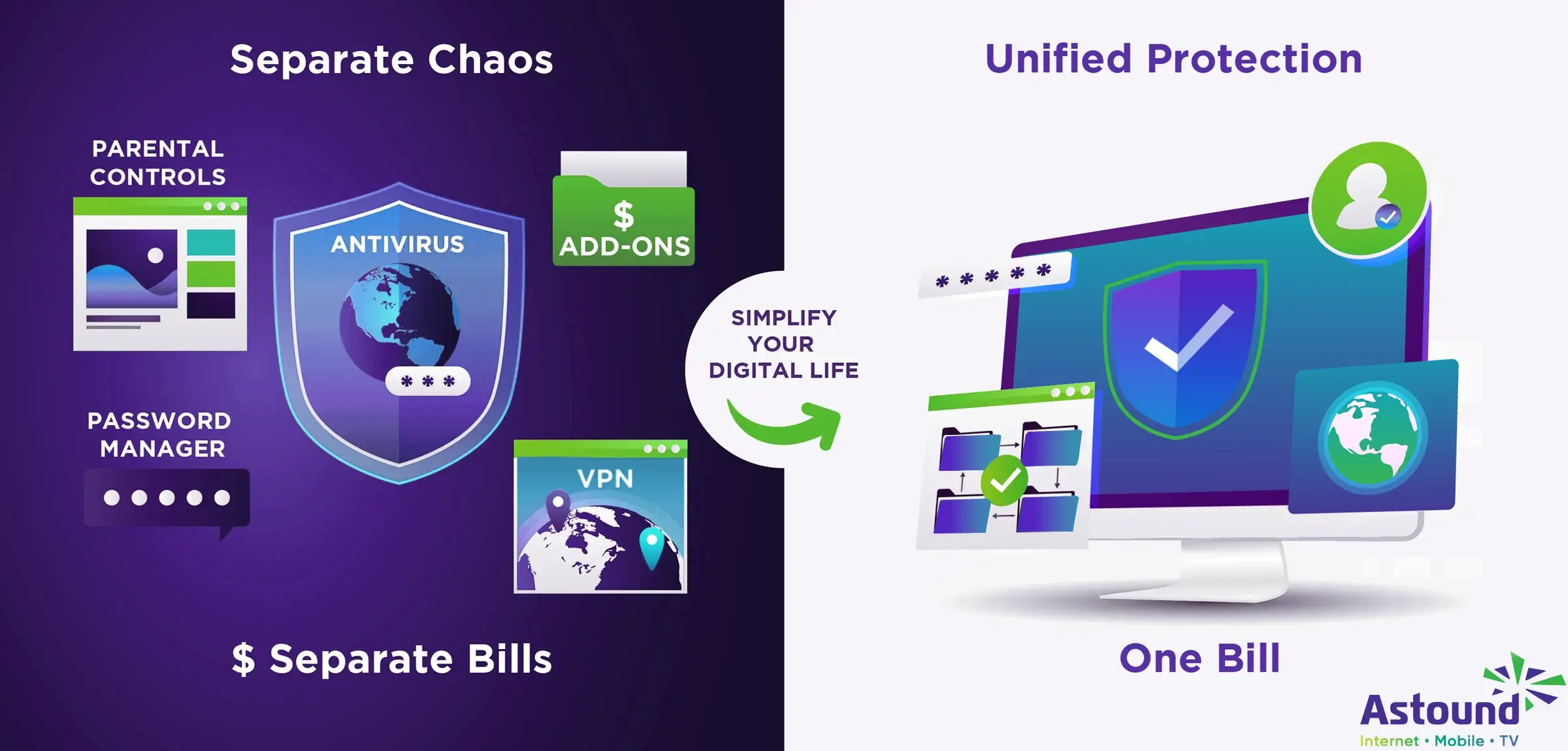
An all‑in‑one internet security package bundles multiple layers of protection into a single subscription. Instead of juggling separate antivirus licenses, password managers and parental controls, you get everything you need in one place.
Home network protection
Most users looking for internet security are looking for home network security as well. Home network security refers to the measures taken to protect your devices and data from cyber threats while using your internet connection, designed to safeguard your household network and connected devices from unauthorized access.
Home network security programs may include antivirus software to block malware, firewall software to monitor incoming and outgoing traffic, phishing protection to block fraudulent websites, a virtual private network (VPN) to encrypt your browsing and identity theft monitoring to alert you if your personal information is exposed. By combining these functions, an internet security bundle simplifies management across laptops, smartphones, gaming consoles and smart home gadgets.
What’s the difference?
So, what’s the difference between an all-in-one-security package and a standalone security program? An all‑in‑one package is different from a standalone antivirus program because it covers the full spectrum of threats. It may integrate device‑level software with router‑level protection, meaning suspicious traffic is filtered before it reaches your devices.
What’s included in an all‑in‑one internet security package?
It often includes mobile apps for Android and iOS, browser extensions for safer shopping and automatic updates so that new threats are handled without manual intervention. Many bundles also come with multi‑device licensing, so you can install protection on every computer and phone in your household without buying separate subscriptions.
One common way to get an all-in-one security package is to subscribe directly to a security software provider. Another is to choose an internet plan from Astound that bundles home network security with Whole Home WiFi via eero so protection can apply across the network.
Video tutorial: Internet Security | Ask the Expert: Are unsecured connected devices a risk?
Why home network security matters
Modern households are prime targets for cyber criminals. Personal WiFi networks must secure confidential corporate data and protect sensitive email attachments. Children rely on shared networks for school assignments, gaming and social media. Smart refrigerators, security cameras, thermostats and voice assistants communicate around the clock.
Each device introduces new vulnerabilities, and most consumer routers ship with basic firewalls that don’t recognize emerging threats. Hackers know this and increasingly target home networks, often scanning the internet for poorly configured routers or open ports.
Cyber attacks
Security experts warn that hackers are keeping pace with technological advances, focusing on home networks as prime targets. Without robust home internet security, your data is vulnerable. Some features often fail to protect connected devices because many threats bypass simple encryption or firewall rules.
Attacks on home networks frequently involve intercepting unencrypted traffic to steal passwords or personal messages, infecting devices with malware that can propagate across your household network or impersonating your WiFi network (known as an “evil twin” attack) to trick users into connecting.
Device vulnerabilities
Beyond direct hacking attempts, unsecured home networks create a gateway for criminals to commit identity theft or financial fraud. If attackers gain access to your router, they can change DNS settings to redirect you to malicious websites or install malware that logs keystrokes. Compromised IoT devices can become part of botnets used in distributed denial of service (DDoS) attacks.
Even devices that seem harmless, such as smart light bulbs, can be leveraged as entry points into your network. Losing control of your connected devices could put you or your family’s personal safety at risk by disabling alarms or unlocking smart locks.

eero Plus
eero Plus protects your family online with a password manager to safely create, store and share passwords, virus and malware protection and a VPN that lets you browse the web safely and securely.
A complete feature set: What to look for
The best internet security package offers multi‑layered protection that covers hardware, software and user behavior.
- Antivirus and anti‑malware tools scan downloads, attachments and applications for known and emerging threats.
- Real‑time threat detection monitors network traffic and blocks suspicious activity before it infects your device.
- A two‑way firewall inspects both inbound and outbound connections, making sure that malicious software can’t phone home.
- Ransomware protection monitors file behavior, looking for encryption activity and stopping it before your documents are locked.
- Identity theft protection keeps an eye on the dark web for your personal information and sends alerts if it’s found.
- Password management generates and stores complex passwords so you don’t reuse the same credentials across multiple accounts.
- Parental controls let you set schedules, block inappropriate content and monitor usage on every device your kids use.
- A secure VPN encrypts all traffic between your devices and the internet, preventing anyone, including advertisers or attackers, from snooping on your browsing.
Additionally, some packages include spam and phishing filters to catch fake emails and malicious attachments, and cloud backup tools so you can restore files if ransomware strikes. When evaluating packages, consider whether they offer multi‑device protection across Windows, macOS, Android and iOS, as well as options for network‑level protection through your router.
For example, eero Plus, a premium service designed to enhance home WiFi security and functionality, provides a number of features that increase security and utility: WiFi analytics, advanced security, a VPN powered by Guardian, Malwarebytes antivirus and 1Password password management.
By offering these features in one subscription, eero Plus simplifies management: you can schedule WiFi downtime during family dinners, create separate profiles with content filters for each child and turn on VPN protection when using public hotspots.
Another advantage of all‑in‑one packages is device independence. Rather than buying separate licenses for each laptop, smartphone and tablet, you install the security suite on all of them.
Most bundles also provide a central dashboard where you can monitor the status of each device, see which threats have been blocked and adjust settings remotely. This is invaluable for busy families and home offices that need to keep track of multiple devices.
If you want network wide protection plus family controls, look for a bundle that offers router level threat blocking and content filtering. If you also want VPN and password management as part of the same subscription, look for a premium tier like eero Plus, which Astound offers in available markets.
WiFi that just works!
WiFi plans for any home
Tiny, large or somewhere in between; find WiFi coverage to fit any space. Blanket your entire home with a fast and ultra‑reliable connection.
WiFi & internet security bundles: How they protect your home
Many internet service providers now offer integrated security bundles that combine high speed internet service with WiFi equipment and security software. Astound, for example, pairs its enhanced Whole Home WiFi service with eero Secure and offers an upgrade to eero Plus. By bundling these services with your broadband plan, you eliminate the guesswork of choosing compatible hardware and ensure your router and security software work seamlessly together.
A WiFi and internet security bundle offers convenience in other ways as well. Because the router, mesh nodes and security software are managed by the same provider, you receive automatic firmware updates and configuration support. You can manage family profiles, monitor bandwidth usage and set up guest networks directly from the mobile app. Bundling also gives you access to promotions like discounted equipment, free trials or multi‑device offers that reduce overall cost.
When selecting a bundle, check whether it locks in promotional pricing for a year or more and whether there are any device limits. Some providers include warranties with their security packages, adding extra value for households with heavy internet usage.
Router level protection and smart home security
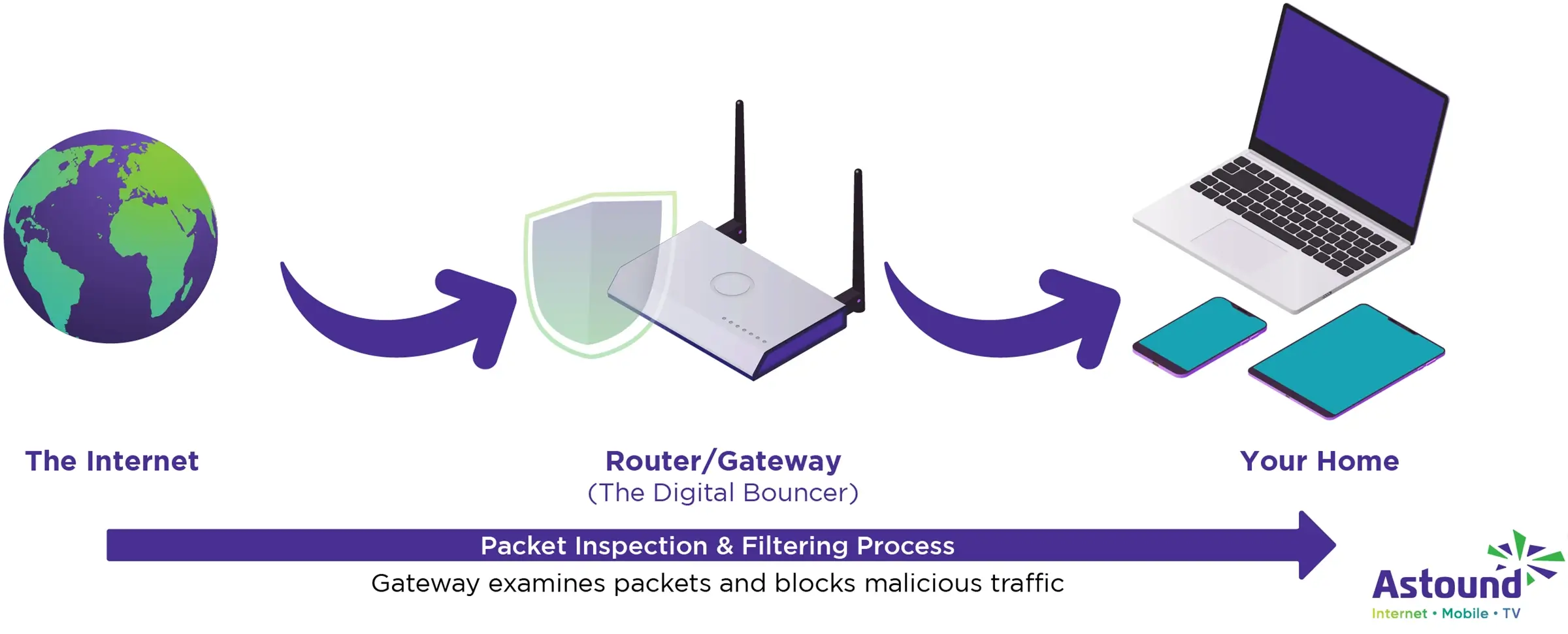
For the best protection, invest in router level defense, in which the router or gateway filters traffic as it enters and exits your network and blocks threats before they reach your devices. Router level protection is especially important for smart home devices that can’t run security software, like thermostats, light bulbs and doorbells.
Router-level protection technology can be complex. Some methods work by intercepting information about interactions between IoT devices, servers and services, using databases of device characteristics and known cyber threats to detect malicious activity and then blocking or rerouting traffic.
In practice, this means your gateway examines packets from a smart camera or smart lock, compares them against patterns of known malware and decides whether to allow the traffic. If a threat is detected, the gateway can isolate the device or cut off its internet access, protecting the rest of your network.
Smart home security also includes features like device fingerprinting and anomaly detection. These tools catalogue each device’s normal behavior, including average bandwidth usage and communication patterns. When a device deviates from its baseline (a light bulb sending a large amount of data to an unknown server), the system flags it as suspicious. Some bundles offer parental controls that apply specifically to smart toys and connected assistants, ensuring that voice data isn’t transmitted unexpectedly.
When combined with router level scanning, these features provide a powerful defense against botnets, malware and privacy invasions.
Build your plan
Your perfect plan is just a click away
Get the speeds, WiFi, mobile and TV plans you need all at an affordable price. Bundle your services with Astound and see how much you can save.
Choosing the best internet security bundle for your home
With so many options available, choosing the right internet security package can be difficult.
- Start by considering how many devices you need to protect. A small apartment may only require coverage for a couple of laptops and a phone, while a family home might need protection for a dozen devices, including gaming consoles and smart TVs. Look for packages that offer flexible licensing.
- Next, evaluate the suite’s core features. At a minimum, you want antivirus and anti malware protection, a firewall and phishing safeguards. If you often handle sensitive documents or financial information, identity theft monitoring and dark web scans add an extra layer of assurance.
- Consider your specific needs. Families should prioritize parental controls and content filters that can be tailored to different ages. For remote workers, a VPN is essential for encrypting traffic when connecting to corporate networks or using public WiFi.
- Look for bundles & savings. If your provider offers a discounted package that includes hardware, network security and premium features like eero Plus, you may pay less than purchasing each service separately. Bundled plans often come with perks like free installation, extended warranties and price locks that can save money over the long term. Always read the fine print to understand contract terms and promotional periods.
Comparing internet security suites
Several companies compete in the market for comprehensive security packages.
- Norton’s plans pair device security with a firewall, cloud backup, password manager and VPN. Its premium bundle adds identity theft protection and parental controls across multiple platforms.
- McAfee’s Total Protection for Home offers similar features, including multi‑device antivirus, firewall, safe browsing and identity monitoring, plus an encrypted storage vault and secure VPN.
- Bitdefender’s Premium Security Suite delivers real‑time threat detection, advanced ransomware remediation and a VPN with unlimited traffic. It also includes a password manager and parental controls that allow you to track your children’s online activities.
- Kaspersky’s Internet Security Solutions focus on anti‑malware and privacy protection, adding payment protection for online shopping, webcam and microphone control, plus a secure browser for banking.
- Avast’s Ultimate Internet Security package provides antivirus, a two‑way firewall, ransomware shield, data shredder, webcam protection and a VPN.
These products are powerful, but many of them concentrate only on device‑level protection. If you want router‑level defenses and smart home coverage, you may need to add a compatible hardware platform, like eero, or choose a bundle integrated with your ISP.
Unbeatable value
Save when you switch to Astound
Looking for smarter ways to put money back into your pocket? Bundle internet, mobile and TV with Astound and watch your savings grow.
Best practices for enhancing home network security
Even the most advanced security package needs to be paired with good habits. Here’s a list of a few best practices to help keep you and your family safe while browsing online.
1. Passwords
Start with strong, unique passwords for your WiFi network and every account you use. Avoid obvious phrases or patterns and consider using at least 12 characters with a combination of letters, numbers and symbols. A password manager simplifies this by generating and storing complex credentials.
2. Multi‑factor authentication (MFA)
Enable multi‑factor authentication (MFA) whenever possible. MFA typically requires a one‑time code or biometric in addition to your password; it adds a significant hurdle for attackers who may steal your password but can’t access your phone or fingerprint.
3. Reboot often for system updates
Reboot your devices often so they get updates automatically that keep them and their firmware up to date. Router manufacturers release patches to fix security flaws and ignoring updates leaves known vulnerabilities exposed.
4. Guest network
Create a separate guest network for visitors to ensure their devices do not interact with your core network.
5. Audit smart devices
Regularly audit connected devices in your smart home. If you see a device you don’t recognize, investigate and remove it.
6. Remote management
Disable remote management on your router unless you need it.
7. VPN
When using public hotspots, always activate your VPN. Additionally, families should educate children about online dangers and the need for a VPN. Explain the risks of clicking unknown links, downloading pirated games or sharing personal information on social media.
Use the parental control features in your security package to block malicious or inappropriate sites, limit screen time and receive alerts when rules are violated. Encourage teenagers to keep their devices updated and to ask questions if something looks suspicious.

Mesh WiFi with
eero Secure
Enhanced Whole Home WiFi uses multiple routers (or eeros®) to boost range, speed and stability—while eero Secure, included at no extra cost, offers parental controls, ad blocking and internet backup for constant connectivity.
The advantages of bundling with your internet provider
Opting for a security bundle through your ISP offers unique benefits. As the provider controls both your broadband connection and the WiFi equipment, they can optimize your network for speed and security.
Some bundles include support, so if a software update breaks connectivity or a threat is detected on your network, you have a single point of contact. Providers may also offer promotional pricing, free trial periods and discounts on additional devices.
If you’re looking for a standalone bundle, consider Astound’s eero Secure or eero Plus for comprehensive protection. The base level of Astound Whole Home WiFi includes eero Secure at no additional cost, giving you network‑wide security features that you can control from the eero app.
Upgrading to eero Plus adds VPN protection, password management and malware protection, turning your WiFi system into a smart home security hub without the need to purchase separate licenses.
FIBER-POWERED GIG INTERNET
Gig+ speeds, unbeatable value
Get Gig speeds up to 1500* Mbps starting at $60/mo on Astound’s ultra-reliable fiber-powered‡ network.

Start with the right bundle
Online safety isn’t a single product; it’s a commitment to protecting your family’s privacy and devices. A great internet security package combines antivirus, firewall, VPN, identity monitoring, parental controls and router‑level protection into one easy‑to‑manage subscription.
Choose a bundle that integrates with your internet service provider’s hardware to simplify setup and gain access to advanced network management features. As cyber threats continue to evolve, selecting the best internet security package will help you stay a step ahead.
If you prefer a bundle managed alongside your internet service, Astound customers who get Gig and above internet receive Whole Home WiFi with eero Secure at no additional charge.
eero Secure protects your network by monitoring what should be blocked so you don’t have to. Upgrading to an eero Plus subscription adds valuable additional layers of protection like a 1Password subscription and Guardian VPN.
Frequently asked questions
What does an all‑in‑one internet security package include?
An all‑in‑one package typically bundles antivirus software, firewall protection, phishing and spam filters, a VPN, password manager, parental controls and sometimes identity theft monitoring. Many modern packages also offer router‑level scanning and smart home protections, so threats are blocked before they reach your devices.
Do I need a separate antivirus program if my router has built-in security?
Router‑level defenses are important, but they don’t replace device‑level protection. A router can block suspicious traffic, but it can’t scan files you download or remove malware already on a laptop. For comprehensive security, you should run antivirus software on each device while using router‑level protection to filter network traffic.
How does a VPN improve home network security?
A virtual private network encrypts your internet traffic, making it unreadable to anyone between your device and the VPN server. This prevents hackers, advertisers or even your internet service provider from snooping on your browsing habits. VPNs are particularly valuable when using public WiFi, but also add privacy at home.
What features should parents look for in a security bundle?
Parents should prioritize content filtering, time of day scheduling, usage reports and the ability to create profiles for each child. Look for packages that let you block specific apps or websites, monitor screen time and receive notifications if rules are violated.
Does network level security protect smart home devices?
Yes. Many smart home devices can’t run security software, so router level scanning is critical. It examines traffic to and from each device, detects anomalies and blocks malicious connections. Some advanced systems can isolate a compromised device to prevent it from infecting the rest of your network.
How do I know if my provider offers a security bundle?
Check your internet service provider’s website or speak with customer support to learn about available bundles. Look for plans that include enhanced WiFi equipment and security features like Astound does for eero Secure or eero Plus.
Related content

Home network security checklist
Check out our home network security checklist to learn how best to protect your network and data against cyber attacks.

eero Secure vs. eero Plus
Compare eero Secure vs. eero Plus to find which WiFi security features, parental controls and plan is best for your home.

How can I tell if someone is using my WiFi?
Learn to tell if someone is using your WiFi. Secure your network with practical steps and advanced security measures.

Why is cybersecurity awareness important?
Cybersecurity awareness is understanding and managing online threats targeting personal data, devices and networks.

How to set up a secure guest WiFi network
Discover the convenience and security of managing a guest WiFi network while safeguarding your primary network.

How to monitor home network traffic
Follow our easy steps to track your home network traffic and keep your network safe from cyberattacks.

How to secure your home WiFi now
Discover essential security solutions like network encryption, firewalls and more to keep your network safe from cyber threats.

Managing parental controls with eero
Explore how to manage eero parental controls, content filters and how to block or apps to safeguard your family online.

7 Expert Tips To Prevent Online Identity Theft
Learn essential skills to safeguard your online identity and keep your personal information secure.

How to identify and prevent phishing attacks
Learn how to spot phishing attacks, recognize the different types and avoid the harm these scams can bring on.

Identify & prevent social media impersonation
Social media impersonation is a growing concern in the digital world. Learn to identify and prevent these threats.
Create the perfect bundle
Get the speed, WiFi, mobile and TV that’s just right for you.
*Internet speeds vary, not guaranteed. Certain equipment may be required. See astound.com for details. Modem req’d. No contracts. Astound Internet is powered by fiber and connected to the premises via coaxial connection or fiber, where available. Delivery methods may vary by area. Subject to availability. Ltd-time offer; subj. to change without notice. Internet speeds under 1 Gig, pricing valid for 12 mos. Gig+ Internet speeds, pricing valid for 36 mos. Add’l fees apply for taxes, surcharges, & data overages, & are subj. to change. For details visit astound.com/fees. Enhanced WiFi or Whole Home WiFi included with Gig+; $5/mo for lower speeds or add’l devices. Regular rates apply after promo ends. Monthly price shown includes discount for enrolling in autopay & e-bill. $10 off/mo w/ bank acct autopay or $5 off/mo w/ credit/debit card autopay. Valid email & enrollment req’d. Must enroll w/in 30 days of order. Discount appears within 3 bill cycles, ends if autopay/e-bill is canceled, svcs change, or acct isn’t in good standing. ^Astound Mobile req’s Astound Internet service for activation. Max 5 lines. Equip., intl./roaming charges, taxes, fees extra & may change. Astound not liable for svc disruptions or outages. Higher rate applies if Internet not maintained. Mobile svc only in Astound areas. Pricing subj. to change. Data may slow during congestion. After 20GB, Unlimited plans slow to 768 Kbps; 1.5GB/3GB plans capped. No rollover; add’l data $10/GB. Coverage varies. Some features may require specific plans. Mobile svc includes BIAS w/ data, voice, texts & SMS. Other restrictions may apply. See astound.com/mobile for details. Offer valid for new res. customers or former customers in good standing w/out Astound svc in past 60 days. Add’l svcs, equip, premiums & tiers extra & subject to add’l charge & reg. increases. $14.99 one-time activation fee (plus install) applies & may change. Taxes & surcharges extra & subj. to change. WA RESIDENTS: unless otherwise specified, price does not include 2% Regulatory Administration Fee. Cust. responsible for any accrued charges. Subj. to credit check. Not all svcs/speeds avail. in all areas. 30-Day Money-Back Guarantee for new residential customers who cancel within 30 days of install. Maximum refund is equal to one month’s monthly recurring service fee of services & equip. ordered & installed. Refund within 60 days after conditions are satisfied. Refund not applicable to usage-based fees. All svcs are governed by Astound Customer Terms & Conditions found at astound.com/policies-disclaimers. © 2026 Radiate HoldCo, LLC d/b/a Astound Broadband. All rights reserved.
While we have made every attempt to ensure that the information contained in this site has been obtained from reliable sources, Astound is not responsible for any errors or omissions, or for the results obtained from the use of this information. All information in this site is provided “as is”, with no guarantee of completeness, accuracy, timeliness and without warranty of any kind, express or implied, including, but not limited to warranties of performance, merchantability and fitness for a particular purpose. Certain links in this site connect to other websites maintained by third parties over whom Astound has no control. Astound makes no representations as to the accuracy or any other aspect of information contained in other websites.
eero Plus is available for an additional $9.99/month and requires subscription to whole home WiFi powered by eero.