















eero vs. Netgear: Which mesh WiFi system should you choose?

Choosing the right mesh WiFi system can make a significant difference in how reliable and consistent your home WiFi network performs. Two of the most popular mesh WiFi options are eero and Netgear, but choosing between them depends on balancing their ease of setup, features, performance and cost.
In this article, we’ll break down their differences in specs, performance and value, so that you can decide which system best matches your household’s needs.
What is a mesh WiFi system?
A mesh WiFi system uses multiple interconnected nodes that work together to deliver consistent coverage throughout your home. Instead of relying on a single router, each node communicates with the main router and other nodes to create a single network that eliminates zones and balances traffic across devices.
Every mesh node automatically connects to the nearest node to create a grid-like network that routes data through the fastest and most efficient paths. This architecture allows you to move between rooms while gaming, streaming or video chatting with minimal drops and buffering.
Mesh systems connect via wireless or wired backhaul, depending on your setup. Wireless backhaul uses a dedicated radio channel to communicate between nodes, while wired backhaul involves Ethernet connections to provide consistent speeds. This design makes mesh WiFi systems particularly useful for large homes, multi-story layouts or spaces where thick walls or long distances weaken a single router’s signal.
If you prefer a mesh system that integrates directly with your internet provider, Astound provides eero Whole Home WiFi with its Gigabit plans, giving many households a convenient and more affordable way to upgrade their home connectivity.

Mesh WiFi with
eero Secure
Enhanced Whole Home WiFi uses multiple routers (or eeros®) to boost range, speed and stability—while eero Secure, included at no extra cost, offers parental controls, ad blocking and internet backup for constant connectivity.
eero vs. Netgear: Brand overview and setup experience
What is eero?
eero Mesh WiFi, owned by Amazon since 2019, offers Whole Home WiFi coverage with a simple “plug-and-play” design and an app-based setup process. The eero devices run on eeroOS, which delivers automatic over-the-air updates for security and performance. eero design makes it perfect for homes that need dependable mesh WiFi with easy setup.
Setting up eero is straightforward with guidance from the eero app. The app walks you through connecting each device, naming your network and checking signal strength between nodes. The setup process takes about 15 minutes and the system begins optimizing as soon as it’s online.
What is Netgear?
Netgear offers networking hardware, including the Orbi series for mesh WiFi systems. It serves power users, gamers and large households seeking high-performance throughput and more control over their network.
Setting up Netgear Orbi can be done through the Orbi mobile app or web dashboard. The app offers a setup process similar to eero, while the web interface provides users with advanced controls to adjust bandwidth priorities or configure firewalls and VLANs. The dual approach allows both beginners and experienced users to customize their setup with ease.
eero vs. Netgear at a glance
Below is a side-by-side comparison of the key specifications between eero and Netgear mesh WiFi systems.
| Feature: | eero | Netgear |
|---|---|---|
| Setup | App-based guide with the eero mobile app | App-based or web setup |
| Ease of use | Automated updates and a self-optimizing network | Granular controls for customized network configuration |
| Coverage | Up to 7,500 square feet on the latest models | Up to 10,000 square feet on the latest models |
| Maximum speed supported | Wired speeds up to 9.4 Gbps and wireless speeds up to 4.3 Gbps (on eero Max 7) | Wired speeds up to 10 Gbps (On latest Orbi 970 series) |
| Smart home automation | Works with Alexa | Works with Alexa and Google Assistant for basic commands |
| Ideal for | Families and everyday users | Power users and large homes |
|
Feature:
Setup |
eero
App-based guide with the eero mobile app |
Netgear
App-based or web setup |
|
Feature:
Ease of use |
eero
Automated updates and a self-optimizing network |
Netgear
Granular controls for customized network configuration |
|
Feature:
Coverage |
eero
Up to 7,500 square feet on the latest models |
Netgear
Up to 10,000 square feet on the latest models |
|
Feature:
Maximum speed supported |
eero
Wired speeds up to 9.4 Gbps and wireless speeds up to 4.3 Gbps (on eero Max 7) |
Netgear
Wired speeds up to 10 Gbps (On latest Orbi 970 series) |
|
Feature:
Smart home automation |
eero
Works with Alexa |
Netgear
Works with Alexa and Google Assistant for basic commands |
|
Feature:
Ideal for |
eero
Families and everyday users |
Netgear
Power users and large homes |
eero is ideal for households that want fast, reliable mesh WiFi with minimal setup or maintenance. Netgear appeals to users who enjoy fine-tuning their network for maximum performance and scalability.
FIBER-POWERED GIG INTERNET
Gig+ speeds, unbeatable value
Get Gig speeds up to 1500* Mbps starting at $60/mo on Astound’s ultra-reliable fiber-powered‡ network.
eero vs. Netgear performance
Both brands deliver fast speeds and whole-home WiFi coverage, but their approaches differ. eero delivers consistent, self-optimizing performance and coverage throughout your home. Netgear Orbi mesh routers focus on high throughput and an extended range, utilizing high-powered antennas and dedicated backhaul channels.
Speeds and signal strength
Both brands support the latest WiFi 6, 6E and 7 standards, with various models using either dual- or tri-band channels for higher bandwidth capacity and support for fast speeds. WiFi 6 improves efficiency for busy households and WiFi 6E introduces a low-interference 6 GHz band for faster short-range performance. WiFi 7 adds wider channels and Multi-Link Operation (MLO) to support multi-Gigabit speeds across multiple bands.
eero utilizes TrueMesh technology to automatically route traffic through the fastest available route between nodes, reducing congestion and maintaining a strong signal as you move across your home. Recent models, like the eero Max 7, support speeds of up to 4.3 Gbps while intelligently balancing traffic across bands to ensure consistent speeds and signals across multiple devices.
Netgear’s mesh routers, such as the Orbi 970 series, support speeds of up to 10 Gbps. They achieve this through dedicated wireless backhaul and multi-Gig Ethernet ports that keep communication between the router and satellites separate from user traffic. This design preserves bandwidth for connected devices, especially in larger homes or when multiple people are streaming, gaming or video conferencing simultaneously.
WiFi coverage and device count
A three-pack eero mesh WiFi system typically covers between 4,500 and 7,500 square feet, depending on the model and number of nodes. You can expand coverage by adding extra nodes to your mesh WiFi network to cover every corner of your home. For example, a three-pack of eero Max 7 units can cover up to 7,500 square feet and handle 200+ connected devices, automatically balancing the load to prevent slowdowns.
Netgear Orbi mesh routers are built for scale. A three-pack of the Orbi 970 series can extend coverage up to 10,000 square feet and support up to 200 concurrent devices. The combination of larger antennas, tri-band architecture and dedicated backhaul makes it suited for very large or multi-story homes where both range and capacity are priorities.
Latency and stability
Both eero and Netgear Orbi mesh systems deliver low latency for streaming, gaming or video calls through Quality of Service (QoS) controls to minimize jitter and maintain consistency.
eero manages latency with its built-in Optimize for Conference and Gaming feature, which prioritizes real-time traffic and intelligently shapes how traffic queues to reduce latency and limit the amount of bandwidth specific devices use.
Netgear Orbi uses automatic Dynamic QoS that prioritizes bandwidth for gaming, streaming and real-life traffic. The router runs periodic speed tests to assess available bandwidth and automatically adjusts priorities accordingly. Unlike older standalone routers, Orbi systems do not allow users to change QoS settings or prioritize specific devices manually.
Scalability and backhaul
While both mesh systems expand coverage by adding extra nodes, they differ in how they handle internode communication.
eero automatically detects and integrates new devices easily through its app and optimizes the network in real-time. Wired Ethernet backhaul can also optimize WiFi speeds and stability, particularly in homes with high device counts or bandwidth-heavy activities.
The Netgear Orbi uses a dedicated backhaul connection, such as the Enhanced Dedicated Backhaul that is available in the Orbi 970 series. It enhances WiFi 7’s Multi Links Operation (MLO) technology to combine dedicated 5GHz and 6GHz bands to create a special network backhaul for its nodes. Orbi systems can also connect via a wired multi-Gig Ethernet backhaul in large homes or multi-building setups to maintain consistent throughput across the house.
Which setup delivers performance?
If you want a “set-it-and-forget-it” system, eero mesh WiFi provides dependable coverage and speeds with little manual effort through automated optimization and app-based control.
Choose Netgear Orbi systems if you need the highest possible throughput, extended range and the flexibility to customize your setup.
WiFi that just works!
WiFi plans for any home
Tiny, large or somewhere in between; find WiFi coverage to fit any space. Blanket your entire home with a fast and ultra‑reliable connection.
eero vs. Netgear features
Parental control features and profile management
eero offers parental control features that make it easy to manage screen time and online safety for families. You can pause WiFi for specific profiles, configure content filters and set schedules for offline hours through the eero app. You can also create guest networks to isolate your primary devices from guest or smart home devices.
These features are accessible via eero Secure or eero Plus, with eero Secure included when you subscribe to Astound Whole Home WiFi.
Orbi provides similar parental control features through its Netgear Smart Parental Controls. Its free tier allows you to pause or assign internet access to specific devices, while the paid version offers more features, such as tracking internet and app usage, creating profiles, setting content filters and scheduling time limits.
WiFi security and privacy
eero secures your home WiFi with WPA3 encryption and automatic over-the-air updates for patches and bug fixes. Users can also upgrade to eero Plus for advanced security features, including ad blocking, malware protection, VPN access, password management and advanced content filtering. eero’s security features make it appealing for households that want strong WiFi protection without manual setup.
Netgear Orbi provides WiFi security through Netgear Armor, which provides malware protection, sensitive data and on-the-go mobile device protection as well as network vulnerability assessments. Users can view real-time threat alerts and network health reports directly from the Orbi app or web dashboard. Unlike eero’s automatic updates, Orbi allows manual scheduling for greater visibility and control over network changes.
Smart home and voice assistant integration
eero is part of Amazon’s smart home ecosystem and works seamlessly with Alexa. You can pause WiFi for specific devices, check network status or manage connected devices hands-free using voice commands or Alexa routines. Recent eero models also include built-in Zigbee, Matter and Thread protocols, allowing them to act as hubs for smart lights, thermostats and other IoT devices.
Netgear Orbi supports both Alexa and Google Assistant for smart home automation, giving users the flexibility to use different ecosystems. However, voice assistant integration is more limited than eero’s Alexa ecosystem, focusing on simple commands rather than advanced automations, such as checking WiFi signal strength and turning guest networks on and off.
Build your plan
Your perfect plan is just a click away
Get the speeds, WiFi, mobile and TV plans you need all at an affordable price. Bundle your services with Astound and see how much you can save.

eero vs. Netgear: Cost and value
The cost and value of eero and Netgear depend on the upfront hardware costs, ongoing subscriptions and long-term support.
eero:
Simplicity and affordability with Astound
For eero, the value lies in its simplicity and affordability, especially when bundled with Astound.
What is Astound eero? Astound offers Whole Home WiFi powered by eero with select internet plans, such as the 1 Gig and multi-Gigabit options.
You can also rent or lease additional beacons from Astound to extend your coverage and avoid the need to purchase full retail kits. This setup eliminates the need to purchase separate routers or extenders and helps customers cut costs on equipment and maintenance while ensuring compatibility with Astound’s Gigabit and multi-Gig plans.
Bundling eero with Astound consolidates hardware, setup, support and billing under one provider, which simplifies troubleshooting and warranty coverage. For most households, this setup makes Astound eero a practical and budget-friendly way to enjoy reliable whole-home WiFi with minimal hassle.
Netgear Orbi:
Premium performance at a premium price
The Netgear Orbi series offers higher throughput but at a higher upfront cost. A typical Orbi 3-pack ranges from $399 to as high as $1,699, depending on the model type and features. While there are no mandatory subscriptions, users choose to add premium features like Netgear Armor for advanced network security and parental controls after the free trial period ends.
Unlike eero, Netgear Orbi systems are not bundled directly with ISPs, requiring customers to buy the equipment outright. This approach gives users complete ownership of their equipment but also shifts maintenance and firmware management into their hands. The Orbi app and web dashboard offer tools for manual updates, troubleshooting and advanced configuration, making them ideal for users who want to fine-tune their network performance.
Which setup delivers the best value?
For most households, Astound eero provides the best overall value. Its cost-effective bundle includes hardware, installation and customer support from a single provider.
Netgear Orbi, on the other hand, appeals to advanced power users who prefer control of the mesh WiFi network, have large homes and use heavy internet services.
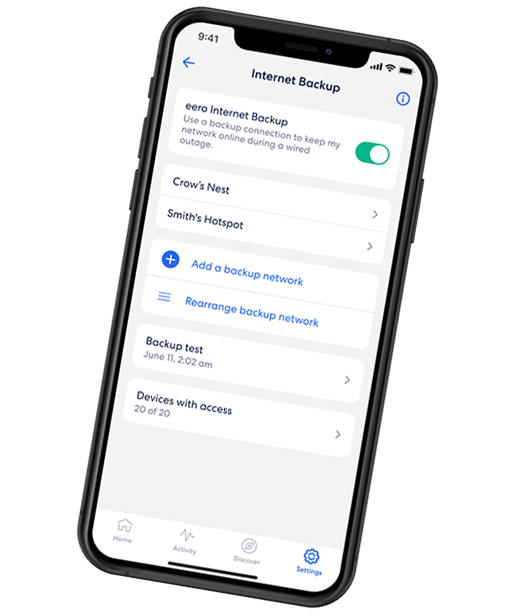
EERO INTERNET BACKUP
We’ve got your back(up)
eero Internet Backup lets you add alternative wireless connections – like a personal hotspot – to keep your WiFi up and running even when your wired connection is disrupted.
Conclusion
Choosing between eero and Netgear depends on what you value most in your home WiFi experience. While both deliver fast, dependable and consistent coverage, they are designed for different users.
eero stands out for its simple setup, self-optimizing performance and reliable smart home automation compatibility. It’s a great fit for families or users looking for reliable mesh WiFi without manual configuration. With Astound eero, it’s an affordable option that keeps your home connected with reliable speeds and coverage under one provider.
In contrast, Netgear Orbi offers advanced customization, broader coverage and high speed capability for large homes or users who prefer fine-tuning the configurations. It’s an excellent choice for tech enthusiasts or power users who are willing to pay higher upfront costs in exchange for enhanced performance and control.
Frequently asked questions
Is eero better than Netgear mesh router?
It depends on your needs. eero is best for users who want a simple, reliable, self-optimizing mesh WiFi with minimal setup. On the other hand, Netgear appeals to users with high-performance needs who prefer advanced customization.
What is Astound eero?
Astound eero is a Whole Home WiFi solution offered by Astound that combines eero mesh WiFi with your internet plan. Astound provides eero mesh routers when you purchase the Gigabit plans, along with troubleshooting, installation and direct customer support.
Does Astound include eero router in the internet plan?
Yes. Astound includes eero routers with 1 Gig or higher tiers. Customers on other plans can add eero routers for a small monthly fee, with the option to lease additional units to extend coverage.
Which offers more advanced settings: eero or Netgear?
Netgear provides more advanced configuration settings, including VLAN setup, device prioritization and bandwidth management through the app or web dashboard. eero keeps things simple through its app and handles updates and network optimization automatically.
Is an eero subscription required?
No. eero works out of the box without any subscription and Astound customers automatically receive eero Secure with their Whole Home WiFi service, which includes ad blocking, malware protection and basic content filtering at no extra cost. However, users can optionally upgrade to eero Plus for enhanced features such as VPN access and password management tools.
Related content

eero vs. Google WiFi
Compare eero vs. Google WiFi (or Google WiFi system vs. eero) for speed, coverage, setup, ecosystem and value. Find the right mesh WiFi solution for your home.

eero vs. Orbi
Compare eero and Orbi mesh WiFi systems side-by-side. Explore setup ease, performance and features to decide which system fits your home network.

eero-vs-tp-link-wifi
Compare eero vs. TP-Link WiFi for speed, coverage, setup, ecosystem and value. Find the right mesh WiFi solution for your home.

eero vs. Ubiquiti in 2025
Investigate eero and Ubiquiti mesh WiFi systems to learn which delivers better coverage, speed and value.

Is eero a good router?
Wondering if eero is a good router for 2025? We examine WiFi speed, reliability, setup and features supported by eero to help you decide if it’s right for your home.

eero Secure vs. eero Plus
Compare eero Secure vs. eero Plus to find the best WiFi security features and parental controls and which plan is right for your home.

eero 7 vs. eero Pro 6E
Compare the eero 7 and eero Pro 6E mesh WiFi systems. See specs, performance, coverage and value to find the right setup for your home network.

eero Pro 6 vs. eero 6e
Compare eero Pro 6 and eero 6E to find your perfect mesh WiFi system. Learn about performance and features to make an informed choice.
Create the perfect bundle
Get the speed, WiFi, mobile and TV that’s just right for you.
*Internet speeds vary, not guaranteed. Certain equipment may be required. See astound.com for details. Modem req’d. No contracts. Astound Internet is powered by fiber and connected to the premises via coaxial connection or fiber, where available. Delivery methods may vary by area. Subject to availability. Ltd-time offer; subj. to change without notice. Internet speeds under 1 Gig, pricing valid for 12 mos. Gig+ Internet speeds, pricing valid for 36 mos. Add’l fees apply for taxes, surcharges, & data overages, & are subj. to change. For details visit astound.com/fees. Enhanced WiFi or Whole Home WiFi included with Gig+; $5/mo for lower speeds or add’l devices. Regular rates apply after promo ends. Monthly price shown includes discount for enrolling in autopay & e-bill. $10 off/mo w/ bank acct autopay or $5 off/mo w/ credit/debit card autopay. Valid email & enrollment req’d. Must enroll w/in 30 days of order. Discount appears within 3 bill cycles, ends if autopay/e-bill is canceled, svcs change, or acct isn’t in good standing. ^Astound Mobile req’s Astound Internet service for activation. Max 5 lines. Equip., intl./roaming charges, taxes, fees extra & may change. Astound not liable for svc disruptions or outages. Higher rate applies if Internet not maintained. Mobile svc only in Astound areas. Pricing subj. to change. Data may slow during congestion. After 20GB, Unlimited plans slow to 768 Kbps; 1.5GB/3GB plans capped. No rollover; add’l data $10/GB. Coverage varies. Some features may require specific plans. Mobile svc includes BIAS w/ data, voice, texts & SMS. Other restrictions may apply. See astound.com/mobile for details. Offer valid for new res. customers or former customers in good standing w/out Astound svc in past 60 days. Add’l svcs, equip, premiums & tiers extra & subject to add’l charge & reg. increases. $14.99 one-time activation fee (plus install) applies & may change. Taxes & surcharges extra & subj. to change. WA RESIDENTS: unless otherwise specified, price does not include 2% Regulatory Administration Fee. Cust. responsible for any accrued charges. Subj. to credit check. Not all svcs/speeds avail. in all areas. 30-Day Money-Back Guarantee for new residential customers who cancel within 30 days of install. Maximum refund is equal to one month’s monthly recurring service fee of services & equip. ordered & installed. Refund within 60 days after conditions are satisfied. Refund not applicable to usage-based fees. All svcs are governed by Astound Customer Terms & Conditions found at astound.com/policies-disclaimers. © 2026 Radiate HoldCo, LLC d/b/a Astound Broadband. All rights reserved.
While we have made every attempt to ensure that the information contained in this site has been obtained from reliable sources, Astound is not responsible for any errors or omissions, or for the results obtained from the use of this information. All information in this site is provided “as is”, with no guarantee of completeness, accuracy, timeliness and without warranty of any kind, express or implied, including, but not limited to warranties of performance, merchantability and fitness for a particular purpose. Certain links in this site connect to other websites maintained by third parties over whom Astound has no control. Astound makes no representations as to the accuracy or any other aspect of information contained in other websites.
eero Plus is available for an additional $9.99/month and requires subscription to whole home WiFi powered by eero.