














eero vs. orbi: Pros, cons, and the final winner
eero and Orbi both provide reliable whole-home mesh WiFi, but eero is better for users who want simple setup, automatic optimization and smart home integration. Orbi is better for large homes, more wired devices and users who prefer advanced network controls and multi-Gig performance.

Key Takeaways:
- eero offers easy setup, automatic updates and seamless whole-home WiFi with smart home support.
- Orbi provides more Ethernet ports, advanced settings and dedicated backhaul for large, high-demand networks.
- eero is ideal for families, streaming, remote work and everyday connectivity.
- Orbi suits power users, large homes and those needing advanced network customization.
- Choose based on your home size, connected devices and internet speed requirements.
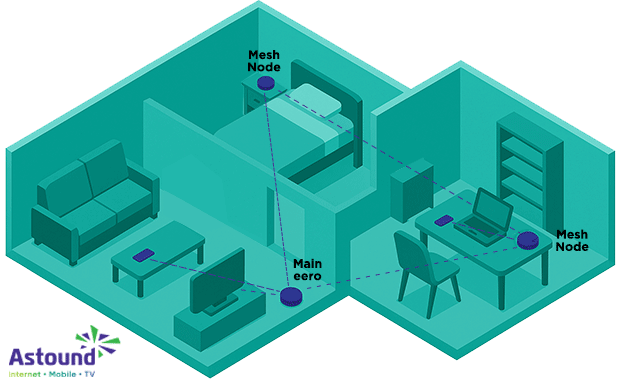
If your home WiFi router leaves pockets of weak signal or inconsistent speeds, a mesh network can help. Mesh systems, by using two or more nodes, hand off your connection as you move, keep your devices on the fastest signals available and extend coverage to areas a single router can’t reach.
Two of the biggest names in mesh are Amazon’s eero and Netgear’s Orbi. Both brands offer systems across multiple price points and WiFi standards, but they take different approaches. In this guide, we’ll examine the differences, so you can choose the right fit for your home.
What you'll learn:
Why compare eero and Orbi?
As both brands promise fast, Whole Home WiFi, comparing eero vs. Orbi helps you match the right system to your home size, devices and how hands-on you want to be.
What is eero?
Founded in 2014 and acquired by Amazon in 2019, eero markets consumer mesh systems that favor simplicity over complexity. Nodes automatically route devices to the strongest signal and the entire network is configured and managed through the eero app, which also delivers automatic software updates.
Higher‑end models support WiFi 6e and WiFi 7, multi‑Gigabit Ethernet ports and eero TrueMesh dynamic backhaul. Many units incorporate smart home radios so they can act as hubs for Alexa and other ecosystems.
What is Orbi?
Netgear’s Orbi line debuted in 2016 and became known for its large units and range. Orbi systems are traditionally sold as a router and one or more satellites. Recent WiFi 6e and WiFi 7 Orbi models use dedicated backhaul radios, typically using the high speed 5 GHz or 6 GHz band. Many Orbi units have multiple Gigabit LAN ports, full web‑based interfaces with features like QoS, dynamic DNS and VPN support.
Overall, eero appeals to people who want a set‑it‑and‑forget‑it system with seamless smart home integration, while Orbi is aimed at those who demand more wired connections and deeper control.

Mesh WiFi with
eero Secure
Enhanced Whole Home WiFi uses multiple routers (or eeros®) to boost range, speed and stability—while eero Secure, included at no extra cost, offers parental controls, ad blocking and internet backup for constant connectivity.
Setup and usability: What you’ll actually experience
App-first design and simplicity: eero
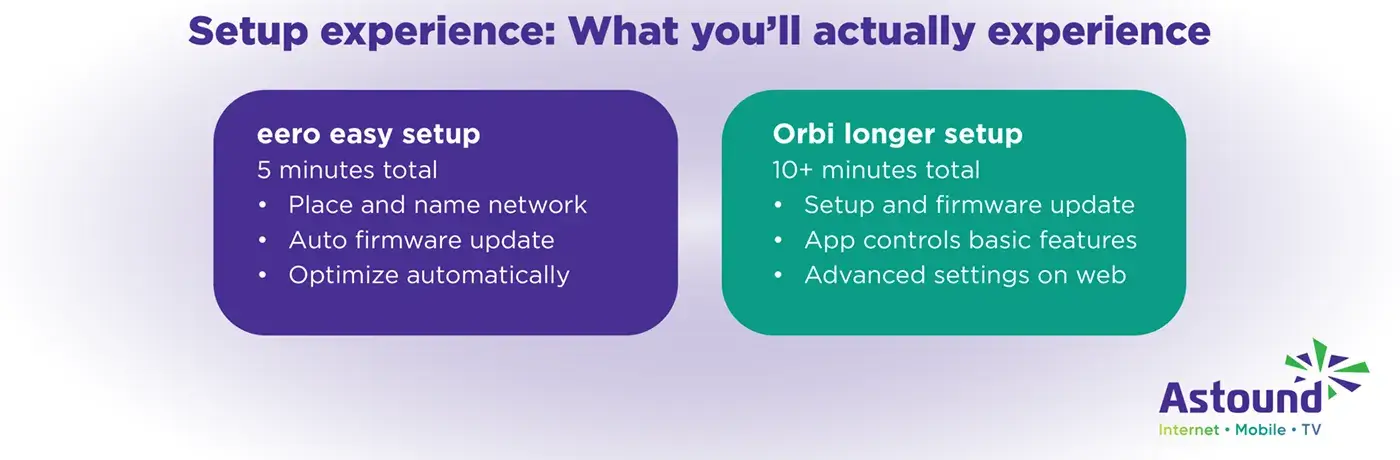
In a long-term test conducted by PowerMoves, the reviewer noted that setting up a two‑node eero Pro 6 system took about five minutes. After guiding you through placement, network naming and firmware updates, eero automatically optimizes the network without manual intervention. Moreover, family profiles allow you to group devices by user and pause or schedule internet access.
Does eero have a dedicated web interface? Because eero uses an app-centric approach, that means that there is no dedicated web interface and that an eero system requires an internet connection to set up and manage. Out of the box, this may not be an issue, but power users may miss features like bandwidth graphs. However, an upgrade to eero Plus through Astound’s Whole Home WiFi bundle provides deeper WiFi analytics, a VPN, a 1Password subscription and malware scanning.
Advanced settings and web interface: Orbi
Netgear Orbi setup generally takes longer than eero. In the same test by PowerMoves, configuring two Orbi RBK752 units took about ten minutes plus firmware updates. Orbi’s smartphone app lets you view connected devices and perform basic tasks, but many controls are only available via the web interface.
Orbi pushes many advanced features behind subscriptions. Netgear Armor (about $100/year) bundles Bitdefender threat protection, while Smart Parental Controls ($70/year) enable time schedules and per‑profile limits.
Build your plan
Your perfect plan is just a click away
Get the speeds, WiFi, mobile and TV plans you need all at an affordable price. Bundle your services with Astound and see how much you can save.

Hardware and performance: What the specs and tests show
Ethernet ports, backhaul and bands
Both brands offer tri‑band and, more recently, WiFi 7 systems. The eero Pro 6 and Orbi RBK752 share an AX4200 tri‑band specification: two 5 GHz bands and one 2.4 GHz band. With TrueMesh, eero uses dynamic backhaul, meaning all bands can serve clients or link nodes depending on demand. Orbi, by contrast, dedicates one 5 GHz band as a permanent backhaul, which may deliver faster speeds to satellites but can reduce flexibility.
When it comes to wired connections, most Orbi routers provide one WAN and three LAN ports, while satellites offer two LAN ports. By contrast, the eero Pro 6 has only two auto‑sensing Ethernet ports per node. If you have many wired devices, or plan to hard-wire all your nodes, Orbi may be more appealing.
Looking ahead to WiFi 7, higher-end Orbi systems have multi‑Gig ports: the Orbi 970 series includes a 10 GbE WAN port, a 10 GbE LAN port and four 2.5 GbE LAN ports. Similarly the eero flagship product, Max 7, features 10 GbE and 2.5 GbE ports, making both capable of handling Astound’s multi‑Gig internet plans.
Real‑world speed and coverage comparisons
In tests with two eero Pro 6 nodes, the system averaged 540 Mbps, peaking at 742 Mbps when ten feet from the router. Reviewers extrapolated that a two‑node eero setup should cover about 5,000 square feet. In the same setting, Orbi averaged 453 Mbps across the test locations and 656 Mbps at ten feet from the router. Coverage for two Orbi units is similar, at roughly 5,000 square feet.
On its website, the Orbi 970 Series claims up to 27 Gbps of aggregate wireless bandwidth and coverage, while eero Max 7 offers tri‑band WiFi 7 with multi‑Gig ports and a range of about 2,500 square feet per node.
Reliability, firmware updates and usability quirks
Long-term reviewers state that eero prioritizes reliability over raw speed. In PowerMoves’ experience, device handoffs between eero nodes were so smooth he never noticed when his devices switched nodes and he reported no significant cutouts. And, reducing the need for manual intervention, eero pushes updates quickly and automatically.
On the other hand, Orbi’s track record is mixed. Earlier Orbi firmware versions were prone to bad updates and node switching hiccups. Reviewers like LinkdHOME caution that the Orbi app can lag or log you out. And some reviewers claim that the Orbi’s 5 GHz backhaul remains active even when you wire up the nodes, which can reduce overall capacity.
Find your speed
What speed do you need?
Maybe you just need the essentials—or maybe you need to unleash the ultimate internet speed. Explore your options to get the best experience for every device in your home.
Selecting a mesh system for your home layout
For small to medium homes with a smart home focus: eero
If you live in an apartment or single‑family home (up to ~3,000 square feet) and want minimal hassle, eero is the more user‑friendly choice. The hardware is compact; a two‑node kit can be discreetly placed and installation through the app takes minutes.
Moreover, the integration eero has with Amazon’s Alexa ecosystem enables voice commands to pause WiFi, check network status or enable a guest network. Newer units support Matter, Zigbee and Thread, allowing them to act as smart home hubs without extra hardware. Parents will appreciate free family profiles through Astound via eero Secure and the option to upgrade to eero Plus for more protection.
For homes with a moderate number of wired devices, eero’s two auto‑sensing Ethernet ports per node may suffice. If you need more ports, you can connect a cheap unmanaged switch to any node. The dynamic backhaul tends to prioritize stability over absolute throughput, which is a good fit for streaming, video conferencing, smart home devices and casual gaming. However, heavy gamers or those needing to wire consoles may want to look at the multi‑Gig capable eero Max 7 or a dedicated gaming router.
For large homes with many power users
For truly large homes, Orbi’s WiFi 7 systems provide multi-Gig wireless links, 10 GbE ports and support for up to 200 devices. Orbi’s larger antennas mean you may need fewer nodes to cover the same area. The RBK752 router offers one WAN and three LAN ports, while the satellite has two LAN ports. For a home office with multiple wired PCs, printers or NAS devices, those extra ports avoid needing a separate switch.
Power users will also appreciate Orbi’s web interface, which exposes settings like QoS, VLANs and VPN server configuration. The trade‑off is complexity and the downside is cost; the Orbi 970 three‑pack lists for well over $1,000, while even the Orbi RBK752 costs more per unit than a comparable eero kit.
For Astound customers, Whole Home WiFi powered by eero offers mesh coverage without purchasing equipment upfront. On Astound’s Gig or multi-Gig internet plans, eero devices can be rented, keeping hardware current with automatic upgrades as new WiFi standards roll out.
Gaming, streaming and future‑proofing considerations
For latency‑sensitive gaming and 4K / 8K streaming, you need consistent throughput and minimal packet loss. Nothing is better than a wired Ethernet connection. But Orbi’s dedicated backhaul may offer more predictable performance, offering a slightly better experience for multi-room gaming setups on WiFi 7.
However, eero TrueMesh maintains stable connections throughout the home and the latest models on WiFi 7 include 10 GbE ports and 320 MHz channels, narrowing the hardware gap with higher-end Orbi units.
Futureproofing also means considering upcoming WiFi standards. WiFi 7 is expected to remain state-of-the-art until the release of WiFi 8 in 2029. Both eero and Orbi offer WiFi 7 options. If you already have wired backhaul or plan to install Ethernet, eero’s dynamic backhaul may be more efficient because all the radios can focus on your devices.
WiFi that just works!
WiFi plans for any home
Tiny, large or somewhere in between; find WiFi coverage to fit any space. Blanket your entire home with a fast and ultra‑reliable connection.
Pros and cons: eero vs. Orbi
Here is a quick look at the main pros and cons of eero and Orbi so you can see how they compare at a glance before you decide which one fits your home.
| System: | Pros | Cons |
|---|---|---|
| eero | ● Easy app‑based setup ● Automatic firmware updates ● Compact units ● Matter / Thread / Zigbee support ● Dynamic backhaul yields stable roaming and reliable performance ● Family profiles and parental controls built in ● Optional eero Plus adds VPN and security |
● Only two Ethernet ports per node ● No web interface ● Range slightly less than Orbi in some tests |
| Orbi | ● Multiple LAN ports and optional 10 Gb ports on WiFi 7 models ● Dedicated backhaul and strong antennas ● Full web interface with advanced settings (QoS, VPN, VLANs) |
● Much larger physical units ● Setup / app can be clunky ● Firmware updates occasionally problematic ● Many security and parental features require paid subscriptions ● Dedicated backhaul reduces radio flexibility and wastes bandwidth when using wired backhaul |
|
System:
eero |
Pros
● Easy app‑based setup● Automatic firmware updates ● Compact units ● Matter / Thread / Zigbee support ● Dynamic backhaul yields stable roaming and reliable performance ● Family profiles and parental controls built in ● Optional eero Plus adds VPN and security |
Cons
● Only two Ethernet ports per node● No web interface ● Range slightly less than Orbi in some tests |
|
System:
Orbi |
Pros
● Multiple LAN ports and optional 10 Gb ports on WiFi 7 models● Dedicated backhaul and strong antennas ● Full web interface with advanced settings (QoS, VPN, VLANs) |
Cons
● Much larger physical units● Setup / app can be clunky ● Firmware updates occasionally problematic ● Many security and parental features require paid subscriptions ● Dedicated backhaul reduces radio flexibility and wastes bandwidth when using wired backhaul |
Final verdict and recommendation
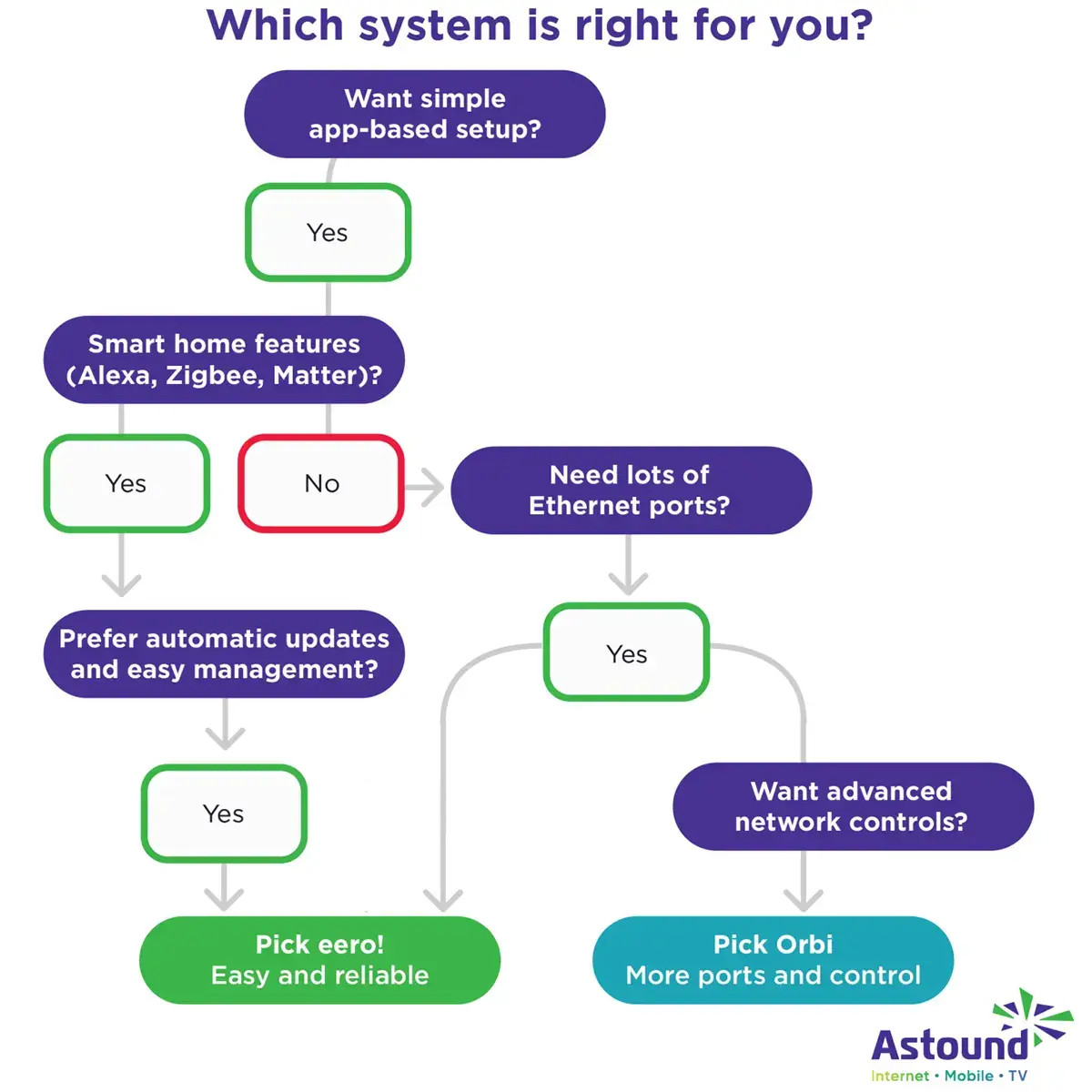
Choose eero if you want simple app-based setup, smart home integration and small nodes that just work. Choose Orbi if you need more raw speed, more Ethernet ports and a powerful web interface for tuning. Keep an eye on hardware cost, subscriptions and upgrade paths, then use the decision tree above as a quick way to confirm your choice.
FIBER-POWERED GIG INTERNET
Gig+ speeds, unbeatable value
Get Gig speeds up to 1500* Mbps starting at $60/mo on Astound’s ultra-reliable fiber-powered‡ network.
Frequently asked questions
Can I mix eero and Orbi in the same home network?
No. Each brand uses its own proprietary mesh protocol so eero and Orbi nodes cannot interoperate.
Which has more Ethernet ports: eero or Orbi?
Orbi routers typically include one WAN and three LAN ports and satellites have two LAN ports. eero Pro 6 and similar models offer only two auto‑sensing Ethernet ports per node.
Is Orbi better than eero for large homes?
No. For large or multi‑story homes where range and wired connectivity matter, Orbi’s larger antennas and dedicated backhaul may deliver more coverage. However, eero’s dynamic backhaul and compact nodes make it easier to add more units for dense coverage and eero Max 7 offers multi‑Gig WiFi 7 performance.
Which is easier to manage for parents and non‑technical users?
With an app‑centric design, automatic updates and custom profiles, eero is the friendlier choice. Orbi offers more granular controls via a web interface but requires navigating multiple menus and, for parental controls, often purchasing a subscription.
Does Orbi offer better range than eero?
It depends. In some tests, Orbi delivered better range than the eero Pro 6. Orbi’s larger antennas mean you may need fewer nodes, but at the cost of much larger hardware. Some reviewers report that eero’s dynamic backhaul feature helps maintain higher speeds farther from the router.
Does eero or Orbi offer better parental controls?
With Astound Whole Home Internet, you get access to eero Secure, which includes free family profiles and scheduling, content filtering and ad blocking. Upgrading to eero Plus unlocks a VPN, Malwarebytes and 1Password features. Orbi’s app can pause individual devices, but full parental control requires the Smart Parental Controls subscription.
Which is better for gaming, eero or Orbi?
Both systems work well for gaming. Orbi’s dedicated backhaul and additional Ethernet ports may benefit multi-room gaming setups, while eero’s True Mesh technology dynamically routes traffic for stable performance. For the lowest latency, use a wired Ethernet connection.
Which is better for smart homes, eero or Orbi?
eero is generally better suited for smart homes because newer models support technologies such as Matter, Thread and Zigbee. This allows compatible eero devices to integrate with smart home ecosystems while providing mesh WiFi coverage.
Do eero and Orbi support WiFi 7?
Yes. Both brands offer WiFi 7 mesh systems. Models such as eero Max 7 and higher-end Orbi systems support multi-Gig connectivity and newer WiFi 7 features for faster, more capable home networks.
Can eero and Orbi handle multi-Gig internet?
Yes, depending on the model. Higher-end eero and Orbi systems include multi-Gig Ethernet ports and WiFi technology designed to support Gigabit and multi-Gig internet plans.
Do eero and Orbi support Ethernet backhaul?
Yes. Both systems can use Ethernet to connect mesh nodes. Wired backhaul can provide more consistent performance, reduce wireless interference and preserve wireless bandwidth for connected devices.
Can I add more eero or Orbi nodes later?
Yes. Both mesh platforms allow you to expand your network with compatible nodes or satellites. Adding units can improve coverage in larger homes or areas where the WiFi signal is weak.
Which is easier to set up, eero or Orbi?
eero generally offers the simpler setup experience. Its app guides users through installation and automatically handles network optimization and updates. Orbi is also app-supported but provides additional settings through its web interface.
Which is better for homes with many wired devices?
Orbi is generally better for households with many wired devices because many models provide more built-in Ethernet ports. eero systems typically have fewer ports, although an Ethernet switch can be added when additional connections are needed.
Do older WiFi devices work with eero and Orbi?
Yes. Modern eero and Orbi systems are backward compatible with older WiFi devices. However, older devices will remain limited by the maximum speeds and capabilities of the WiFi standards they support.
Which is better for a small home or apartment?
eero is often a good fit for smaller homes and apartments because of its compact hardware, simple management and automatic optimization. A single high-quality router may also be sufficient if the space already has strong WiFi coverage.
Related content

eero vs. TP-Link
Compare eero vs. TP-Link WiFi characteristics to find the right mesh WiFi solution for your home.

Is eero a good router?
Examine WiFi speed, reliability, setup and features supported by eero to help you decide if it’s right for your home.

eero vs. Netgear
Compare eero vs. Netgear mesh WiFi systems and learn how Astound eero fits into the picture.

eero vs. Google WiFi
Compare eero vs. Google WiFi system for speed, coverage, setup, ecosystem and value.

eero Secure vs. eero Plus
Compare eero Secure vs. eero Plus to find the best WiFi security features and parental controls for your home.

eero vs. Ubiquiti in 2025
Investigate eero and Ubiquiti mesh WiFi systems to learn which delivers the coverage, speed and value you need.
Create the perfect bundle
Get the speed, WiFi, mobile and TV that’s just right for you.
*Internet speeds vary, not guaranteed. Certain equipment may be required to reach advertised speeds. ^^Available in select areas. DOCSIS 3.1 modem with 2.5GE physical LAN port is required for 1 Gigabit speeds and higher. See astound.com/yourspeed for why speeds may vary. To view Astound’s FCC Network Management Disclosure see astound.com/policies-disclaimers. Modem required for Internet service. No contract required. Subject to availability. Ltd-time offer; subj. to change. Internet pricing valid for 12 mos. Gig+ internet service price for life for add’l $5/mo. Excludes taxes, surcharges, & fees. Offer subj. to change. Pricing valid from start; subj. to change thereafter. Std. WiFi included. Whole Home WiFi included w/ 2 Gig+ svc; $10/mo for lower speeds or add’l devices. Regular rates apply after promotion ends. Price reflects autopay & e-bill discount for enrolling in autopay & e-bill with ACH. Valid email & enrollment required. Discount is applied within 3 bill cycles and ends if autopay or e-bill is canceled, services change, or the account is not in good standing. ^Ltd-time offer; subj. to change. Free mobile offer = 1 Unlimited line w/ monthly credit for 12 mos from activation. Std rates apply after promo or if qualifying svcs not maintained. Limit 1 free line/account; not valid on existing lines. Add’l lines avail. at extra cost. Astound Mobile req’s Astound Internet service for activation. Max 5 lines. Equip., intl./roaming charges, taxes, fees extra & may change. Astound not liable for svc disruptions or outages. Higher rate applies if Internet not maintained. Mobile svc only in Astound areas. Pricing subj. to change. Data may slow during congestion. After 20GB, Unlimited plans slow to 768 Kbps; 1.5GB/3GB plans capped. No rollover; add’l data $10/GB. Coverage varies. Some features may require specific plans. Mobile svc includes BIAS w/ data, voice, texts & SMS. Other restrictions may apply. See astound.com/mobile for details. A one-time activation fee of $14.99 (in addition to any installation fees) will be charged. WA RESIDENTS: unless otherwise specified, price does not include 2% Regulatory Administration Fee. Cust. responsible for any accrued charges. Subj. to credit check. Not all svcs/speeds avail. in all areas. 30-Day Money-Back Guarantee for new residential customers who cancel within 30 days of install. Max refund = 1 month’s recurring service & equip. fees. Refund issued within 60 days if all conditions met. Excludes usage-based fees. ©2026 Amazon.com, Inc. or its affiliates. eero and all related marks are trademarks of Amazon.com, Inc. or its affiliates. Amazon.com c/o eero LLC, 660 3rd St. San Francisco, CA. All svcs are governed by Astound Customer Terms & Conditions found at astound.com/policies-disclaimers. © 2026 Radiate HoldCo, LLC d/b/a Astound Broadband. All rights reserved.
Price for Life locks in your monthly service rate for as long as you maintain the same qualifying internet service without changes, downgrades, or disconnection. Additional fees, equipment charges, taxes, surcharges, and discounts are subject to change and are not guaranteed for life.
While we have made every attempt to ensure that the information contained in this site has been obtained from reliable sources, Astound is not responsible for any errors or omissions, or for the results obtained from the use of this information. All information in this site is provided “as is”, with no guarantee of completeness, accuracy, timeliness and without warranty of any kind, express or implied, including, but not limited to warranties of performance, merchantability and fitness for a particular purpose. Certain links in this site connect to other websites maintained by third parties over whom Astound has no control. Astound makes no representations as to the accuracy or any other aspect of information contained in other websites.
eero Plus is available for an additional $9.99/month and requires subscription to whole home WiFi powered by eero.