













Understanding your average internet data consumption
Average internet data usage refers to the amount of data households consume monthly, typically ranging from 500 GB to 700 GB, depending on activities like streaming, gaming, remote work, and connected devices.

Key Takeaways:
- Average household data usage is ~500–700 GB per month
- Streaming, gaming, and downloads are the biggest data drivers
- Data usage increases with more users and connected devices
- 4K streaming and large downloads consume significant data
- Remote work and video calls add to monthly usage
- Faster speeds can lead to higher data consumption
- Monitoring usage helps avoid overages and optimize plans
- Unlimited plans suit high-usage households
- Data needs vary based on household size and online activities
Streaming, working remotely, gaming and connected devices all use data and network bandwidth. Activities like 4K streaming, updating games or downloading large files can quickly add up, especially in homes with multiple users and devices.
But how much data does the average person use per month?
In this article, we’ll explore how consumers are using internet data and what influences data consumption. Whether you’re a light user or part of a high-demand household, understanding your data usage can help you avoid overage fees, maximize your plan—whether it’s a capped data plan or an unlimited option—and stay connected.
What you'll learn:
- Why internet data usage matters
- 2025 internet data usage statistics
- Data consumption breakdown by activity
- How much internet data do you need?
- What factors influence internet data usage?
- How faster speeds impact data usage
- Do you need an unlimited internet data plan?
- How to monitor and reduce home internet data usage
- Quick tips for managing your mobile data
- Conclusion
- Frequently asked questions
- Looking for more topics?
Check for service
Get internet service that delights
Astound is ranked among the best for overall satisfaction*. When it comes to download speed and quality, Astound more than delivers.

Why internet data usage matters
Understanding your data usage can help make the most of your internet plan. For some providers, exceeding your plan’s limit can result in overage fees or throttled internet speeds.
Data-intensive activities like Ultra 4K video streaming, online gaming and large downloads can quickly add up, especially across multiple users and devices. By tracking your data usage, you can stay within your plan’s limits and avoid unnecessary charges.
2025 internet data usage statistics
From household to household, WiFi and home internet usage varies but OpenVault reports the average American family uses between 650 and 700 GB of data per month.
This average monthly internet usage may be affected by many factors, including internet plans, internet providers and data caps.
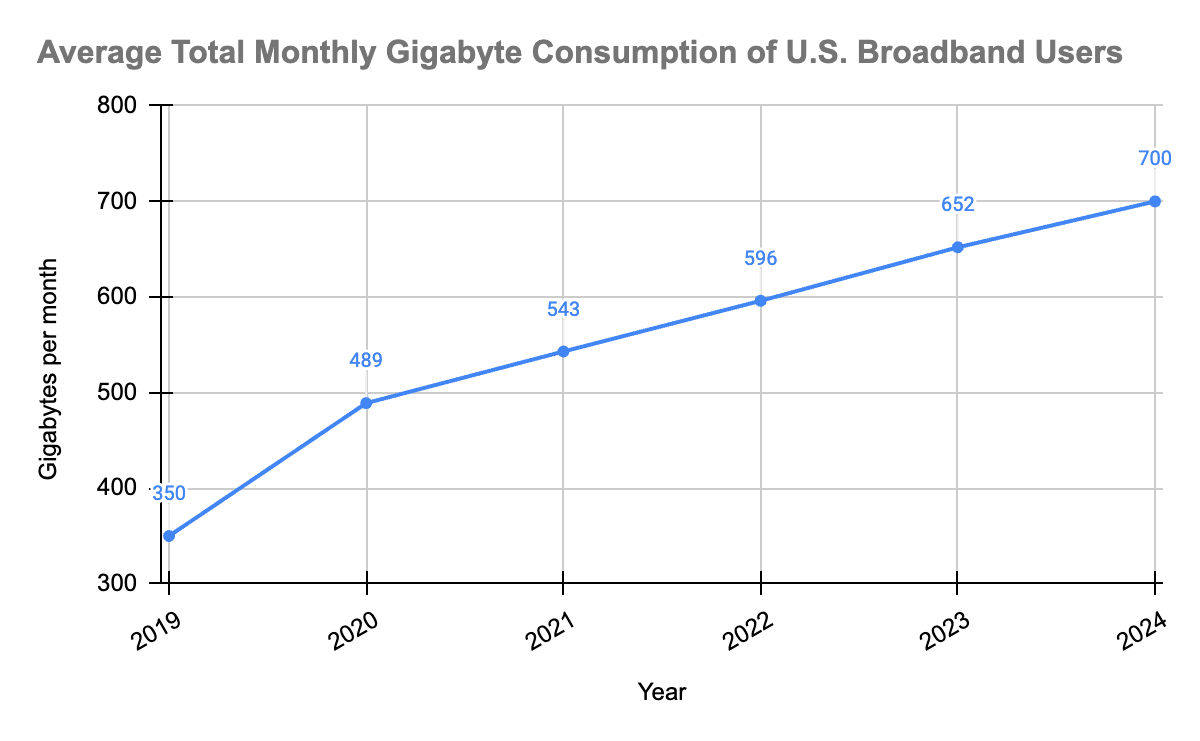
Since 2019, home internet data usage has increased by 94%.
The largest spike was between 2019 and 2020, likely due to the global pandemic, but internet data use has continued to trend upward since and shows no signs of slowing down. In 2024, home internet subscribers consumed about 700 GBs per month.
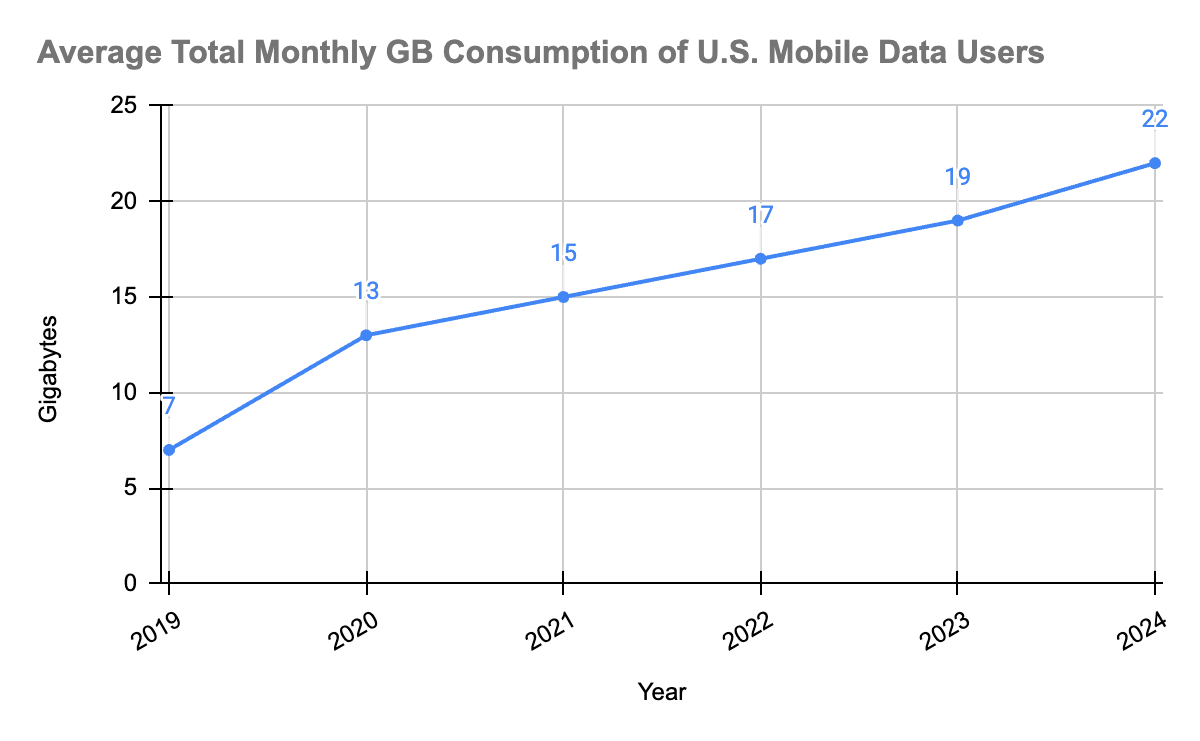
Compared to home internet usage, mobile data usage shows a similar trend, spiking upwards between 2019 and 2020, but has shown a larger percent increase, growing by almost 214% since 2019.
In 2024, mobile data subscribers consumed about 22 GBs per month.
If these trends continue, we can expect to see US home internet data use in 2025 to grow to around 750 GBs per month, and mobile data use to reach upwards of 25 GBs per month.
While there isn’t a single defined source for how much data the entire United States consumes per month, Statista estimates around 98 million exabytes. An exabyte is a unit of digital data storage equal to 1 billion gigabytes, meaning that all US internet users together consume at least 105,913,893,519,360,000 GBs per month.
Data consumption breakdown by activity
Average WiFi data usage per month per person depends on activities such as video streaming, online gaming, video calls, and large downloads. Households with multiple users and connected devices generally consume more data.
Here’s a breakdown of typical monthly data usage for common internet scenarios.
These estimates can help you understand your household’s monthly data requirements and choose the right internet plan.
- Large households: For a large household, typical monthly internet data usage averages between 700 GB – 1 TB, depending on the number of connected devices and activities.
- Apartments: For apartments, typical internet data usage averages around 500 – 700 GB per month, depending on the number of occupants, their online habits and the types of devices connected.
- Gaming and streaming: Multiplayer online games using around 40 – 300 MB per hour. Game downloads and updates, however, can consume 20 – 100 GB each.
- Working and learning from home: On average, working or learning from home consumes 20 – 200 GB per person per month, depending on the intensity of activities.
How much internet data do you need?
By assessing the number of users, devices and activities, you can determine the right data plan for your needs.
- Large households: Families with multiple members and numerous connected devices often consume substantial amounts of data. Households with larger families may exceed OpenVault’s reported 700 GBs, due to simultaneous streaming, online gaming and other data-intensive activities.
- Apartments: Residents in apartments or smaller households may have lower data consumption. However, with the increasing reliance on streaming services, remote work and smart devices, even smaller households can experience significant data usage, and may need at least 500 GBs or more.
- Gaming and streaming: These activities are among the most data-intensive. Streaming high-definition video can consume up to 3 GB per hour, while 4K streaming on Netflix may use up to 7 GB per hour. Online gaming varies but generally uses about 40 – 300 MB per hour; however, downloading new games or updates can require several gigabytes. A home with streamers or dedicated gamers may need at least 500 GBs or more.
- Working and learning from home: Engaging in remote work or online education involves activities like video conferencing and accessing cloud-based resources. A group video call can require approximately 2.1 Mbps downstream and 0.5 Mbps upstream, translating to about 1 – 2 GB per hour, depending on the platform and number of participants. If anyone in the home will be performing other tasks on the internet simultaneously, a plan that goes above 500 GBs may be necessary.
Find your speed
What speed do you need?
Maybe you just need the essentials—or maybe you need to unleash the ultimate internet speed. Explore your options to get the best experience for every device in your home.
What factors influence internet data usage?
Internet data usage is influenced by several factors, including video streaming quality, the number of connected devices and the types of online activities.
Homes with multiple users or smart devices often see higher data consumption as activities like video conferencing, cloud-based work and smart home automation run simultaneously.
Additionally, auto-updates and background processes can add to usage, making managing and monitoring your data even more important.
How faster speeds impact data usage
Faster internet speeds may indirectly lead to higher data usage, as they enable access to higher-quality activities and content, faster. Simply put, speed itself doesn’t directly increase data consumption, activities enabled by higher speeds do.
Here are four ways faster speeds may impact your data usage:
- Higher-quality streaming: Faster speeds enable streaming video in 4K resolutions, which can use up to 10 GB of data per hour compared to 1 GB per hour for standard definition. Most streaming platforms use adaptive bitrate streaming to automatically adjust quality based on available speed, leading to higher data consumption.
- Quicker downloads and updates: Faster speeds, Gigabit internet speed, bring more convenient file downloads, games or other software updates to your household. As a result, downloads may happen more frequently, increasing your data usage overall.
- Increased device usage: Faster internet supports multiple devices. Streaming, gaming and video calls on several devices at once can quickly add up.
- Enhanced online gaming: While gaming itself doesn’t always consume excessive data, the right speed for gaming can facilitate larger downloads of games, patches and updates, which can range from 10 GB to over 100 GB.
The faster the connection, the easier it is to spend time online, leading to increased streaming, browsing and other activities. To maintain your average monthly internet usage, monitor your activities and adjust settings like streaming quality, updates and downloads.
Do you need an unlimited internet data plan?
If you’re trying to decide between an unlimited internet data plan or a plan with data caps, here are some points to consider.
High-data activities
If your household regularly streams 4K videos, engages in online gaming or downloads large files, an unlimited plan can help. These activities consume significant data, especially when multiple users are involved.
Multiple users and devices
Homes with many users or devices connected simultaneously often see higher data usage. Unlimited data ensures everyone in the home can Internet for streaming, browse, work from home and game without worrying about limits.
Current data usage
Before committing to an unlimited plan, understand your household’s data consumption. If your usage consistently approaches or exceeds your limits, an upgrade to unlimited may provide better value.
An unlimited internet plan is ideal for households with high-data activities, multiple users and consistently high usage, but may not be necessary for everyone.
How to monitor and reduce home internet data usage
You can track home internet data usage using tools provided by your ISP or through your router settings. Talk to your ISP about how to access your data usage, and follow the tips below.
- Optimize streaming devices: Lower the streaming quality on TVs and devices, setting it to HD or SD instead of 4K when possible. This can drastically reduce data usage without significantly impacting viewing experience.
- Turn off auto-play: Disable auto-play for videos on platforms like YouTube, Netflix and social media, as they can consume data even when you’re not active on the app.
- Upgrade router settings: Use settings that cap data usage for specific devices and prevent unnecessary data consumption from background processes.
- Schedule large downloads: Download or update your system during off-peak hours and ensure downloads are complete to avoid partial downloads consuming extra data.
- Use data-saving mode: Most TVs, gaming consoles and smart home devices have eco or data-saving modes. Enable these to limit data usage, without sacrificing functionality.
Using these tips, you’ll be able to manage your home network and stay within your plan limits. Now, let’s look at how to manage your data on the go.
See how much you can save
Save with Astound
Check out our savings calculator to see the change in your bill when you build a plan with Astound.
Quick tips for managing mobile data
Monitoring your mobile data usage is essential to avoid overage charges and any possible throttling issues. Monitor and reduce your data consumption with these tips.
- Turn off mobile data for certain apps: Restrict mobile data access for apps you don’t use frequently, preventing them from consuming data in the background.
- Use mobile data tracking: Enable data monitoring features on your phone to track usage and set limits. Most devices allow you to view data-heavy activities by app.
- Restrict streaming apps to WiFi: Adjust settings in streaming apps like Spotify or Netflix to download content exclusively over WiFi, reducing the use of mobile data.
- Enable data saver mode: Most smartphones have a data saver mode that reduces data use and prevents unnecessary background activity.
- Turn off automatic updates: Prevent apps and your phone’s operating system from downloading updates over mobile data. Instead, only download updates when connected to WiFi.
Using these tips, you’ll have more control over your mobile data plan and stay within your limits.
Conclusion
For the best online experience, understanding your internet data use is critical. Video streaming, gaming, working remotely and managing multiple devices all contribute to data consumption, with activities like streaming 4K video and downloading large files quickly adding up.
Whether you’re a light user or part of a high-demand household, it’s essential to practice awareness and proactive management of your data usage to make the most of your internet plan. By monitoring your usage, adjusting settings and choosing the right plan based on your needs, you can enjoy the best of a home internet connection while staying on budget.
Build your plan
Your perfect plan is just a click away
Get the speeds, WiFi, mobile and TV plans you need all at an affordable price. Bundle your services with Astound and see how much you can save.
Frequently asked questions
Is 100 GB of internet data enough for 1 month?
Whether or not 100 GB of internet data is enough depends on your household’s monthly internet usage. If you primarily browse, email and stream music or SD content occasionally, we recommend no less than 100 GB, and monitoring your usage patterns to adjust. However, if you stream HD or 4K video, game heavily or download large files daily, you may quickly exceed 100 GB per month.
Is 300 GB of data enough for a month?
300 GB of data per month can be enough, but it depends on how many users and what activities you have at home.
- For light usage (1–2 users) like browsing, emails, and occasional streaming-300 GB is generally sufficient. In fact, two light users typically use around 300 GB/month.
- For moderate to heavy usage, it may not be enough. For example, HD streaming alone can use around 320 GB per month, which can already exceed a 300 GB cap.
- The average household uses ~590 GB/month, meaning 300 GB is below average for many homes today.
How do I know how many GB of internet data I need?
Estimate your needs based on your activities: infrequent browsing and emailing use some data, while HD streaming, gaming and large downloads require more. Individually, light users may need at least 100 GB/month, moderate users 100-200 GB and heavy users 200+ GB.
What uses the most internet data at home?
Streaming video, like Netflix (especially in HD or 4K), and downloading large files use the most data, with 4K streaming consuming up to 10 GB per hour. Online gaming and video conferencing also require significant data, ranging from 100 MB to several GB per hour.
How much internet data does 1 person use per month?
While it’s difficult to give an exact number per person per month, a person may use at least 300 – 500 GB, or more, depending on their activities, per month – on average.
How much internet data does a family of 4 use per month?
A family of 4 typically uses 400 – 1,200 GB per month, depending on their activities. Light usage might require 300 – 500 GB, while heavy streaming, gaming and multi-device use could push usage over 1,000 GB.
How much data does streaming use per month?
Streaming data use depends on video quality and viewing time. HD streaming may use several gigabytes per hour, while 4K streaming can use up to 10 GB per hour.
Does online gaming use a lot of internet data?
Playing online games usually uses less data than video streaming, but game downloads and updates can use 20 GB to more than 100 GB at a time.
Can working from home increase monthly data usage?
Yes. Video calls, cloud tools, file sharing and online meetings can significantly increase monthly data use, especially when more than one person works or studies from home.
Why does my household use more data than expected?
Your usage may be higher because of 4K streaming, automatic updates, background apps, cloud backups or multiple connected devices using data at the same time.
Do smart home devices use a lot of data?
Most smart devices use small amounts of data individually, but cameras, smart TVs and several always-connected devices can noticeably increase monthly usage.
Does faster internet use more data?
Faster internet does not automatically use more data. However, it makes it easier to stream in higher quality, download larger files and use more devices, which can increase total usage.
How can I check my home internet data usage?
You can check your usage through your internet provider’s app or account dashboard. Some routers also show data use for each connected device.
How can I reduce internet data usage at home?
Lower streaming quality, turn off autoplay, limit background updates and schedule large downloads only when needed. You can also use data-saving settings on supported devices.
When should I consider an unlimited data plan?
An unlimited plan may be useful if your household frequently streams in 4K, downloads large games, works from home or regularly reaches its monthly data limit.
Can too many connected devices increase data usage?
Yes. Each connected phone, TV, computer, camera or smart device can use data, and total usage rises when several devices are active at the same time.
How can I check my monthly internet data usage?
You can check your monthly internet data usage through your internet provider’s account portal or available router tools. Review usage regularly to identify high-data activities and determine whether your current plan meets your needs.
Related content

How to improve your connection for gaming
Discover strategies to enhance your WiFi and internet connection for gaming. Learn tips to boost speed, reduce lag and improve overall gaming performance.

Do I need an unlimited internet data plan?
Wondering if unlimited internet data is right for your home? Learn about its usage, data caps and how to choose the right plan for your internet experience.

Why is my internet speed so slow?
Discover common causes and solutions for slow internet speeds, including tips for diagnosing and fixing issues.

How much data does Netflix use?
Curious to know how much data Netflix uses? Learn why Netflix consumes so much data and how to optimize your streaming experience.

How to choose an internet provider
Learn how to choose the best internet provider. This comprehensive guide covers key factors, comparisons and tips to help you make an informed decision.
Create the perfect bundle
Get the speed, WiFi, mobile and TV that’s just right for you.
*Internet speeds vary, not guaranteed. Certain equipment may be required to reach advertised speeds. ^^Available in select areas. DOCSIS 3.1 modem with 2.5GE physical LAN port is required for 1 Gigabit speeds and higher. See astound.com/yourspeed for why speeds may vary. To view Astound’s FCC Network Management Disclosure see astound.com/policies-disclaimers. Modem required for Internet service. No contract required. Subject to availability. Ltd-time offer; subj. to change. Internet pricing valid for 12 mos. Gig+ internet service price for life for add’l $5/mo. Excludes taxes, surcharges, & fees. Offer subj. to change. Pricing valid from start; subj. to change thereafter. Std. WiFi included. Whole Home WiFi included w/ 2 Gig+ svc; $10/mo for lower speeds or add’l devices. Regular rates apply after promotion ends. Price reflects autopay & e-bill discount for enrolling in autopay & e-bill with ACH. Valid email & enrollment required. Discount is applied within 3 bill cycles and ends if autopay or e-bill is canceled, services change, or the account is not in good standing. ^Ltd-time offer; subj. to change. Free mobile offer = 1 Unlimited line w/ monthly credit for 12 mos from activation. Std rates apply after promo or if qualifying svcs not maintained. Limit 1 free line/account; not valid on existing lines. Add’l lines avail. at extra cost. Astound Mobile req’s Astound Internet service for activation. Max 5 lines. Equip., intl./roaming charges, taxes, fees extra & may change. Astound not liable for svc disruptions or outages. Higher rate applies if Internet not maintained. Mobile svc only in Astound areas. Pricing subj. to change. Data may slow during congestion. After 20GB, Unlimited plans slow to 768 Kbps; 1.5GB/3GB plans capped. No rollover; add’l data $10/GB. Coverage varies. Some features may require specific plans. Mobile svc includes BIAS w/ data, voice, texts & SMS. Other restrictions may apply. See astound.com/mobile for details. A one-time activation fee of $14.99 (in addition to any installation fees) will be charged. WA RESIDENTS: unless otherwise specified, price does not include 2% Regulatory Administration Fee. Cust. responsible for any accrued charges. Subj. to credit check. Not all svcs/speeds avail. in all areas. 30-Day Money-Back Guarantee for new residential customers who cancel within 30 days of install. Max refund = 1 month’s recurring service & equip. fees. Refund issued within 60 days if all conditions met. Excludes usage-based fees. ©2026 Amazon.com, Inc. or its affiliates. eero and all related marks are trademarks of Amazon.com, Inc. or its affiliates. Amazon.com c/o eero LLC, 660 3rd St. San Francisco, CA. All svcs are governed by Astound Customer Terms & Conditions found at astound.com/policies-disclaimers. © 2026 Radiate HoldCo, LLC d/b/a Astound Broadband. All rights reserved.
Price for Life locks in your monthly service rate for as long as you maintain the same qualifying internet service without changes, downgrades, or disconnection. Additional fees, equipment charges, taxes, surcharges, and discounts are subject to change and are not guaranteed for life.
While we have made every attempt to ensure that the information contained in this site has been obtained from reliable sources, Astound is not responsible for any errors or omissions, or for the results obtained from the use of this information. All information in this site is provided “as is”, with no guarantee of completeness, accuracy, timeliness and without warranty of any kind, express or implied, including, but not limited to warranties of performance, merchantability and fitness for a particular purpose. Certain links in this site connect to other websites maintained by third parties over whom Astound has no control. Astound makes no representations as to the accuracy or any other aspect of information contained in other websites.
eero Plus is available for an additional $9.99/month and requires subscription to whole home WiFi powered by eero.