















What is eero? — Explaining the eero home WiFi mesh system

eero is a mesh WiFi system that uses multiple small routers to cover your whole home with a single, seamless network. Instead of one overworked box in a corner, eero spreads coverage room to room and manages traffic for you. In this guide we explain what eero is, how it works and when it makes sense to use it.
What you'll learn:
- What is eero: A quick definition
- How eero works: The basics of mesh WiFi
- What makes eero so different: Key features and advantages
- Who should consider eero: Ideal use-cases
- eero: Common questions and misconceptions
- Things to consider before buying eero
- Should I get eero? The bottom line
- Frequently asked questions
- Looking for more topics?
What is eero: A quick definition
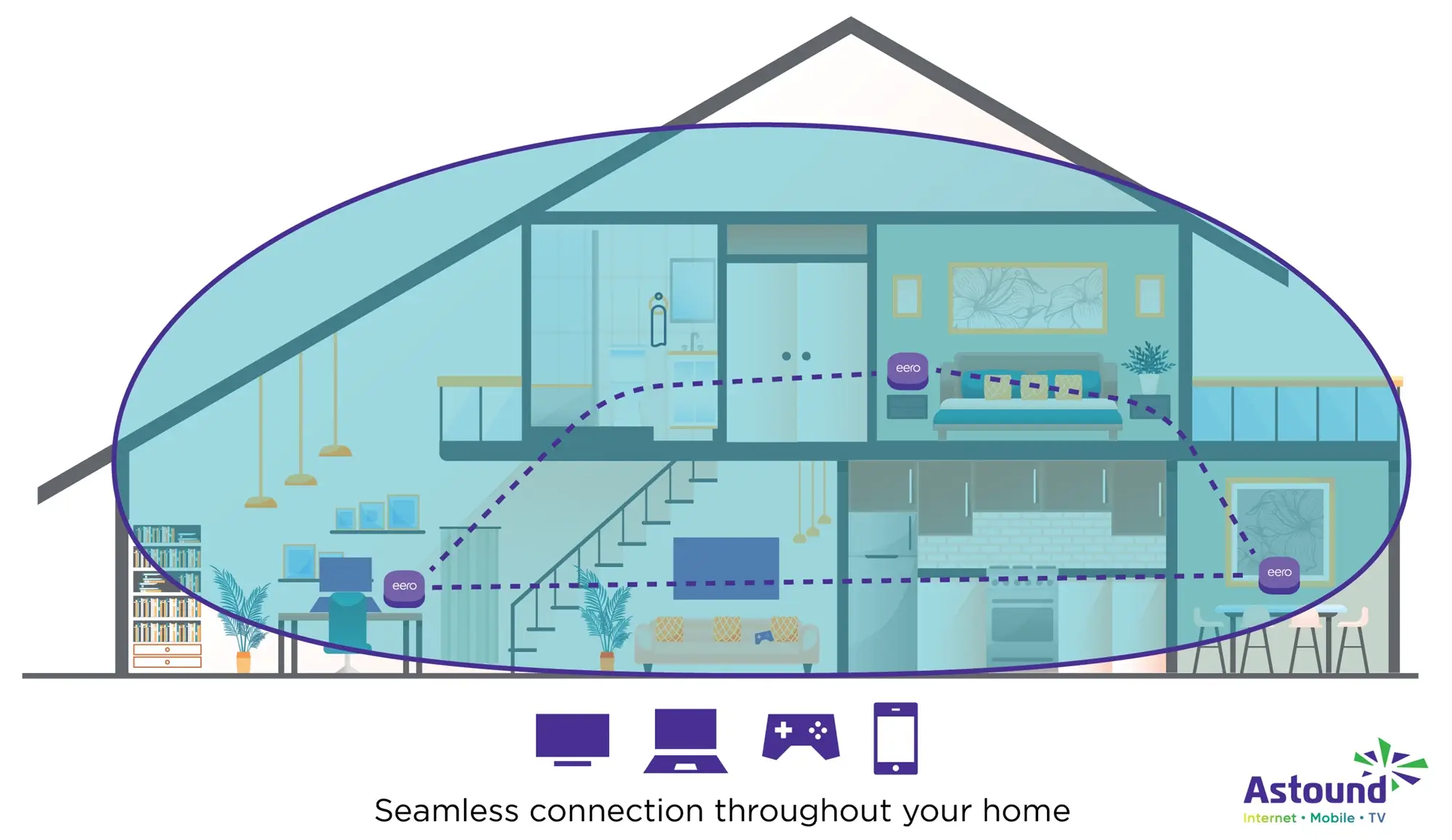
Available on Astound’s Whole Home WiFi plans, eero is the brand name for a family of home mesh WiFi systems. Instead of a single router, eero relies on multiple interconnected nodes placed throughout your home. These nodes work together to create a mesh network so that your devices automatically connect to the nearest node and enjoy a strong, consistent signal wherever you roam.

Mesh WiFi with
eero Secure
Enhanced Whole Home WiFi uses multiple routers (or eeros®) to boost range, speed and stability—while eero Secure, included at no extra cost, offers parental controls, ad blocking and internet backup for constant connectivity.
How eero works: The basics of mesh WiFi
Mesh networking explained
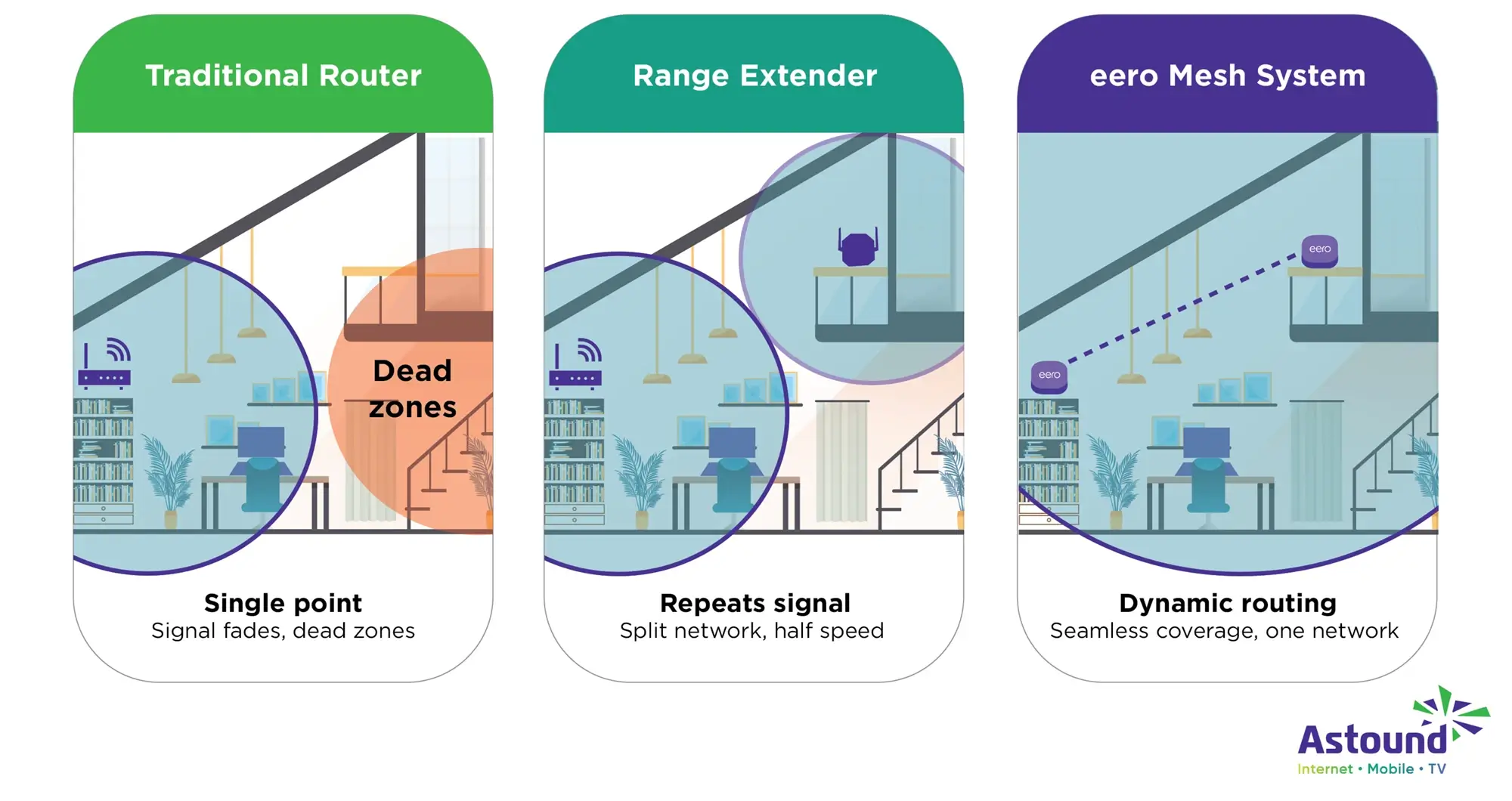
Traditional home WiFi relies on one central router. Signals weaken as they travel through walls and long hallways, leading to buffering or dead zones.
Mesh WiFi solves this by using several smaller routers called nodes that form a cooperative network. Each node can send and receive data to the others, so your devices always connect to the strongest signal available. The network continuously reconfigures itself to find the best route, even if one node goes offline or encounters interference.
Because all nodes broadcast the same network name and password, you never have to switch networks when moving between rooms.
eero TrueMesh, TrueRoam and TrueChannel
eero mesh network is powered by proprietary TrueMesh software. Unlike mesh systems that rely on a fixed backhaul path, TrueMesh creates redundant links between nodes and constantly calculates the fastest, least-congested route for each device.
Newer models enhance this with TrueRoam, which proactively keeps devices on the optimal access point as you move, as well as TrueChannel, which automatically selects the clearest WiFi channel to avoid interference.
Models like the eero Pro 6, 6E and Max 7 can even choose the optimal backhaul band such as 2.4 GHz, 5 GHz or 6 GHz to maximize throughput and minimize congestion. If a node loses connectivity, TrueMesh reroutes traffic through the remaining nodes so your internet does not drop.
Unified network vs. range extenders
Can a range extender increase WiFi coverage? It is common to extend WiFi coverage with inexpensive range extenders, but these repeaters often halve your bandwidth and create separate network names that you must manually switch between.
eero takes a different approach: all nodes broadcast the same SSID and password, so you seamlessly roam throughout your home. The system continuously optimizes traffic flow to maintain speed, eliminating the lag or disconnection that can occur with extenders.
WiFi 6, 6E and 7 lineup
eero continues to release progressively more powerful models.
- Early dual-band eero and eero 6 units covered around 1,500 square feet per node.
- eero Pro 6 increased coverage to 2,000 square feet and supported more than 75 devices.
- eero Max 7, the flagship WiFi 7 router, delivers wireless speeds up to 4.3 Gbps, wired speeds up to 9.4 Gbps and covers around 2,500 square feet per node.
- Lower cost eero 7 routers support 120+ devices and provide up to 2,000 square feet of coverage.
- eero Pro 7 models support 200+ devices with WiFi 7 speed up to 3.9 Gbps.
Whole home coverage with eero
What makes eero WiFi so different: Key features and advantages
Intelligent routing with TrueMesh
At the heart of eero’s performance lies TrueMesh. This, combined with TrueRoam and TrueChannel, proactively keeps devices on the strongest signal available.
Plug-and-play setup and app-based management
eero emphasizes simplicity. To get started, you plug the first eero into your existing modem (remember, eero replaces your router, not your modem) and use the eero app to create a network name and password.
Additional nodes are added by scanning QR codes and placing them where coverage is weak; the app measures signal strength and suggests optimal placement. The app also lets you pause WiFi, prioritize devices, create a guest network and view connected devices.
Scalability and coverage
eero systems are modular. You can start with one or two nodes and add more to eliminate dead spots; the mesh self-configures as you expand. For extremely large homes, multi-pack bundles can extend coverage to 7,500 square feet or more.

eero Plus
eero Plus protects your family online with a password manager to safely create, store and share passwords, virus and malware protection and a VPN that lets you browse the web safely and securely.
Security and automatic updates
eero runs its own operating system, eeroOS, which receives firmware and security updates automatically, often overnight, without requiring user action. The data shared between your devices, your network and the eero cloud are encrypted with TLS. For additional security, WiFi connections support more current WPA2 and optional WPA3 encryption. eero deliberately excludes outdated protocols like WEP and WPA to prevent vulnerabilities.
Basic networks and Astound’s Whole Home WiFi include eero Secure, which provides content filtering, ad blocking and malware protection. Customers who want more robust protection can subscribe to eero Plus via Astound, which layers additional features: Guardian-powered VPN, Malwarebytes antivirus and a 1Password family plan.
Without eero Plus, your network remains secure; eero regularly tests and patches vulnerabilities but subscribing adds a second layer of protection and convenience.
Advanced parental controls and content filtering
Families often struggle to manage screen time and online safety. Through Family Profiles in the eero app, eero Secure users can set bedtimes, pause internet access or block entire categories of apps and websites.
These controls contain more granular content filters that let you choose preset levels (pre-K, pre-teen, teen, adult) and even block categories like shopping, social media or streaming. Each profile’s filters apply to all of that person’s devices and parents can view insights showing which sites were blocked or allowed.
Internet backup and signal: Staying online when your ISP goes down
Internet interruptions can be disruptive, especially for remote workers or households with smart locks and cameras. eero Internet Backup lets you designate a nearby mobile hotspot or neighboring WiFi network as a fallback.
When your wired connection drops, the gateway eero automatically connects to the backup network and shares it with all nodes so your devices remain online. The network switches back to the main connection automatically when service is restored.
WiFi that just works!
WiFi plans for any home
Tiny, large or somewhere in between; find WiFi coverage to fit any space. Blanket your entire home with a fast and ultra‑reliable connection.
Who should consider eero: Ideal use‑cases
Large or multi-floor homes
If your house is large, has multiple levels or contains thick walls, you are likely to experience dead zones with a single router. Because each eero node covers between 1,500 and 2,500 square feet depending on the model, you can place nodes on different floors or at opposite ends of your home to blanket your space with reliable WiFi.
Households with many devices and bandwidth-intensive activities
Modern homes are full of connected gadgets: smart TVs, tablets, gaming consoles, thermostats, cameras and smart locks. Entry-level eero units handle 50 – 75 devices, mid-range models support 75+ devices and high-end eero Pro and Max models support 200+ devices.
Smart home enthusiasts
If you have invested in Alexa devices, smart lights, locks or sensors, eero can act as the backbone for your connected home. Zigbee, Thread and Matter support simplifies pairing and management and eero Built-in plus Echo devices can extend your network without additional hardware. Voice control through Alexa makes tasks like pausing WiFi for the kids or starting a speed test as easy as speaking.
Remote workers and those who need reliability
For remote workers or households dependent on online education, stable connectivity is essential. eero Internet Backup and eero Signal keep you online during disruptions by automatically switching to cellular or nearby WiFi.
This is especially useful in regions where service interruptions are common. The ability to prioritize devices during a disruption ensures video calls and critical tasks remain smooth.
Router vs. range extender vs. Mesh WiFi eero
eero: Common questions & misconceptions
Is eero a router or a range extender?
eero is a mesh system consisting of multiple access points. It replaces your existing router and creates a single, unified WiFi network. Range extenders merely repeat a router’s signal, often halving speeds and creating a secondary network you must manually join. eero’s mesh network eliminates those issues by offering seamless roaming and dynamic routing.
Do I still need a modem and an ISP?
Yes. eero is not a modem or an internet service provider, like Astound. Your first eero plugs into your cable or modem; if you have a modem/router combo, you should put it in bridge mode. You must still maintain service with your internet provider.
How many eero nodes do I need?
The number depends on your home’s size and layout. A small apartment (up to 1,500 square feet) may need just one or two nodes. Homes between 1,500 and 3,000 square feet often require two or three nodes, while large or multi-floor homes (3,000 – 5,000 square feet) may need three or more nodes. Complex layouts and thick walls may require additional units.
most popular resource
Optimize your internet speed
Is WiFi interference slowing your internet speeds? Here are a few tips to optimize and maximize your home’s high speed internet performance.

Things to consider before buying eero
Home size, layout and construction
Measure your home and consider its layout. You may need more nodes than the simple square footage guidelines suggest. Place nodes on different floors and central locations; eero is most effective when nodes can see one another.
Internet plan speed and number of devices
Mesh WiFi distributes your connection but cannot create bandwidth you do not pay for. Choose an eero model that matches or exceeds your internet plan (for example eero 7 for plans up to 2.5 Gbps, Pro 7 for 5 Gbps plans, Max 7 for 10 Gbps). Think about how many devices you will connect; heavy users on Astound’s multi-Gig plans and smart home enthusiasts may benefit from higher-capacity models.
Smart home integration needs
If you plan to add smart locks, thermostats or sensors, choose a model supporting Zigbee, Thread and Matter. eero Built-in works only with certain Echo devices, so check compatibility.
Subscription costs and value
Evaluate whether you need a subscription beyond the hardware. eero Secure is free with Astound Whole Home WiFi, but eero Plus costs extra. If you already pay for a VPN, password manager or antivirus software, eero Plus may consolidate those services and save money.
Future-proofing
WiFi standards evolve quickly. eero 6 and 6E models support current devices well, but WiFi 7 routers like eero 7, Pro 7 and Max 7 include features like multi-link operation and support for hundreds of devices. Investing in WiFi 7 may extend the life of your network and provide headroom for Gigabit plans and new devices.
Mobile + Internet + TV
Switch to Astound
Get Astound Mobile, Internet and TV—and save on the best services available.
Should I get eero? The bottom line
Yes. eero reinvented home networking by replacing the single router with a flexible mesh of intelligent nodes. Its patented TrueMesh software, combined with features like TrueRoam and TrueChannel, delivers reliable speeds, especially when paired with a multi-Gig plan from Astound, across your home, even in challenging layouts.
Setup is quick, management happens through a user-friendly app and automatic updates keep your network secure. Integration with Amazon brings smart-home hub functionality, Alexa voice control and backup through eero Signal.
Whether you live in a compact apartment or a sprawling multistory house, eero offers scalable, future-ready WiFi with optional subscriptions that add VPN, password management, malware protection and more.
Frequently asked questions
What is eero and how does it work?
eero is a mesh WiFi system consisting of multiple nodes that create a single, unified network. Each node communicates with the others using TrueMesh to route traffic along the fastest path, eliminating weak spots and delivering consistent speeds.
Is eero better than a regular router or WiFi extender?
For most homes, yes. A traditional router can leave dead zones and range extenders create secondary networks with reduced speeds. eero mesh uses multiple nodes with one SSID and automatically optimizes traffic for seamless roaming and higher throughput.
How many eero units do I need for my home?
Small apartments (up to 1,500 square feet) generally need one or two nodes. Homes between 1,500 and 3,000 square feet may require two or three, while large or multi-floor homes (3,000 – 5,000 square feet) may need three or more.
Does eero replace my modem or ISP?
No. eero replaces your router. You still need a modem from your internet provider, like Astound. If you have a modem/router combo, set it to bridge mode before connecting your eero.
Does eero support smart-home devices like Zigbee, Thread and Matter?
Yes. Many eero models function as smart-home hubs supporting Zigbee, Thread and Matter. Linking your Amazon account enables eero Built-in, which uses compatible Echo devices as mesh nodes and allows voice control.
Is eero secure? Does it protect my data?
eero devices receive automatic firmware updates and use TLS encryption; WiFi networks are secured with WPA2 or WPA3. eero Secure includes ad blocking, content filtering and parental controls. eero Plus adds a VPN service, 1Password, Malwarebytes, WiFi Radio Analytics and more.
Is eero worth the cost compared with standard routers or other mesh systems?
The value of eero lies in its ease of use, automatic updates, strong security and integration with Amazon’s smart home ecosystem. The hardware can be more expensive than basic routers and eero Plus adds a monthly fee, but the combination of reliable coverage, advanced security makes it worthwhile for many households, especially those with large homes and many devices.
Related content

Top 9 benefits of mesh WiFi
Elevate your home network with mesh WiFi. Enjoy seamless coverage, fast speeds and enhanced security. Optimize your internet with mesh WiFi.

How many eeros do I need?
Discover how many eeros needed to enhance your mesh network. Learn how to assess your home's layout and internet usage to ensure seamless WiFi coverage.

Add eero to your network
With easy eero integration you can expand your WiFi coverage range, eliminate dead zones and improve your network stability and security.

eero 7 vs. eero Pro 6E
Compare the eero 7 and eero Pro 6E mesh WiFi systems. See specs, performance, coverage and value to find the right setup for your home network.

How fast are eero routers
Explore our guide to learn more about max speeds and the true potential of eero router speed and optimize your home WiFi experience.

Is eero good for gaming?
Break down the gaming capabilities of every eero model—to choose the ideal setup for your home size, internet speed and playstyle.
Create the perfect bundle
Get the speed, WiFi, mobile and TV that’s just right for you.
*Internet speeds vary, not guaranteed. Certain equipment may be required. See astound.com for details. Modem req’d. No contracts. Astound Internet is powered by fiber and connected to the premises via coaxial connection or fiber, where available. Delivery methods may vary by area. Subject to availability. Ltd-time offer; subj. to change without notice. Internet speeds under 1 Gig, pricing valid for 12 mos. Gig+ Internet speeds, pricing valid for 36 mos. Add’l fees apply for taxes, surcharges, & data overages, & are subj. to change. For details visit astound.com/fees. Enhanced WiFi or Whole Home WiFi included with Gig+; $5/mo for lower speeds or add’l devices. Regular rates apply after promo ends. Monthly price shown includes discount for enrolling in autopay & e-bill. $10 off/mo w/ bank acct autopay or $5 off/mo w/ credit/debit card autopay. Valid email & enrollment req’d. Must enroll w/in 30 days of order. Discount appears within 3 bill cycles, ends if autopay/e-bill is canceled, svcs change, or acct isn’t in good standing. ^Astound Mobile req’s Astound Internet service for activation. Max 5 lines. Equip., intl./roaming charges, taxes, fees extra & may change. Astound not liable for svc disruptions or outages. Higher rate applies if Internet not maintained. Mobile svc only in Astound areas. Pricing subj. to change. Data may slow during congestion. After 20GB, Unlimited plans slow to 768 Kbps; 1.5GB/3GB plans capped. No rollover; add’l data $10/GB. Coverage varies. Some features may require specific plans. Mobile svc includes BIAS w/ data, voice, texts & SMS. Other restrictions may apply. See astound.com/mobile for details. Offer valid for new res. customers or former customers in good standing w/out Astound svc in past 60 days. Add’l svcs, equip, premiums & tiers extra & subject to add’l charge & reg. increases. $14.99 one-time activation fee (plus install) applies & may change. Taxes & surcharges extra & subj. to change. WA RESIDENTS: unless otherwise specified, price does not include 2% Regulatory Administration Fee. Cust. responsible for any accrued charges. Subj. to credit check. Not all svcs/speeds avail. in all areas. 30-Day Money-Back Guarantee for new residential customers who cancel within 30 days of install. Maximum refund is equal to one month’s monthly recurring service fee of services & equip. ordered & installed. Refund within 60 days after conditions are satisfied. Refund not applicable to usage-based fees. All svcs are governed by Astound Customer Terms & Conditions found at astound.com/policies-disclaimers. © 2026 Radiate HoldCo, LLC d/b/a Astound Broadband. All rights reserved.
While we have made every attempt to ensure that the information contained in this site has been obtained from reliable sources, Astound is not responsible for any errors or omissions, or for the results obtained from the use of this information. All information in this site is provided “as is”, with no guarantee of completeness, accuracy, timeliness and without warranty of any kind, express or implied, including, but not limited to warranties of performance, merchantability and fitness for a particular purpose. Certain links in this site connect to other websites maintained by third parties over whom Astound has no control. Astound makes no representations as to the accuracy or any other aspect of information contained in other websites.
eero Plus is available for an additional $9.99/month and requires subscription to whole home WiFi powered by eero.