















eero 6 vs. eero 6+: Which mesh WiFi system should you buy?

Choosing the right eero mesh WiFi system for your home WiFi can make a significant difference in how consistently your devices stay connected. When comparing eero 6 vs. eero 6+, the decision often depends on balancing performance, coverage and price.
In this guide, we’ll break down the differences between the two models by looking at their specs, real-world performance and value, to help you choose the eero system that best fits your household needs.
What you'll learn:
- Quick verdict: Which should you get?
- eero 6 vs. eero 6+: At-a-glance comparison
- eero 6 vs. eero 6+: What the specifications tell you
- eero 6 vs. eero 6+: What real world reviews say
- Which model matches your home and internet setup?
- eero 6 vs. eero 6+: Comparing the pros and cons
- Upgrade or skip? Is eero 6+ worth it?
- Setup tips and best practices
- Use our decision tree to guide your choice
- Final thoughts
- Frequently asked questions
- Looking for more topics?
Quick verdict: Which should you get?
Choose eero 6+ if your home’s internet plan exceeds 500 Mbps, like Astound’s Gigabit speed plan, and your household has multiple connected devices or uses wired connections for gaming consoles and PCs. eero 6+ supports 160 MHz channels for faster throughput on compatible devices, includes two Gigabit Ethernet ports on each unit and is ideal for homes planning to upgrade to faster speeds.
For households on plans up to 500 Mbps, the eero 6 delivers reliable whole-home WiFi performance for everyday activities like streaming, gaming and remote work. While it can support peak wireless speeds up to 900 Mbps, its 80 MHz channel width caps its real‑world throughput, making it best suited for mid‑tier plans
eero 6 vs. eero 6+: At-a-glance comparison
Below is a side-by-side comparison of the key specifications that separate the eero 6 vs. eero 6+ models.
| Feature: | eero 6 | eero 6+ |
|---|---|---|
| WiFi standard | WiFi 6 (802.11ax) dual-band | WiFi 6 (802.11ax) dual-band |
| Channel bandwidth | Up to 80 MHz | Up to 160 MHz |
| Maximum theoretical speed support | Up to 900 Mbps on wireless, and 1 Gbps on wired connections | Up to 1 Gbps on both wireless and wired connections |
| Coverage (per unit) | 1,500 sq. ft | 1,500 sq. ft |
| Device capacity | ~ 75 devices | ~ 75 devices |
| Ethernet ports | Two 1 GbE ports (main gateway router only) | Two 1 GbE ports on each unit |
| Smart home hub | Built‑in Zigbee and Thread | Built‑in Zigbee and Thread |
|
Feature:
WiFi standard |
eero 6
WiFi 6 (802.11ax) dual-band |
eero 6+
WiFi 6 (802.11ax) dual-band |
|
Feature:
Channel bandwidth |
eero 6
Up to 80 MHz |
eero 6+
Up to 160 MHz |
|
Feature:
Maximum theoretical speed support |
eero 6
Up to 900 Mbps on wireless,
and 1 Gbps on wired connections
|
eero 6+
Up to 1 Gbps on both wireless and wired connections |
|
Feature:
Coverage (per unit) |
eero 6
1,500 sq. ft |
eero 6+
1,500 sq. ft |
|
Feature:
Device capacity |
eero 6
~ 75 devices |
eero 6+
~ 75 devices |
|
Feature:
Ethernet ports |
eero 6
Two 1 GbE ports (main gateway router only) |
eero 6+
Two 1 GbE ports on each unit |
|
Feature:
Smart home hub |
eero 6
Built‑in Zigbee and Thread |
eero 6+
Built‑in Zigbee and Thread |
most popular resource
Optimize your internet speed
Is WiFi interference slowing your internet speeds? Here are a few tips to optimize and maximize your home’s high speed internet performance.

eero 6 vs. eero 6+: What the specifications tell you
While both models utilize mesh WiFi technology and offer many of the same key features, there are a few key differences that determine which model best fits your home internet.
WiFi standard and throughput
Both the eero 6 and eero 6+ models use the WiFi 6 (802.11ax) standard and are dual-band systems operating on the 2.4 GHz and 5 GHz frequency bands. The main difference lies in the 5 GHz band, where eero 6 supports 80 MHz, while eero 6+ supports both 80 MHz and the additional 160 MHz channels, which doubles the available bandwidth for compatible devices.
This wider channel allows the eero 6+ to deliver faster data throughput and better efficiency on Gigabit plans, especially on devices that are WiFi 6 compatible and support 160 MHz channels (such as newer mobile devices or laptops). It also helps maintain consistent speeds in busy households by reducing congestion when multiple devices are active.
Ethernet ports and wired backhaul
Each model has two (1GbE) Gigabit Ethernet ports. However, eero 6 only includes them on the gateway router, while eero 6+ has ports on both the gateway router and the other nodes in the mesh system.
The extra Ethernet ports on the eero 6+ mesh system offer more options for wired connections, such as linking directly to devices like gaming consoles, smart TVs or laptops or connecting to another eero node for a stronger, low-latency wired backhaul.
Coverage and device load
Both systems are dual-band mesh networks that cover up to 1,500 square feet per unit and support up to 75 connected devices, making them suitable for small to mid-sized homes. You can also expand coverage easily by adding more eero nodes to create a seamless mesh network that extends WiFi to every corner of your home and helps eliminate dead zones.
Smart home hub integration
Both eero 6 and eero 6+ models include built-in Zigbee and Thread smart home hubs for smart home integration. These protocols enable you to control compatible smart home devices like lights, locks and sensors directly through the eero app and the Amazon Alexa app without needing a separate hub.
Price and value
The eero 6 typically retails at $89.99 for the single unit, $139 for a two-pack and $199 for the three-pack. The eero 6+ model costs a bit more, starting at $139.99 for one unit and about $239.99 and $299.99 for the two- and three-packs.
For most users, the price difference depends on whether the extra Ethernet ports and 160 MHz channel support justify the upgrade. If you plan to switch to a faster speed tier or want more flexibility with wired connections, the eero 6+ offers better long-term value. For families with moderate internet usage, the eero 6 provides a reliable and budget-friendly option.
To help minimize upfront costs, Astound includes an eero mesh WiFi system with its Gigabit plans. You can also rent extra beacons from Astound to expand your coverage, making the eero 6+ an easy upgrade option without paying full retail prices.
eero 6 vs. eero 6+: What real world reviews say
Both eero 6 and eero 6+ deliver fast and reliable WiFi performance for most households. However, expert and user feedback show that the performance difference between them is subtle in typical everyday use.
Side-by-side comparisons show that the main distinction between the models is the addition of the 160 MHz channels in eero 6+. This channel enables higher potential speeds and reduced interference, but only for devices that support the channel.
During testing, reviewers found that the eero 6+ provides stable, consistent throughput, though it isn’t significantly faster than the eero 6 in typical home setups. The speed gains were most noticeable on Gigabit or 500 Mbps+ plans, while the eero 6 remains ideal for moderate-speed households.
Community discussions also support these findings. In a Reddit thread, users agree that while the eero 6+ is a nice upgrade, the difference between the two models isn’t significant, making it not essential for smaller households with low-speed internet plans.
The technology gap
You deserve better internet
5G Home Internet Fixed Wireless Access uses radio waves which are impacted by obstacles like buildings and trees, resulting in reduced reliability.

Which model matches your home and internet setup?
Internet plan speed
If you have an internet plan of 500 Mbps or less, the eero 6 can handle your daily online activities. It offers fast and stable WiFi 6 speeds for streaming, online gaming, remote work and web browsing.
For households with Gigabit plans, such as Astound’s 1 Gig option, the eero 6+ is more suitable. Its broader 160 MHz channel offers extra bandwidth that increases data throughput, especially for newer devices that support it.
Compare Astound’s internet plans to find the speed tier that best fits your home and aligns with the right eero mesh WiFi system for your setup.
Home size and device count
Both mesh WiFi systems cover about 1,500 square feet per node and can handle up to 75 connected devices. For homes under 4,000 square feet using a three-pack setup, the eero 6 delivers reliable coverage and performance.
In homes with a higher device count or experiencing heavier network traffic, the eero 6+ provides slightly better throughput under heavy load for a consistent connection. You can also extend coverage even further by adding additional eero nodes to your mesh network for a broader, whole-home WiFi experience.
Wired devices and Ethernet ports
Both models feature two 1GbE Gigabit Ethernet ports. However, the eero 6 restricts these ports to the gateway router only. This setup works well if you mainly use a wireless backhaul for most of your devices.
On the other hand, each eero 6+ unit has two Ethernet ports that allow you to create wired connections for devices needing faster, consistent speeds and low latency, such as gaming consoles, PCs or a smart TV. Additionally, you can establish a wired backhaul between nodes for stronger and lower-latency connections.
Future-proofing and upgrades
If you plan to upgrade your internet plan beyond 500 Mbps, need additional wired connections or own devices that support 160 MHz channels, the eero 6+ mesh system is the right choice. It offers future-proofing with higher throughput potential.
If you anticipate future advanced needs, such as multi-Gig internet speeds, bandwidth- and data-intensive activities or connecting more than 75 devices, consider advanced eero mesh systems like the eero Pro 6E or eero Max 7. These support the latest WiFi 6E or WiFi 7 standards, providing even more headroom and speed flexibility.
Budget and value
The eero 6 offers reliable performance at a lower cost, making it ideal for families on a tight budget who depend on Whole Home WiFi.
While the eero 6+ mesh system offers more flexibility for wired connections and support for higher speeds, it costs $50 to $100 above the standard model. Choose the eero 6+ if you want a mesh WiFi network that supports faster internet speeds and next-generation devices.
EERO INTERNET BACKUP
We’ve got your back(up)
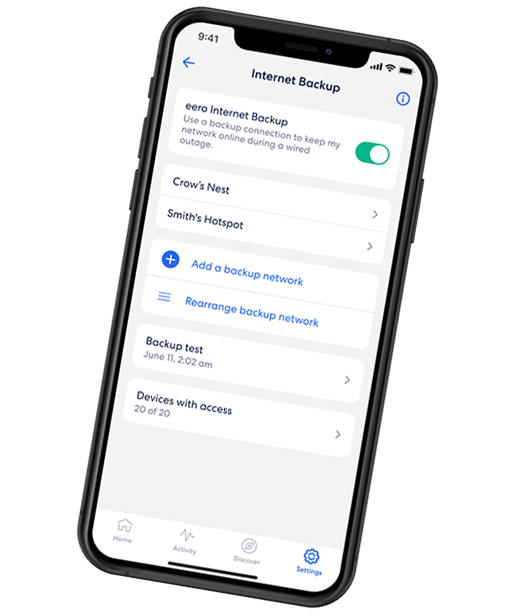
eero Internet Backup lets you add alternative wireless connections – like a personal hotspot – to keep your WiFi up and running even when your wired connection is disrupted.
eero 6 vs. eero 6+: Comparing the pros and cons
Here is a look at the strengths and trade-offs of each eero mesh WiFi system to help you determine which setup fits your home WiFi network.
eero 6
Pros:
- Affordable pricing starting at $89.99 for a single unit or $199.99 for the three-pack.
- Reliable and consistent performance for internet plans up to 500 Mbps.
- Easy setup and network management through the eero app.
- Handles up to 75 connected devices.
- Delivers up to 1,500 sq. ft. of coverage per unit (around 4,500 sq. ft. for a three-pack).
- Built-in Zigbee and Thread hub for smart home automation.
Cons:
- Limited to the 80 MHz channel width, restricting it from utilizing full Gigabit speeds.
- Only the main router includes two Ethernet ports, limiting wired connections.
- Requires additional nodes for homes over 4,000 square feet.
- Less future-proof for higher speed plan upgrades.
eero 6+
Pros:
- Supports Gigabit speeds with 160 MHz channels for higher data throughput.
- Two Gigabit Ethernet ports on every unit for wired backhaul or direct device connections.
- Easy setup and network management through the eero app
- Handles around 75 devices with better stability under heavy load.
- Built-in Zigbee and Thread hub for smart home automation.
- Great future-proofing for speed plans above 500 Mbps.
- Delivers up to 1,500 sq. ft. of coverage per unit (around 4,500 sq. ft. for a three-pack)
Cons:
- Higher price; $50 to $100 more than the eero 6 model.
- Only slight real-world speed gains on plans under 500 Mbps.
- Requires compatible devices to benefit from the 160 MHz channels fully.
Upgrade or skip? Is eero 6+ worth it?
Reviewers note a slight performance boost between eero 6 and eero 6+, with speed improvements mainly noticeable on devices that support the 160 MHz channels or on faster internet plans.
The eero 6+ is a smart upgrade for homes with plans above 500 Mbps, connecting to multiple 160 MHz-compatible devices and using the additional Gigabit Ethernet ports on each unit for wired connections and backhaul.
Can I mix eero 6 and eero 6+ units in the same network? You can use both eero models as nodes in a single mesh WiFi network since they are backward compatible. However, the mesh will operate at the capabilities of the lowest model in the setup. You won’t get the full 160 MHz performance if the connection passes through an eero 6 node.
For homes with slower plans, the eero 6 remains a dependable, low-cost alternative. However, if you’re planning to upgrade to multi-Gig speeds, add more devices or want the best performance for bandwidth- and data-heavy activities, consider upgrading to a tri-band WiFi 6E or WiFi 7 system like the eero Pro 6E or eero Max 7.
Setup tips and best practices
Setting up an eero 6 or eero 6+ mesh WiFi network is a straightforward process thanks to the user-friendly eero app. Here are a few extra steps that can help you get the strongest and most consistent signal throughout your home.
App-based setup
Both eero 6 and eero 6+ are easy to set up and manage using the eero mobile app for iOS and Android. The app automatically detects devices, guides you through naming your WiFi network and checks signal strength between nodes. You can also create user profiles, pause WiFi on specific devices and configure parental control with an eero Secure and eero Plus subscription.
The app also serves as a smart home hub to connect and control your smart home devices directly in the app without extra hardware. It integrates with Alexa for simple voice commands, enhancing your smart home automation experience.
Position your mesh nodes strategically
For optimal WiFi coverage and performance, place your eero nodes centrally in open spaces away from thick walls or large electronic appliances to reduce signal interference.
Use the one-node-per-room placement method for the nodes, positioning them between the main router and the area you want to cover. Keep the nodes about 30 to 50 feet apart for the best signal strength.
Consider wired backhaul for faster connection
If your home is already wired with Ethernet, setting up a wired backhaul can make your mesh WiFi network stable with consistent speeds. It offloads traffic from the 5 GHz band, allowing your eero system to deliver faster speeds to compatible devices.
The eero 6+ mesh WiFi system is perfect for a wired backhaul, featuring two Ethernet ports on each unit for easy wired links between nodes or direct connections to gaming consoles and PCs to deliver faster, more reliable performance with lower latency.
Enable the 160 MHz channel when needed
Do I need the 160 MHz channels in real life? The 160 MHz channel on the eero 6+ can improve data throughput, but only if your devices support it. You’ll only notice the speed boost on newer mobile devices, gaming consoles or laptops and PCs with WiFi 6 Intel AX200/AX210 network cards.
If your devices don’t support 160 MHz, the system defaults to 80 MHz, which is still sufficient for most everyday use.
Build your plan
Your perfect plan is just a click away
Get the speeds, WiFi, mobile and TV plans you need all at an affordable price. Bundle your services with Astound and see how much you can save.

Use our decision tree to guide your choice
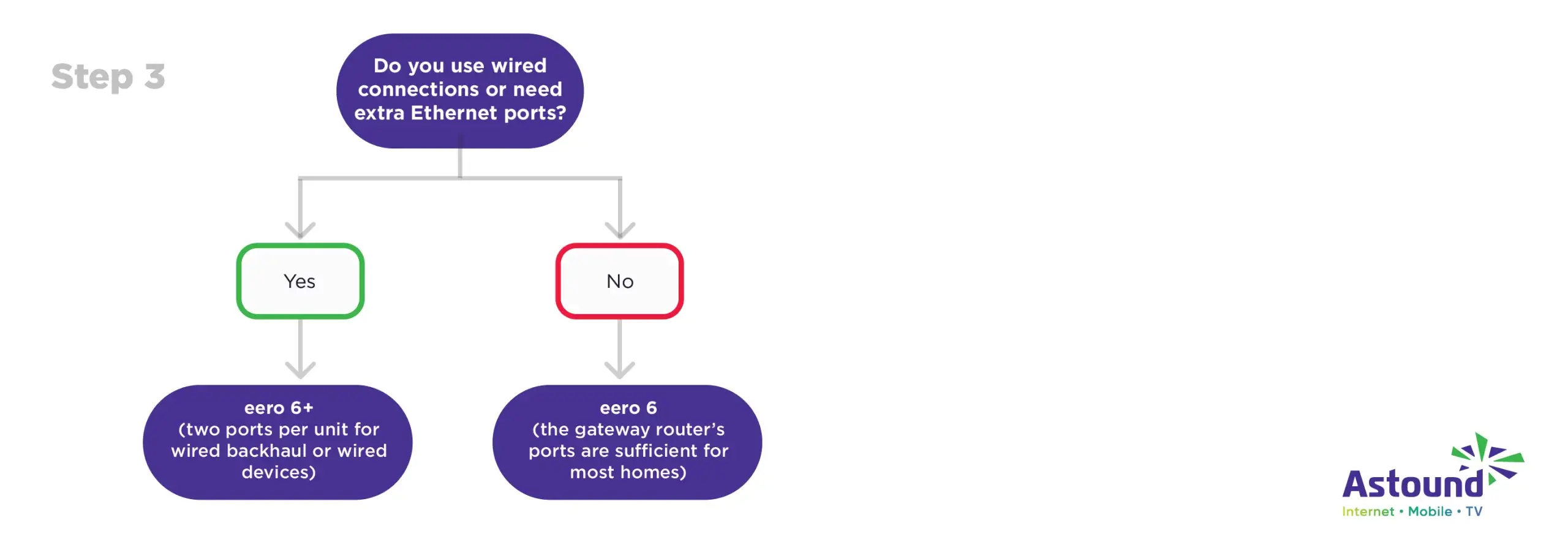
When choosing between eero 6 vs. eero 6+, the right mesh WiFi system depends on your internet speeds, home size, device count and how much flexibility you want from your WiFi network. While both provide dependable Whole Home WiFi performance, the decision tree below will help you decide which model fits your home best.
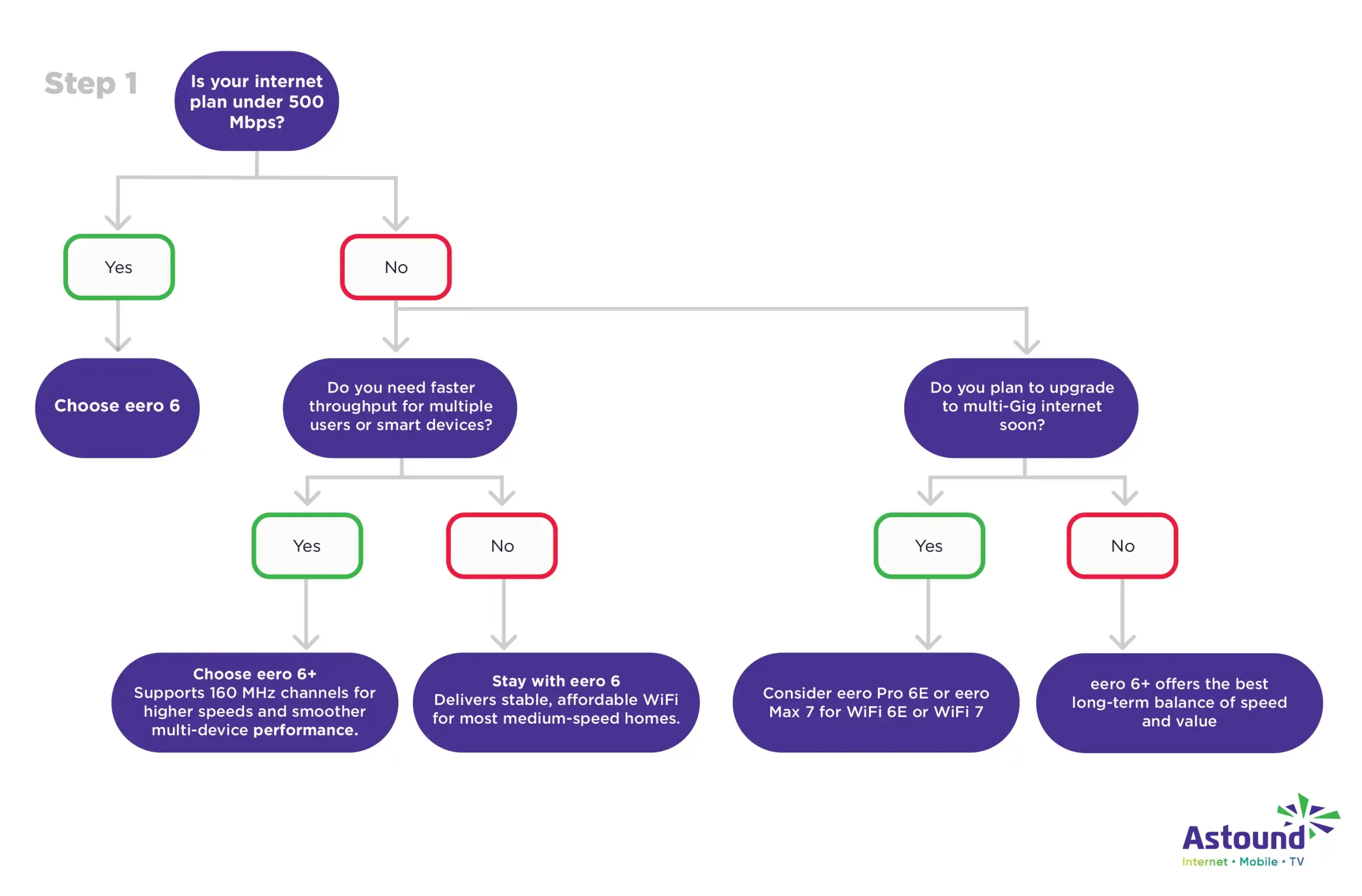
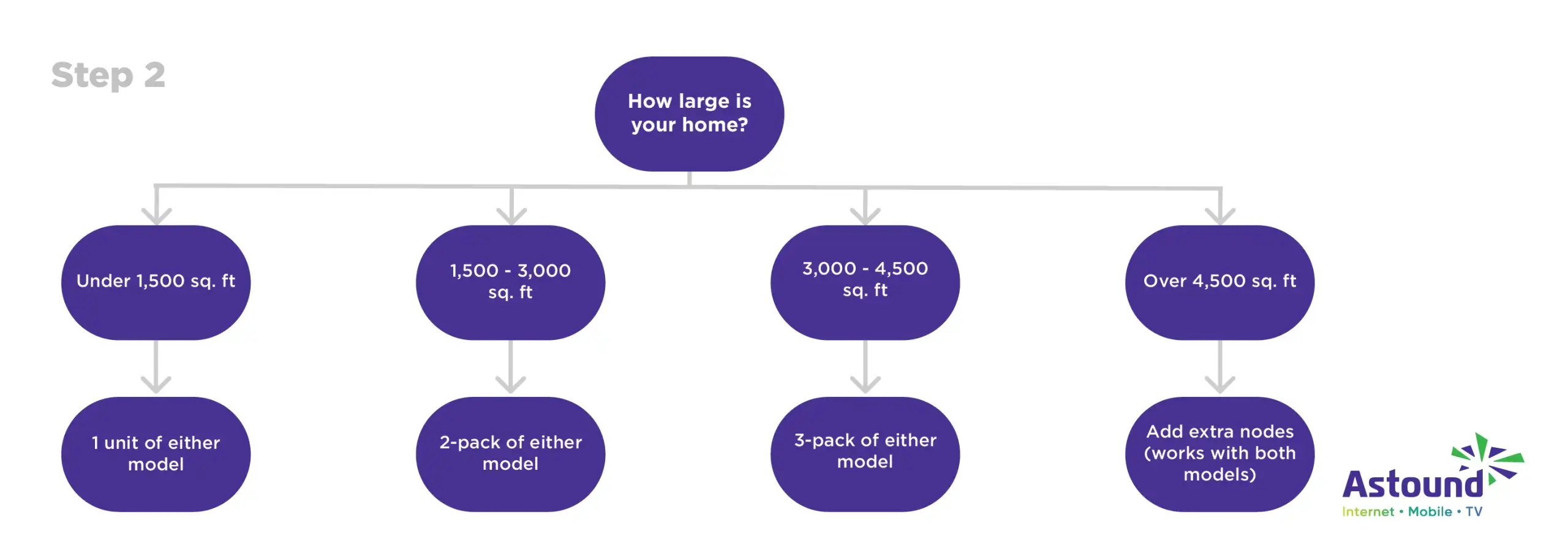
For homes with moderate speeds and fewer than 75 connected devices, eero 6 offers reliable, budget-friendly whole-home WiFi coverage.
If your plan exceeds 500 Mbps and you have multiple compatible devices or prefer wired connections, eero 6+ provides faster throughput, extra ports and room to grow.
Switching is easy
No contracts. No nonsense.
We make switching your internet services easy with on-time appointments and self‑install options to get you connected fast.
Final thoughts
When comparing eero 6 vs. eero 6+, the right choice comes down to your internet speed, device needs, budget and plans for future upgrades. The eero 6 is a more affordable option that performs well for streaming, gaming and remote work on plans up to 500 Mbps. If you want faster throughput, extra wired connections or are thinking of switching to a Gigabit plan, an eero 6+ mesh WiFi network is an ideal choice.
Whichever model you choose, you enjoy a simple app-based setup with the eero mobile app, seamless coverage across your home and a consistent connection, especially when paired with Astound’s high speed internet for optimal Whole Home WiFi.
Frequently asked questions
Does eero 6+ support tri-band or only dual-band?
eero 6+ is a dual-band WiFi 6 that operates on the 2.4 GHz and 5 GHz bands, just like eero 6. If you need a tri-band system for heavier traffic or multi-Gig speeds, consider upgrading to the eero Pro 6 or eero Pro 6E, which add an extra 5 GHz or 6 GHz band for faster data handling.
Do I need 160 MHz channels in real life?
While 160 MHz channels provide faster data throughput, you don’t necessarily need it for everyday use unless your devices support it. You need the 160 MHz channels if you have an internet speed plan over 500 Mbps or plan to upgrade your internet speed to a Gigabit speed plan.
Can I mix eero 6 and eero 6+ units in the same network?
Yes. You can mix the nodes in a single mesh WiFi network, as they are backwards compatible. However, the mesh network will default to the capabilities of the lowest model in the setup. This setup means you won’t get the full 160 MHz performance if the connection passes through an eero 6 node.
Will I see full Gigabit speeds with eero 6/6+?
eero 6+ is better equipped for a Gigabit speed plan thanks to its 160 MHz channel support and Ethernet ports on every node. On the other hand, the eero 6 is not intended to handle Gigabit speeds wirelessly and is best suited for plans up to 500 Mbps.
Which model is better for gaming or streaming 4K?
Both models can handle high-bandwidth activities, but eero 6+ has an advantage for gaming and 4K streaming due to the 160 MHz channels’ support for higher speed tiers and the extra Ethernet ports for wired connections to your gaming consoles. If your household includes multiple gamers and 4K streaming, the eero 6+ mesh WiFi system can provide more stable performance.
Related content

eero Pro 6 vs. eero 6e
Compare eero Pro 6 and eero 6E to find your perfect mesh WiFi system. Learn about performance and features to make an informed choice.

eero 7 vs. eero Pro 6E
Compare the eero 7 and eero Pro 6E mesh WiFi systems. See specs, performance, coverage and value to find the right setup for your home network.

eero 6 Plus vs. eero Pro 6E
Compare the eero 6 Plus and eero Pro 6E mesh WiFi systems. Break down specs, performance, cost and use-cases to decide which is right for you.

eero Secure vs. eero Plus
Compare eero Secure vs. eero Plus to find the best WiFi security features and parental controls and which plan is right for your home.
Create the perfect bundle
Get the speed, WiFi, mobile and TV that’s just right for you.
*Internet speeds vary, not guaranteed. Certain equipment may be required. See astound.com for details. Modem req’d. No contracts. Astound Internet is powered by fiber and connected to the premises via coaxial connection or fiber, where available. Delivery methods may vary by area. Subject to availability. Ltd-time offer; subj. to change without notice. Internet speeds under 1 Gig, pricing valid for 12 mos. Gig+ Internet speeds, pricing valid for 36 mos. Add’l fees apply for taxes, surcharges, & data overages, & are subj. to change. For details visit astound.com/fees. Enhanced WiFi or Whole Home WiFi included with Gig+; $5/mo for lower speeds or add’l devices. Regular rates apply after promo ends. Monthly price shown includes discount for enrolling in autopay & e-bill. $10 off/mo w/ bank acct autopay or $5 off/mo w/ credit/debit card autopay. Valid email & enrollment req’d. Must enroll w/in 30 days of order. Discount appears within 3 bill cycles, ends if autopay/e-bill is canceled, svcs change, or acct isn’t in good standing. ^Astound Mobile req’s Astound Internet service for activation. Max 5 lines. Equip., intl./roaming charges, taxes, fees extra & may change. Astound not liable for svc disruptions or outages. Higher rate applies if Internet not maintained. Mobile svc only in Astound areas. Pricing subj. to change. Data may slow during congestion. After 20GB, Unlimited plans slow to 768 Kbps; 1.5GB/3GB plans capped. No rollover; add’l data $10/GB. Coverage varies. Some features may require specific plans. Mobile svc includes BIAS w/ data, voice, texts & SMS. Other restrictions may apply. See astound.com/mobile for details. Offer valid for new res. customers or former customers in good standing w/out Astound svc in past 60 days. Add’l svcs, equip, premiums & tiers extra & subject to add’l charge & reg. increases. $14.99 one-time activation fee (plus install) applies & may change. Taxes & surcharges extra & subj. to change. WA RESIDENTS: unless otherwise specified, price does not include 2% Regulatory Administration Fee. Cust. responsible for any accrued charges. Subj. to credit check. Not all svcs/speeds avail. in all areas. 30-Day Money-Back Guarantee for new residential customers who cancel within 30 days of install. Maximum refund is equal to one month’s monthly recurring service fee of services & equip. ordered & installed. Refund within 60 days after conditions are satisfied. Refund not applicable to usage-based fees. All svcs are governed by Astound Customer Terms & Conditions found at astound.com/policies-disclaimers. © 2026 Radiate HoldCo, LLC d/b/a Astound Broadband. All rights reserved.
While we have made every attempt to ensure that the information contained in this site has been obtained from reliable sources, Astound is not responsible for any errors or omissions, or for the results obtained from the use of this information. All information in this site is provided “as is”, with no guarantee of completeness, accuracy, timeliness and without warranty of any kind, express or implied, including, but not limited to warranties of performance, merchantability and fitness for a particular purpose. Certain links in this site connect to other websites maintained by third parties over whom Astound has no control. Astound makes no representations as to the accuracy or any other aspect of information contained in other websites.
eero Plus is available for an additional $9.99/month and requires subscription to whole home WiFi powered by eero.