Does mesh WiFi reduce internet speed? Should you upgrade to mesh WiFi?
Mesh WiFi systems extend wireless coverage by using multiple nodes to eliminate dead zones and improve connectivity throughout a home. Speed impacts depend on the mesh design: dual-band systems may reduce throughput due to shared backhaul traffic, while modern tri-band systems with dedicated backhaul, smart routing, and Ethernet support can maintain or improve performance. Mesh networks are particularly effective in large homes, multi-story layouts, device-dense environments, and households with streaming, gaming, remote work, and smart home demands. Upgrading is most beneficial when coverage, congestion, or scalability issues limit the performance of a traditional single-router setup.

Key Takeaways:
- Mesh WiFi improves coverage by extending connectivity through multiple nodes.
- Dual-band mesh systems may reduce speeds due to shared backhaul bandwidth.
- Tri-band systems use dedicated backhaul to help preserve WiFi performance.
- Smart routing and Ethernet backhaul can improve speed and reduce latency.
- Mesh often eliminates dead zones and improves network stability.
- Large homes and multi-story layouts benefit most from mesh networks.
- Mesh helps distribute traffic across devices and reduce congestion.
- WiFi 6E and WiFi 7 mesh systems offer better performance for modern devices.
- Internet plan speeds still determine the maximum available bandwidth.
- A single router may be sufficient for smaller apartments with good coverage.
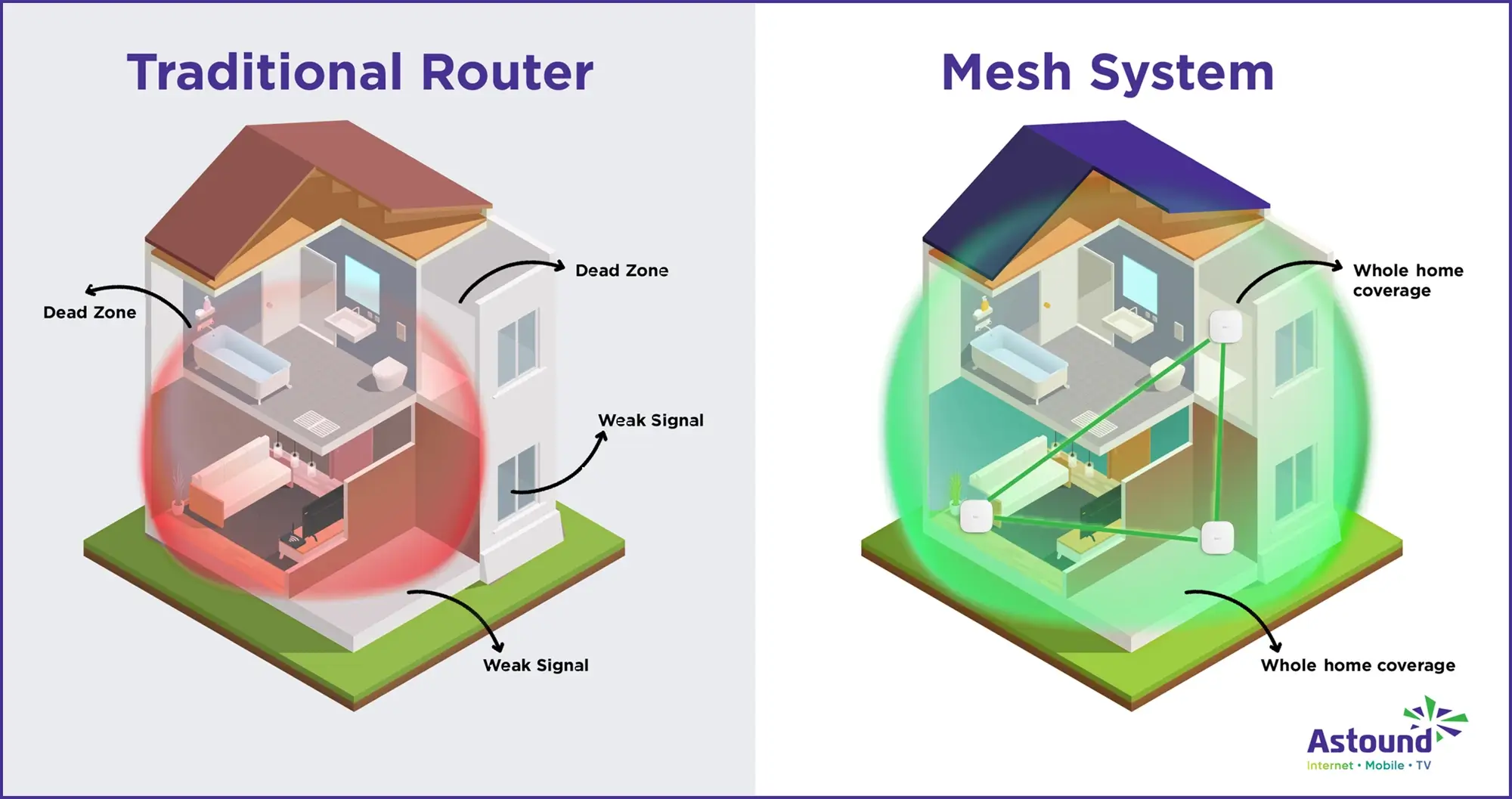
Traditional single‑router setups often leave bedrooms or basements with weak signals, forcing users to sit near the router or invest in signal boosters. A WiFi mesh system promises whole‑home coverage by placing multiple nodes around the house, but some worry that extra equipment might slow their connections.
So, does a WiFi mesh system reduce internet speed? The short answer is that wireless mesh systems can reduce throughput when they use the same radio for both backhaul and device connections, but modern tri‑band mesh systems with dedicated backhaul and advanced software can maintain speed.
What you'll learn:
- Internet speed vs. WiFi speed
- Does a WiFi mesh system reduce internet speed?
- How a WiFi mesh system handles speed and traffic
- When mesh WiFi can be faster or slower
- Should you upgrade to mesh WiFi?
- Pros and cons of upgrading to mesh WiFi
- Conclusion
- Frequently asked questions
- Looking for more topics?
Internet speed vs. WiFi speed
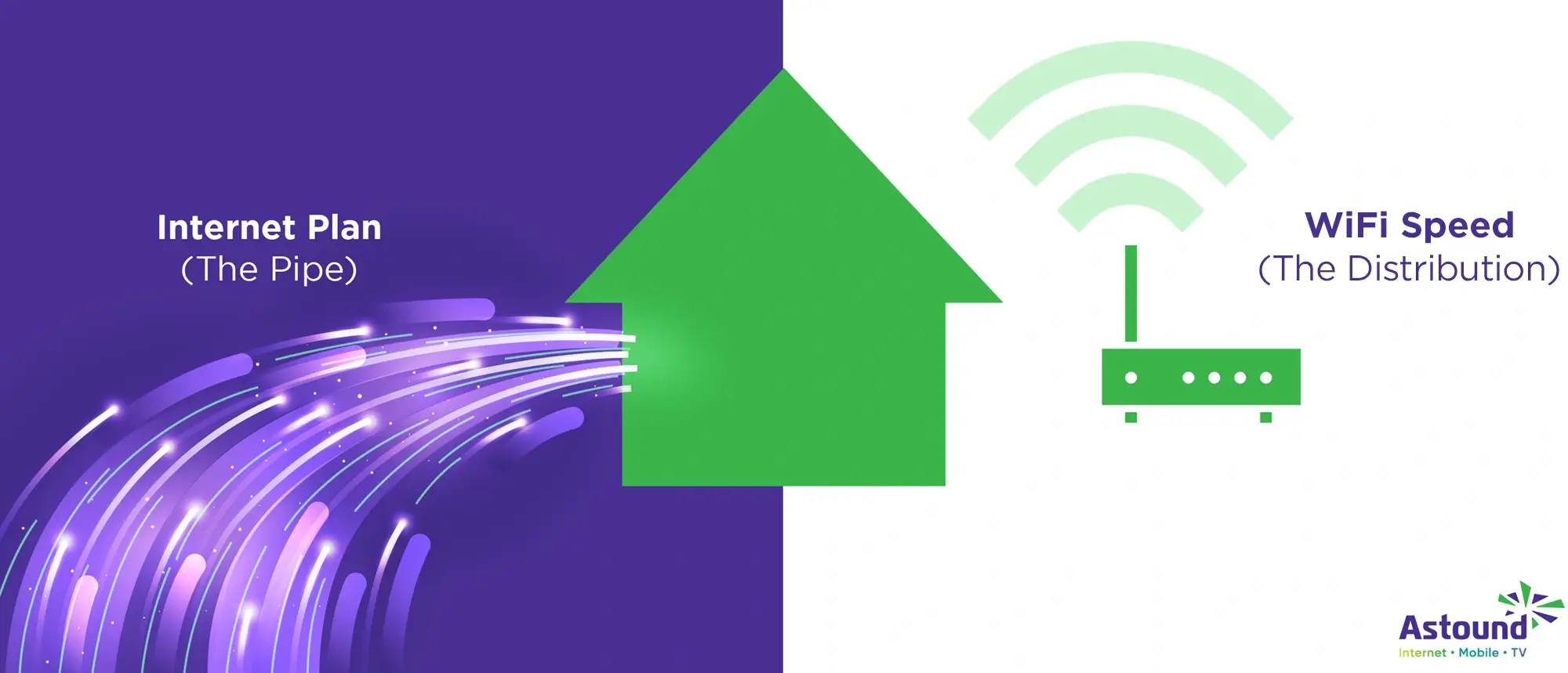
- Internet speed: Your internet plan determines the maximum throughput that the service provider, like Astound, delivers to your home, measured in Megabits per second (Mbps) or Gigabits per second (Gbps).
- WiFi speed: How quickly data travels wirelessly between your router (or mesh node) and your devices. A strong WiFi network should let you make video calls while someone else streams a movie and another person plays games online.
Dead zones, buffering and lag usually stem from poor WiFi coverage or congestion, not a slow internet plan. Mesh WiFi addresses these problems by extending the reach of your wireless network beyond what a single router can handle. However, whether you should upgrade depends on your home’s size, layout and the number of devices you connect.

Mesh WiFi with
eero Secure
Enhanced Whole Home WiFi uses multiple routers (or eeros®) to boost range, speed and stability—while eero Secure, included at no extra cost, offers parental controls, ad blocking and internet backup for constant connectivity.
Does a WiFi mesh system reduce internet speed?
Mesh WiFi uses multiple nodes to blanket your home in a web of wireless coverage. Each node connects to the main router (also called the gateway) and sometimes to other nodes. When the nodes communicate over WiFi rather than Ethernet, they must share their radio bandwidth between sending traffic to devices and relaying traffic between nodes.
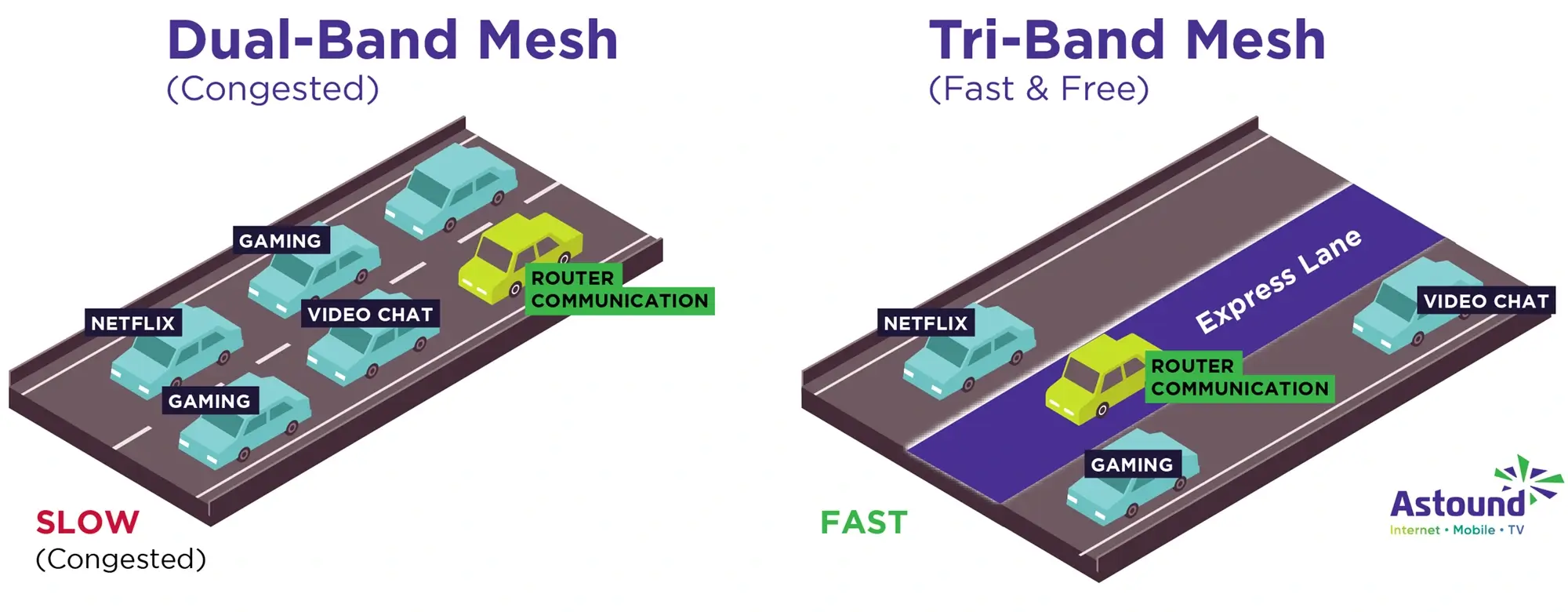
For dual-band systems, this form of wireless communication means the mesh must retransmit signals to the next node. Throughput can be reduced by as much as 50 percent for each hop.
Number of bands and why it matters
A dual‑band mesh system that uses the same 2.4 GHz and 5 GHz bands for both backhaul and devices splits its available bandwidth between device connections and inter‑node communication, which can lead to slower WiFi speeds on devices two or more hops away from the gateway.
However, not all mesh systems use a shared band for backhaul. Tri‑band mesh systems include a dedicated backhaul band so that the bandwidth used to extend the network doesn’t interfere with the bandwidth used for devices, helping to maintain faster speeds. Because device traffic and inter‑node traffic travel over separate channels, tri‑band systems avoid the 50 percent per hop penalty seen in dual‑band designs.
Modern mesh technology also improves performance through smarter routing. For example, eero TrueMesh software analyzes the network layout, interference and device locations in real time and then selects the fastest path for each data packet. A recent update to TrueMesh increased throughput by up to 50 percent and reduced mesh latency by up to 20 percent for users of eero Pro 6 and Pro 6E systems. In homes with many devices, mesh systems may speed up WiFi by distributing traffic more efficiently and avoiding congestion.
Reasons a mesh system can slow down WiFi
Even though a WiFi mesh system can improve coverage and stability, certain setups can make your WiFi feel slower. Most speed drops come from how mesh nodes share wireless airtime, where you place each node and whether your hardware and devices can keep up with your household’s demand. Here are the most common reasons a mesh system can slow down WiFi.
- Wireless backhaul and half‑duplex radios: When nodes send and receive on the same radio band, they must share the channel.
- Poor node placement: Mesh nodes need clear lines of sight to the gateway. Placing a node behind thick walls or metal appliances will weaken the signal. Low signal quality means slower speeds and higher latency.
- Old WiFi standards: Mesh systems built on WiFi 5 (802.11ac) or older standards cannot handle as much bandwidth or as many devices as systems supporting WiFi 6, WiFi 6E or WiFi 7.
- Device congestion: A single 5 GHz channel has limited capacity. If you connect dozens of phones, laptops and smart home gadgets to one node, they will compete for airtime, which reduces per‑device throughput and increases latency.
- Internet plan bottleneck: No mesh system can make your internet connection faster than the plan you pay for. Mesh is designed to distribute the available bandwidth more evenly, not to create more bandwidth.
Reasons mesh can maintain or improve WiFi speed
A WiFi mesh system does not automatically reduce speed. In many homes, it can actually hold speeds steadier or improve performance by reducing weak signal areas and spreading traffic more intelligently. Here are the most common reasons mesh can maintain or improve WiFi speed.
- Dedicated backhaul: Tri‑band systems reserve a 5 GHz or 6 GHz band exclusively for inter‑node communication, so device traffic does not compete with backhaul traffic.
- Smart routing: Advanced software like eero TrueMesh evaluates real‑time network conditions and selects the optimal path for each device.
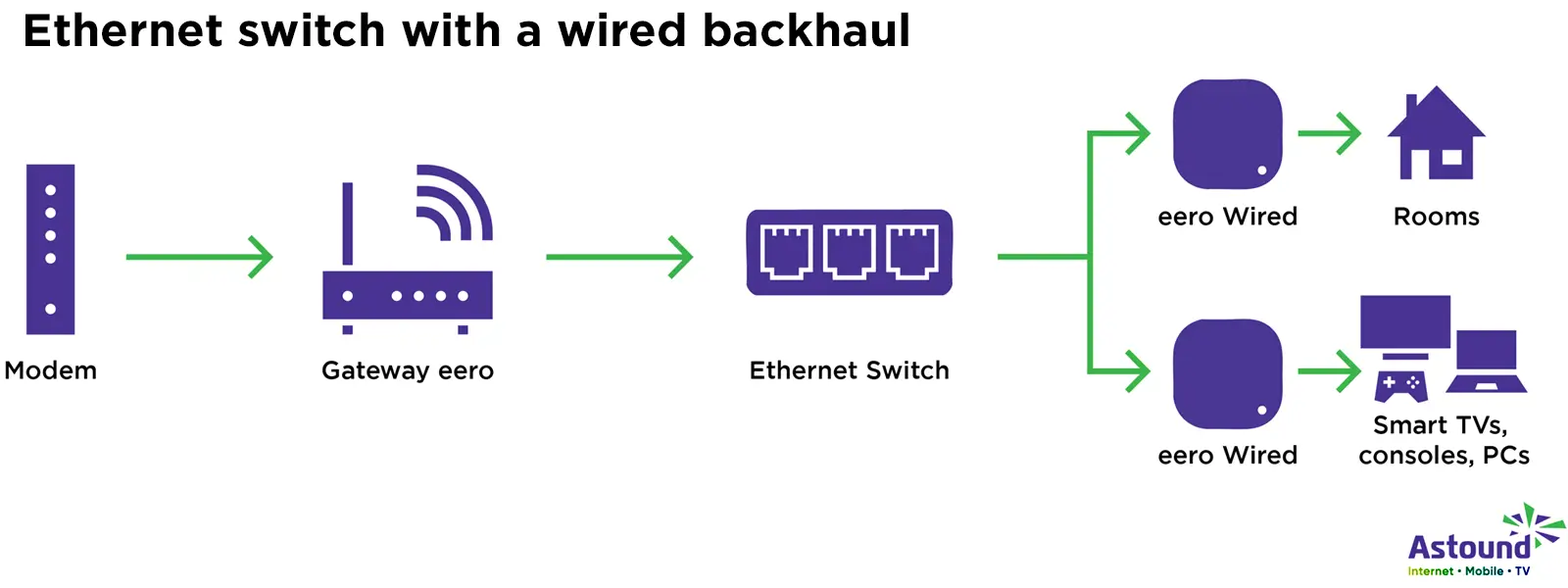
- Ethernet backhaul: Some mesh kits allow you to connect nodes with Ethernet cables. Wired backhaul eliminates wireless interference entirely and allows each node to deliver the full speed of your internet plan to nearby devices.
- Better coverage reduces retransmissions: Stronger signals and fewer dead zones mean devices don’t have to retransmit packets due to errors. Fewer retries translate into higher effective throughput and lower latency.
- Scalability: Mesh networks are modular. If you discover that one node has too many devices or poor signal quality, you can add another node to split the load and maintain high speeds.
Find your speed
What speed do you need?
Maybe you just need the essentials—or maybe you need to unleash the ultimate internet speed. Explore your options to get the best experience for every device in your home.
How a WiFi mesh system handles speed and traffic
Understanding how a mesh network works helps explain why some systems impact speed while others improve it.
In a traditional router setup, a single device acts as both modem and router. It transmits the internet connection to all wireless devices in a star‑like pattern. As you move away from the router, walls and floors weaken the signal.
Multiple nodes
Mesh networks replace the single star with a web. Multiple mesh nodes or access points are placed around your home and act as both access points for devices and relays for each other. Each node can talk to multiple other nodes rather than just sending all traffic back to a central hub.
Hardware and backhaul
In terms of hardware, each node connects to the main gateway via backhaul. Backhaul can be wireless (2.4 GHz, 5 GHz or 6 GHz) or wired (Ethernet). In dual‑band systems, the same bands used to communicate with devices also carry backhaul traffic. Tri‑band systems include a dedicated backhaul band reserved solely for inter‑node communication, ensuring device traffic does not compete with backhaul. Premium WiFi 7 mesh kits even offer quad‑band options or multi‑Gigabit Ethernet ports for wired backhaul.
Software routing
In terms of software, mesh plays a critical role in managing speed and traffic. Algorithms monitor signal strength, interference and device demand. When you start a video call near one node, the system routes your data through the least congested path, perhaps sending part of your call through the 5 GHz band and another user’s game through the 6 GHz band. This dynamic routing reduces latency and keeps throughput consistent across your home.
When mesh WiFi can be faster or slower
A mesh network’s performance is not uniform. Several factors determine whether it is faster or slower than a single router and where you will see improvements.
Home size and layout
Is mesh WiFi good for large homes? Mesh shines in large or multi‑story homes, irregular floor plans and houses with thick walls. Astound’s eero mesh system, for example, usually covers up to 7,500 square feet with a three‑pack; a single eero Max 7 router can cover roughly 2,500 square feet. By placing nodes in strategic locations, you maintain strong signal strength in every room.
Node placement
The distance and obstacles between nodes affect speed. Place nodes in open areas about halfway between the gateway and the devices they serve. Avoid placing a node on the floor, in a closet or behind metal furniture. When nodes have a weak connection to one another or to the gateway, they drop to slower transmission rates and increase latency.
Backhaul type: wired vs. wireless
Dual‑band mesh systems are more susceptible to interference because backhaul and device traffic share the same two bands. Tri‑band systems include a third band for backhaul, preserving throughput. If you need the highest possible speeds and stability, choose a mesh system that supports wired Ethernet backhaul. Wired backhaul ensures that each node delivers the full bandwidth of your internet plan to nearby devices.
Number of connected devices and congestion
Traditional routers broadcast to all devices on the same channel. When multiple devices request data simultaneously, they must wait their turn. Mesh systems distribute devices across multiple nodes and bands. With more nodes and wider channel widths, the network can handle more simultaneous data streams.
Interference and environment
Wireless signals compete with one another. Microwave ovens, Bluetooth devices, baby monitors, cordless phones, neighbors’ routers and thick materials like brick, concrete and metal all interfere with WiFi. Mesh networks mitigate interference by choosing the cleanest channel and shifting traffic to unaffected bands or nodes.
Device capabilities and WiFi standards
Your devices must support modern WiFi standards to benefit fully from a mesh system. WiFi 6 introduces OFDMA and MU‑MIMO to serve many devices simultaneously, while WiFi 7 adds Multi‑Link Operation (MLO) that allows devices to transmit and receive across multiple bands at once. When evaluating mesh systems, check the supported WiFi standard and ensure your devices can use those features.
Service provider speed and quality
Your internet plan sets the ceiling for your network’s throughput. Even the fastest mesh system cannot exceed that limit. When testing speeds, connect a computer to the gateway via Ethernet to see if you’re receiving the speeds promised by your provider.
WiFi that just works!
WiFi plans for any home
Tiny, large or somewhere in between; find WiFi coverage to fit any space. Blanket your entire home with a fast and ultra‑reliable connection.
Should you upgrade to mesh WiFi?
The decision to upgrade depends on your situation. Consider the following scenarios:
- You have WiFi dead zones: If certain rooms suffer from slow connection despite a fast internet plan, a mesh system can eliminate dead zones. Astound’s eero mesh network can blanket up to 7,500 square feet with a three‑pack, ensuring strong signals in every room.
- Remote work, streaming and gaming: Bandwidth‑heavy activities like HD video calls, live streams and online gaming demand stable low‑latency connections. The dynamic routing and dedicated backhaul of tri‑band systems maintain throughput and minimize lag. Modern mesh systems handle streaming and gaming by balancing signal distribution across nodes.
- Large or multi‑story home: Homes with multiple floors or complicated layouts often require more than one access point. Running Ethernet cable to a second router or installing extenders can be messy and may create multiple network names. Mesh systems solve this by creating one network that automatically manages handoffs as you move from room to room.
- Smart home enthusiasts: Smart homes can consist of dozens or even hundreds of IoT devices. Mesh systems with tri‑band or even quad‑band radios provide ample bandwidth for sensors and cameras. They also offer features like Thread or Zigbee hubs built into each node for easier device integration.
- You plan to upgrade devices or your internet plan soon: Investing in a WiFi 6E or WiFi 7 mesh kit ensures you can take advantage of faster connections when you upgrade your devices or internet plan.
Should I upgrade if I am in a small apartment? You may decide not to upgrade if you have a small apartment. A single WiFi 6E router placed in a central location may provide sufficient coverage and speed, especially if you can run Ethernet to a gaming console or workstation.
Mesh systems are more expensive than conventional routers, so if you only browse the web and stream occasionally, a high‑quality router may be enough. However, if your device count grows or you encounter issues, consider upgrading to mesh for better performance.
Pros and cons of upgrading to mesh WiFi
If you are dealing with dead zones or inconsistent performance, upgrading to mesh WiFi can be smart, but it comes with tradeoffs depending on your home, your devices and your budget.
Pros
- Whole home coverage: Multiple nodes eliminate dead zones and maintain strong signal strength across large or multi‑floor homes.
- Efficient traffic distribution: Mesh systems balance loads across nodes and bands, preventing congestion when many devices are active.
- Dedicated backhaul: Tri‑band designs reserve bandwidth for node‑to‑node communication, preserving device speeds.
- Smart routing and self‑healing: Mesh software automatically chooses optimal paths and reroutes traffic if a node fails.
- Scalability: You can add nodes as your home grows or your needs change; systems often support wired backhaul for future upgrades.
- Centralized management: Mobile apps offer simple setup, parental controls, guest networks and device prioritization settings.
Cons
- Potential speed reduction with wireless backhaul: Dual‑band mesh systems may halve throughput for each wireless hop due to shared radio channels.
- Higher cost: Mesh kits are more expensive than single routers, especially tri‑band or WiFi 7 models.
- Complexity: Although setup apps simplify installation optimizing node placement may require trial and error. Running Ethernet for wired backhaul involves additional effort.
- Dependent on internet plan: A mesh system cannot deliver speeds beyond those provided by your ISP, like Astound. You may need to upgrade your plan to get the benefits of a high‑end mesh kit.
In most larger or device-heavy homes, the coverage and stability gains outweigh the downsides, especially when you choose the right system and place nodes correctly.
Mobile + Internet + TV
Switch to Astound
Get Astound Mobile, Internet and TV—and save on the best services available.
Conclusion
A WiFi mesh system can reduce or improve your wireless speeds depending on its design and your home environment. Dual‑band mesh systems that use the same radios for backhaul and device connections will lose throughput on each wireless hop, so distant nodes may deliver only a fraction of your internet speed.
Tri‑band systems with dedicated backhaul, intelligent routing and optional Ethernet links often improve WiFi performance. Modern mesh networks like Astound’s eero system cover large homes up to 7,500 square feet and dynamically balance traffic to sustain speeds during streaming, gaming and remote work.
Ultimately, the question isn’t whether mesh WiFi universally slows down the internet. You’ll need to choose the right mesh architecture and configure it properly. Homeowners with dead zones, many devices or complex layouts will gain the most from mesh WiFi. Those in small spaces or on budgets may be served by a single router or a simple mesh system. Assess your internet plan, device count and coverage needs to decide if upgrading to mesh WiFi is the right move.
Frequently asked questions
Does mesh WiFi slow down my internet?
A mesh network can reduce WiFi throughput when it relies on a shared wireless backhaul, as each hop divides the available bandwidth. Dual‑band systems may lose about half of the speed per hop, whereas tri‑band systems with a dedicated backhaul, wired links or intelligent routing maintain or even improve speeds.
Is mesh WiFi better than a router?
Mesh WiFi isn’t automatically better than a single router; it depends on your needs. For small homes with few devices, a high‑quality WiFi 6E router may provide all the coverage and speed you need. For larger homes, houses with thick walls or networks with many devices, mesh systems distribute traffic more efficiently, provide seamless roaming and support modern standards like WiFi 6, 6E or 7.
Does mesh WiFi reduce bandwidth?
Mesh systems do not change your internet plan’s bandwidth. They distribute the bandwidth throughout your home. However, if a mesh kit uses wireless backhaul and has only two bands, some of that bandwidth will be consumed by inter‑node communication, leaving less for devices. Tri‑band systems with dedicated backhaul or wired connections prevent this reduction and help deliver consistent bandwidth across devices.
Related content

WiFi vs. Internet: How to get full speeds
Are there differences between WiFi and internet speeds? We explain how they work together to deliver a fast connection.

How fast are eero WiFi routers?
Explore our guide to learn about max speeds, the true potential of eero router speed and optimizing your WiFi experience.

Mesh WiFi vs. standard routers
Discover the differences between mesh and traditional routers to help you make an informed decision for your home.

Is eero a good router?
Wondering if eero is a good router? Examine eero speed, reliability, setup and WiFi features to decide what's best for you.

what is mesh wifi?
Explore mesh WiFi. Learn what it is, how it works and why it's better than traditional WiFi. Get setup tips for a better connection!

Top 9 benefits of mesh wifi
Elevate your home network with mesh WiFi. Optimize your internet to enjoy seamless coverage, faster speeds and better security.
Create the perfect bundle
Get the speed, WiFi, mobile and TV that’s just right for you.
*Internet speeds vary, not guaranteed. Certain equipment may be required to reach advertised speeds. ^^Available in select areas. DOCSIS 3.1 modem with 2.5GE physical LAN port is required for 1 Gigabit speeds and higher. See astound.com/yourspeed for why speeds may vary. To view Astound’s FCC Network Management Disclosure see astound.com/policies-disclaimers. Modem required for Internet service. No contract required. Subject to availability. Ltd-time offer; subj. to change. Internet pricing valid for 12 mos. Gig+ internet service price for life for add’l $5/mo. Excludes taxes, surcharges, & fees. Offer subj. to change. Pricing valid from start; subj. to change thereafter. Std. WiFi included. Whole Home WiFi included w/ 2 Gig+ svc; $10/mo for lower speeds or add’l devices. Regular rates apply after promotion ends. Price reflects autopay & e-bill discount for enrolling in autopay & e-bill with ACH. Valid email & enrollment required. Discount is applied within 3 bill cycles and ends if autopay or e-bill is canceled, services change, or the account is not in good standing. ^Ltd-time offer; subj. to change. Free mobile offer = 1 Unlimited line w/ monthly credit for 12 mos from activation. Std rates apply after promo or if qualifying svcs not maintained. Limit 1 free line/account; not valid on existing lines. Add’l lines avail. at extra cost. Astound Mobile req’s Astound Internet service for activation. Max 5 lines. Equip., intl./roaming charges, taxes, fees extra & may change. Astound not liable for svc disruptions or outages. Higher rate applies if Internet not maintained. Mobile svc only in Astound areas. Pricing subj. to change. Data may slow during congestion. After 20GB, Unlimited plans slow to 768 Kbps; 1.5GB/3GB plans capped. No rollover; add’l data $10/GB. Coverage varies. Some features may require specific plans. Mobile svc includes BIAS w/ data, voice, texts & SMS. Other restrictions may apply. See astound.com/mobile for details. A one-time activation fee of $14.99 (in addition to any installation fees) will be charged. WA RESIDENTS: unless otherwise specified, price does not include 2% Regulatory Administration Fee. Cust. responsible for any accrued charges. Subj. to credit check. Not all svcs/speeds avail. in all areas. 30-Day Money-Back Guarantee for new residential customers who cancel within 30 days of install. Max refund = 1 month’s recurring service & equip. fees. Refund issued within 60 days if all conditions met. Excludes usage-based fees. ©2026 Amazon.com, Inc. or its affiliates. eero and all related marks are trademarks of Amazon.com, Inc. or its affiliates. Amazon.com c/o eero LLC, 660 3rd St. San Francisco, CA. All svcs are governed by Astound Customer Terms & Conditions found at astound.com/policies-disclaimers. © 2026 Radiate HoldCo, LLC d/b/a Astound Broadband. All rights reserved.
Price for Life locks in your monthly service rate for as long as you maintain the same qualifying internet service without changes, downgrades, or disconnection. Additional fees, equipment charges, taxes, surcharges, and discounts are subject to change and are not guaranteed for life.
While we have made every attempt to ensure that the information contained in this site has been obtained from reliable sources, Astound is not responsible for any errors or omissions, or for the results obtained from the use of this information. All information in this site is provided “as is”, with no guarantee of completeness, accuracy, timeliness and without warranty of any kind, express or implied, including, but not limited to warranties of performance, merchantability and fitness for a particular purpose. Certain links in this site connect to other websites maintained by third parties over whom Astound has no control. Astound makes no representations as to the accuracy or any other aspect of information contained in other websites.
eero Plus is available for an additional $9.99/month and requires subscription to whole home WiFi powered by eero.