















eero vs. TP-Link: Which mesh WiFi system should you choose?

If parts of your home still struggle with weak WiFi or inconsistent speeds, a mesh WiFi system can help. Mesh networks use multiple devices that work together to deliver even coverage across rooms, floors and hard-to-reach areas, solving a problem a single router often can’t.
Two of the most popular mesh families today are eero and TP-Link Deco. Both offer strong performance, user-friendly apps and whole-home coverage, but they differ in their hardware options, smart home ecosystems and long-term upgrade paths.
This guide compares eero vs. TP-Link across speed, coverage, setup, smart features and value, to help you decide which system best fits your home.
What you'll learn:
What is a mesh WiFi system?
A mesh WiFi system uses two or more interconnected devices (nodes) to deliver consistent internet coverage throughout your home. Instead of depending on one router, each node works together to create a single network that automatically routes your connection through the strongest signal available.
Mesh systems can link wirelessly or through Ethernet (wired backhaul) to maintain stable speeds. This makes them ideal for larger homes, multi-story layouts or thick walls where a traditional router struggles to reach every room.

Mesh WiFi with
eero Secure
Enhanced Whole Home WiFi uses multiple routers (or eeros®) to boost range, speed and stability. While eero Secure, included at no extra cost, offers parental controls, ad blocking and internet backup for constant connectivity.
What are eero and TP-Link Deco?
What is eero?
eero builds consumer mesh WiFi systems focused on simple installation, automatic updates and reliable whole-home coverage. Current models include:
| Model | WiFi standard | Internet plan | Connected devices per three-pack |
|---|---|---|---|
| eero 6+ | WiFi 6 | Up to 1 Gbps | ~75 |
| eero Pro 6e | WiFi 6e | Up to 2 Gbps | ~100 |
| eero 7 | WiFi 7 | 2 - 5 Gbps | ~200 |
| eero 7 Max | WiFi 7 | 5 Gbps and up | 200+ |
|
Model
eero 6+ |
WiFi standard
WiFi 6 |
Internet plan
Up to 1 Gbps |
Connected devices per three-pack
~75 |
|
Model
eero Pro 6e |
WiFi standard
WiFi 6e |
Internet plan
Up to 2 Gbps |
Connected devices per three-pack
~100 |
|
Model
eero 7 |
WiFi standard
WiFi 7 |
Internet plan
2 - 5 Gbps |
Connected devices per three-pack
~200 |
|
Model
eero 7 Max |
WiFi standard
WiFi 7 |
Internet plan
5 Gbps and up |
Connected devices per three-pack
200+ |
Does eero support WiFi 7? Higher-end eero models support WiFi 6e and WiFi 7, multi-Gig wired ports and TrueMesh routing that optimizes traffic across nodes. Many units also include built-in Matter, Zigbee and Thread radios for smart home control.
Astound customers can add Whole Home WiFi powered by eero, which includes eero hardware, installation and eero Secure at no extra cost.
What is TP-Link Deco?
TP-Link’s Deco lineup includes mesh systems across different series and several performance tiers. Some current models include:
| Series | WiFi standard | Internet plan | Connected devices per three-pack |
|---|---|---|---|
| Deco X-series | WiFi 6 | Up to 1 Gbps | ~150 |
| Deco XE-series | WiFi 6e | 1 - 2 Gbps | ~200 |
| Deco BE-series | WiFi 7 | 2 - 10 Gbps | ~200 |
|
Series
Deco X-series |
WiFi standard
WiFi 6 |
Internet plan
Up to 1 Gbps |
Connected devices per three-pack
~150 |
|
Series
Deco XE-series |
WiFi standard
WiFi 6e |
Internet plan
1 - 2 Gbps |
Connected devices per three-pack
~200 |
|
Series
Deco BE-series |
WiFi standard
WiFi 7 |
Internet plan
2 - 10 Gbps |
Connected devices per three-pack
~200 |
The BE-series, including models like the Deco BE65, BE85 and BE95, uses WiFi 7 radios, wider channels and improved MU-MIMO performance for higher speeds on supported devices. Deco units are managed in the TP-Link Deco app, which centralizes setup, parental controls and HomeShield security tools.
How they position themselves
eero focuses on reliability, self-optimizing performance, security and effortless setup. Its Amazon integration and built-in smart home radios make it appealing not only to Alexa and Matter-based homes but also homes with many connected devices.
The TP-Link Deco series targets versatility, performance and offers a wide range of units from budget WiFi 6 models to premium WiFi 7 systems with multi-Gig speeds. However, Deco caters to users who want granular control, advanced security options or greater WiFi 7 throughput.
Network & Coverage
Astound's got you covered
Our mobile service runs on a nationwide network with 5G service in all 50 states giving you reliable nationwide coverage you can count on.

Specifications and performance comparison
Mesh performance depends on wireless standards, backhaul flexibility, hardware limits and real-world layout. Here’s how eero and TP-Link compare in speed, range and connection stability.
Wireless standard and support
Both eero and TP-Link offer mesh systems spanning WiFi 6, WiFi 6E and WiFi 7. These standards differ in bandwidth efficiency, supported channel widths, peak speeds and latency performance. Below is a detailed look at how each brand’s lineup maps to current-generation WiFi standards.
| Wireless standard | Included models |
|---|---|
| WiFi 6 | eero 6+; Deco X20, X55, X60, X68, X90 and others |
| WiFi 6e | eero Pro 6e; Deco XE75, XE5300, XE200 |
| WiFi 7 | eero 7, eero Max 7; Deco BE65, BE85, BE95 |
|
Wireless standard
WiFi 6 |
Included models
eero 6+; Deco X20, X55, X60, X68, X90 and others |
|
Wireless standard
WiFi 6e |
Included models
eero Pro 6e; Deco XE75, XE5300, XE200 |
|
Wireless standard
WiFi 7 |
Included models
eero 7, eero Max 7; Deco BE65, BE85, BE95 |
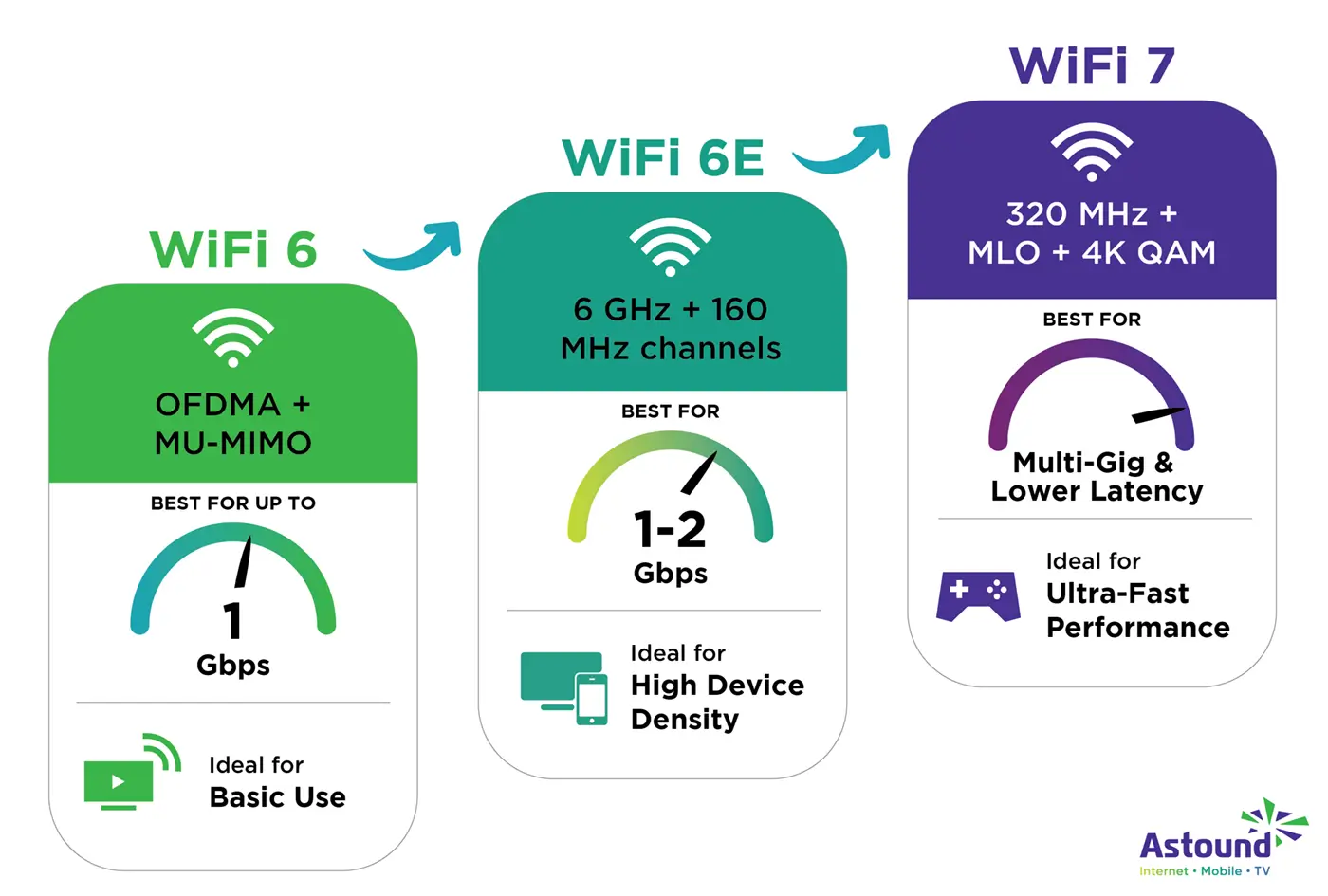
What’s the difference between WiFi 6, WiFi 6e and WiFi 7? WiFi 6, WiFi 6e and WiFi 7 are successive generations of wireless standards that improve speed, efficiency and how well a network handles many devices at once. Here’s a look at some of the differences between standards.
| Wireless standard | Features
|
|---|---|
| WiFi 6 (802.11ax) | ● Introduces OFDMA and uplink/downlink MU-MIMO ● Best for homes on up to 1 Gbps internet plans ● Available on eero 6+ and multiple Deco X-series models |
| WiFi 6e (802.11ax-E) | ● Adds 6 GHz band (low interference, high throughput) ● Supports wider 160 MHz channels ● Ideal for 1- 2 Gbps plans and dense device environments ● Enabled on eero Pro 6e and Deco XE-series |
| WiFi 7 (802.11be) | ● Adds 320 MHz channels, Multi-Link Operation (MLO) and improved modulation (4K QAM) ● Enables multi-Gig wireless performance and greatly reduces latency ● Designed for 2 - 10 Gbps internet plans depending on model ● Supported on eero 7, eero Max 7, Deco BE65, BE85 and BE95 |
|
Wireless standard
WiFi 6 (802.11ax) |
Features
● Introduces OFDMA and uplink/downlink MU-MIMO● Best for homes on up to 1 Gbps internet plans ● Available on eero 6+ and multiple Deco X-series models |
|
Wireless standard
WiFi 6e (802.11ax-E) |
Features
● Adds 6 GHz band (low interference, high throughput) ● Supports wider 160 MHz channels ● Ideal for 1- 2 Gbps plans and dense device environments ● Enabled on eero Pro 6e and Deco XE-series |
|
Wireless standard
WiFi 7 (802.11be) |
Features
● Adds 320 MHz channels, Multi-Link Operation (MLO) and improved modulation (4K QAM) ● Enables multi-Gig wireless performance and greatly reduces latency ● Designed for 2 - 10 Gbps internet plans depending on model ● Supported on eero 7, eero Max 7, Deco BE65, BE85 and BE95 |
Throughput and range
Coverage and throughput depend on the layout of a home, wall materials and the number of devices sharing the network, but each brand publishes general guidance to help estimate how many nodes you’ll need.
According to eero, a single eero 6+ covers up to 1,500 square feet, while the eero Pro 6e extends coverage to about 2,000 square feet per unit. The eero Max 7 increases range and throughput further, supporting multi-Gigabit speeds and up to 2,500 square feet per node, making it suitable for large or multi-level homes.
From TP-Link, coverage varies by Deco series. The Deco X-series (WiFi 6) advertises up to roughly 1,900 square feet per node. The Deco XE75 (WiFi 6E) covers up to about 2,400 square feet per node. TP-Link’s WiFi 7 model, the Deco BE65, lists up to ~2,600 square feet per node, with larger BE-series models supporting even more throughput depending on configuration.
Both eero and TP-Link use multi-band architectures to distribute traffic and maintain stable speeds between nodes. eero’s tri-band and WiFi 7 systems, like the eero Pro 6e, eero 7 and eero Max 7, are engineered to sustain higher throughput over distance, especially when paired with multi-Gig internet from Astound.
Find your speed
What speed do you need?
Maybe you just need the essentials—or maybe you need to unleash the ultimate internet speed. Explore your options to get the best experience for every device in your home.
Real world user experience
Most user feedback highlights eero’s smoother, faster set up and better performance at range. Multiple Deco users report recurring stability problems, especially on WiFi 6e and WiFi 7 units.
In one r/TpLink thread, a Deco XE75 Pro owner wrote that the system became “slow and unstable. Every few hours, they all drop WiFi and my devices lose connection”. Another user on TP-Link’s official forum noted that simply opening the Deco app caused the network to disconnect, stating, “Every time I open the Deco app, my internet disconnects”.
Issues are reported across earlier WiFi 6 units as well. A Deco X20 owner summarized their experience as repeated system failures: “It kept shutting down every 5–6 hours and I would have to reset all the other links”.
Overall, while many households find TP-Link Deco adequate for everyday streaming and browsing, user reports show more frequent stability or firmware-related issues on certain models.
Backhaul options, number of bands and wired ports
How your mesh system moves data between its nodes, backhaul, plays a significant role in network speed and stability. Both brands support wireless backhaul and wired Ethernet backhaul, but differ in radio bands and maximum wired-port throughput.
eero
- Many models use dual-band or tri-band radios (e.g., one 2.4 GHz, one 5 GHz and sometimes 6 GHz) to separate device traffic from node-to-node communication.
- Wired backhaul ranges widely: early WiFi 6 models come with two 1 Gbps Ethernet ports; the eero Max 7 supports up to two 10 Gbps ports (plus two 2.5 Gbps ports) for multi-Gig connections.
- With these multi-Gig wired ports, eero systems work well for ISPs delivering 2 Gbps or higher internet tiers, like Astound.
TP-Link Deco
- Deco models span dual-band (WiFi 6 X-series) to tri-band (WiFi 6e XE-series) and even quad-band or high-end tri-band WiFi 7 (BE-series).
- Many high-end Deco models offer multi-Gig Ethernet ports (e.g., one 10 Gbps combo port + one 10 Gbps WAN/LAN + two 2.5 Gbps LAN).
- The wireless backhaul benefits from WiFi 6e’s 6 GHz band (for XE-series) or WiFi 7’s wider channels and Multi-Link Operation (for BE-series).
Switch & save
Astound is the #1 cable ISP
Stream live content, work, surf, game and connect to multiple devices with speeds up to 1500* Mbps through our ultra‑reliable fiber‑powered network.*

Setup, app and ecosystem integration
eero and TP-Link Deco both emphasize quick, app-based setup and management, but they differ in how they integrate with smart home ecosystems and expose advanced controls.
Setup process and app usability
eero
The eero app walks users through connecting the main router, placing additional nodes, naming the network and verifying signal strength between units. Firmware updates are delivered automatically and the system adjusts network performance without requiring manual tuning. Within the app, users can run speed tests, view connected devices, create profiles and apply access controls from a single dashboard.
TP-Link Deco
TP-Link Deco systems are configured through the Deco app, which prompts users to plug in each unit, follow on-screen LEDs, assign locations and bring each node online. Once setup is complete, the app provides network status, a device list, guest network settings and parental controls.
Ecosystem: eero with Alexa/Amazon vs. TP-Link with Alexa/Google
eero
eero integrates with the Amazon ecosystem and supports Alexa voice control for actions such as pausing WiFi for a profile, checking network status or enabling a guest network. Many newer eero models include built-in support for Matter, Zigbee and Thread, allowing them to function as smart home hubs for compatible lights, locks and sensors without requiring separate bridges.
TP-Link Deco
TP-Link Deco systems work with both Amazon Alexa and Google Assistant for voice commands like turning the guest network on or off, checking the status of the connection or pausing internet access for specific devices. Deco networks also integrate with TP-Link’s Kasa and Tapo smart home product lines, so compatible plugs, bulbs and cameras can be managed alongside WiFi settings within TP-Link’s ecosystem of apps.
Extra features and subscriptions
-
TP-Link Deco systems include built-in parental controls and basic security scanning managed through the Deco app. Users can set time limits, create profiles, block categories and monitor device usage without additional fees. For expanded protection, TP-Link offers HomeShield Pro.
- Advanced network security
- Advanced parental control reports, filters and time limits
- Device prioritization (QoS)
- Enhanced network analytics and reporting
According to TP-Link, HomeShield Pro adds:
HomeShield Pro is available as a monthly or annual subscription and covers the entire Deco network. VPN services, if needed, must be sourced separately, as Deco does not include a built-in VPN for client devices and only a basic router-level VPN passthrough, depending on model.
Value and pricing
Pricing for mesh systems varies by model, generation and number of units.
eero
For eero, pricing scales with WiFi standard and performance. A 3 pack of eero 6+ lists at $299.99 on eero.com, with higher tier systems like eero Pro 6e and eero 7 and eero Max 7 positioned as premium options with multi-Gig ports and larger per node coverage.
All current models are backward compatible, so you can add newer units to an existing eero network and upgrade high traffic rooms first while keeping older nodes in lighter use areas.
Can I rent eero before buying?
Astound customers can get Whole Home WiFi powered by eero without buying the hardware upfront. The eero system is available as an add-on to Astound’s Gig and multi-Gig internet plans, with equipment provided and kept up to date as newer WiFi standards are released.
eero Secure is included at no extra cost and customers can upgrade to eero Plus for additional protection if needed.
If you already have older eero devices, you can add eero 7 or eero Pro 6E to the same network, expanding coverage over time or upgrading only the busiest areas first. Since WiFi 8 isn’t projected to see widespread adoption until around 2029, choosing a WiFi 7 mesh system now provides several years of up-to-date performance while remaining compatible with current devices.
TP-Link Deco
TP Link Deco covers a wider range of price points across its WiFi 6, WiFi 6e and WiFi 7 families. Deco X series kits are positioned as value-oriented WiFi 6 systems, while Deco XE series adds 6 GHz support for higher bandwidth backhaul and Deco BE series introduces WiFi 7 with significantly higher peak throughput and capacity.
TP Link sells these systems primarily as multi-packs and most Deco families support adding extra nodes later to extend coverage, although some advanced capabilities such as WiFi 7 speeds or 6 GHz links depend on using matching models and mixed networks operate to the level of the slowest unit.
eero vs. TP-Link: Pros and cons
| System | Pros | Cons |
|---|---|---|
| eero | ● Supports WiFi 6, 6e and 7 ● Automatic firmware and security updates ● Backward compatible across eero generations ● Multi-Gig Ethernet ports on WiFi 7 models ● Built-in smart home support ● Parental controls |
● Higher purchase price compared to TP-Link systems ● Fewer advanced manual settings ● Amazon ecosystem integration may not suit all users |
| TP-Link Deco | ● Broader selection of WiFi 7 models across price tiers ● Features like built-in QoS on some units |
● Security and parental controls require HomeShield Pro ● Some models offer limited Ethernet speeds ● Not all Deco models can be mixed ● No built-in client VPN service |
|
System
eero |
Pros
● Supports WiFi 6, 6e and 7● Automatic firmware and security updates ● Backward compatible across eero generations ● Multi-Gig Ethernet ports on WiFi 7 models ● Built-in smart home support ● Parental controls |
Cons
● Higher purchase price compared to TP-Link systems● Fewer advanced manual settings ● Amazon ecosystem integration may not suit all users |
|
System
TP-Link Deco |
Pros
● Broader selection of WiFi 7 models across price tiers● Features like built-in QoS on some units |
Cons
● Security and parental controls require HomeShield Pro● Some models offer limited Ethernet speeds ● Not all Deco models can be mixed ● No built-in client VPN service |
Which should you choose?
If you live in a smaller space or need a budget-friendly mesh system and don’t require multi-Gig internet, many TP-Link Deco X- or XE-series kits can be sufficient. These systems are designed to provide whole-home coverage for everyday tasks like streaming, video calls and general smart home use at a lower entry cost than most WiFi 7 options.
For homes with more square footage, multiple floors or a high number of connected devices and if you subscribe to higher-speed internet tiers, the eero family (especially WiFi 6e and WiFi 7 models) is better aligned. Systems like eero Pro 6e, eero 7 and eero Max 7 support multi-Gig backhaul, higher throughput and are built for demanding use-cases such as online gaming, 4K/8K streaming or home offices that rely heavily on cloud services.
Your smart home platform is another factor. If you want tight integration with Alexa and built-in Matter/Thread/Zigbee support, eero is structured to act as a central hub for many devices. If you already use Kasa or Tapo smart plugs, bulbs or cameras and prefer managing networking and devices within TP-Link’s ecosystem, a Deco system may fit your preferences.
Already own one? When to upgrade or switch
Stay with your current system if:
- Coverage and speeds meet your daily usage needs
- Video calls, streaming and smart devices run without noticeable slowdowns
- You don’t plan to increase your internet speed or device count significantly
Consider upgrading within the same brand if:
- You’ve raised your internet plan into the Gig or multi-Gig range
- You’ve moved to a larger or multi-level home
- You’ve added many smart home devices and started to see congestion or dead zones
For eero users, this could mean adding eero 7 or eero Max 7 nodes in high-traffic areas while keeping older units in less demanding rooms. For TP-Link users, it may mean moving from a Deco X-series to a Deco XE- or BE-series kit to take advantage of WiFi 6e or WiFi 7.
Consider switching ecosystems if:
- You’re standardizing around Amazon/Alexa and want eero’s smart home hub capabilities and integration with ISP offerings like Astound
- Or you’re consolidating around TP-Link’s Kasa/Tapo ecosystem and prefer Deco’s place within that device family
WiFi that just works!
WiFi plans for any home
Tiny, large or somewhere in between; find WiFi coverage to fit any space. Blanket your entire home with a fast and ultra‑reliable connection.
Conclusion
Both eero and TP-Link Deco deliver whole-home mesh WiFi, but they emphasize different strengths.
TP-Link Deco offers a wide range of WiFi 6, 6e and 7 systems across multiple price points, making it an attractive option for smaller homes or users already invested in TP-Link’s Kasa and Tapo smart home devices.
eero focuses on streamlined setup, automatic updates, backward compatibility and higher-end WiFi 6e/7 performance, with models built for multi-Gig internet tiers and dense device environments. When paired with Astound’s Whole Home WiFi powered by eero, customers can add mesh coverage without buying hardware upfront, receive eero Secure at no extra cost and optionally upgrade to eero Plus for additional security and privacy features.
The best choice depends on your home layout, device count, internet speed and preferred ecosystem. If you prioritize broad model choice and lower initial cost, a TP-Link Deco system may be a good fit. If you want a mesh network that’s tightly integrated with your ISP, ready for multi-Gig speeds and designed for simple expansion and smart home control, eero is a strong option to consider.
Frequently asked questions
Which is better for large homes: eero or TP-Link Deco?
For larger or multi-story homes, eero’s WiFi 6e and WiFi 7 models, such as eero Pro 6e, eero 7 and eero Max 7, offer higher throughput, multi-Gig backhaul and stronger long-range performance. TP-Link’s Deco BE-series can also support large homes, but eero’s higher-end systems are optimized for multi-Gig internet tiers and dense device environments.
Do eero and TP-Link Deco support multi-Gig internet plans?
Yes. eero’s WiFi 6e and WiFi 7 models support multi-Gig Ethernet ports, with eero Max 7 offering up to 10 GbE. TP-Link’s WiFi 7 Deco units (such as the BE-series) also support multi-Gig speeds, though Ethernet port speeds vary by model.
Can I mix older and newer devices in the same eero or TP-Link Deco network?
eero systems are fully backward compatible, so eero 7 and eero Pro 6e can operate alongside older eero models. TP-Link Deco supports mixing across many generations, but compatibility depends on the specific models and combined networks will operate at the capabilities of the slowest unit.
Do eero and TP-Link offer built-in security features?
Both offer security options. eero includes eero Secure at no extra cost, with the option to upgrade to eero Plus for advanced features like VPN, malware protection and ad blocking. TP-Link Deco includes basic parental controls and security scanning, while HomeShield Pro (subscription) adds intrusion prevention, IoT protection, enhanced parental controls and detailed analytics.
Related content

eero vs. Google WiFi
Compare eero vs. Google WiFi system for speed, coverage, setup, ecosystem and value. Find the right mesh WiFi solution for your home.

eero vs. Ubiquiti in 2025
Investigate eero and Ubiquiti mesh WiFi systems to learn which delivers better coverage, speed and value.

eero vs. Netgear
Compare eero vs. Netgear mesh WiFi systems, including setup, performance, features and value. Plus: how Astound eero fits into the picture.

Is eero a good router?
Wondering if eero is a good router for 2025? We examine WiFi speed, reliability, setup and features supported by eero to help you decide if it’s right for your home.

eero Secure vs. eero Plus
Compare eero Secure vs. eero Plus to find the best WiFi security features and parental controls and which plan is right for your home.

Top 9 benefits of mesh WiFi
Elevate your home network with mesh WiFi. Enjoy seamless coverage, fast speeds and enhanced security. Optimize your internet with mesh WiFi.
Create the perfect bundle
Get the speed, WiFi, mobile and TV that’s just right for you.
*Internet speeds vary, not guaranteed. Certain equipment may be required. See astound.com for details. Modem req’d. No contracts. Astound Internet is powered by fiber and connected to the premises via coaxial connection or fiber, where available. Delivery methods may vary by area. Subject to availability. Ltd-time offer; subj. to change without notice. Internet speeds under 1 Gig, pricing valid for 12 mos. Gig+ Internet speeds, pricing valid for 36 mos. Add’l fees apply for taxes, surcharges, & data overages, & are subj. to change. For details visit astound.com/fees. Enhanced WiFi or Whole Home WiFi included with Gig+; $5/mo for lower speeds or add’l devices. Regular rates apply after promo ends. Monthly price shown includes discount for enrolling in autopay & e-bill. $10 off/mo w/ bank acct autopay or $5 off/mo w/ credit/debit card autopay. Valid email & enrollment req’d. Must enroll w/in 30 days of order. Discount appears within 3 bill cycles, ends if autopay/e-bill is canceled, svcs change, or acct isn’t in good standing. ^Astound Mobile req’s Astound Internet service for activation. Max 5 lines. Equip., intl./roaming charges, taxes, fees extra & may change. Astound not liable for svc disruptions or outages. Higher rate applies if Internet not maintained. Mobile svc only in Astound areas. Pricing subj. to change. Data may slow during congestion. After 20GB, Unlimited plans slow to 768 Kbps; 1.5GB/3GB plans capped. No rollover; add’l data $10/GB. Coverage varies. Some features may require specific plans. Mobile svc includes BIAS w/ data, voice, texts & SMS. Other restrictions may apply. See astound.com/mobile for details. Offer valid for new res. customers or former customers in good standing w/out Astound svc in past 60 days. Add’l svcs, equip, premiums & tiers extra & subject to add’l charge & reg. increases. $14.99 one-time activation fee (plus install) applies & may change. Taxes & surcharges extra & subj. to change. WA RESIDENTS: unless otherwise specified, price does not include 2% Regulatory Administration Fee. Cust. responsible for any accrued charges. Subj. to credit check. Not all svcs/speeds avail. in all areas. 30-Day Money-Back Guarantee for new residential customers who cancel within 30 days of install. Maximum refund is equal to one month’s monthly recurring service fee of services & equip. ordered & installed. Refund within 60 days after conditions are satisfied. Refund not applicable to usage-based fees. All svcs are governed by Astound Customer Terms & Conditions found at astound.com/policies-disclaimers. © 2026 Radiate HoldCo, LLC d/b/a Astound Broadband. All rights reserved.
While we have made every attempt to ensure that the information contained in this site has been obtained from reliable sources, Astound is not responsible for any errors or omissions, or for the results obtained from the use of this information. All information in this site is provided “as is”, with no guarantee of completeness, accuracy, timeliness and without warranty of any kind, express or implied, including, but not limited to warranties of performance, merchantability and fitness for a particular purpose. Certain links in this site connect to other websites maintained by third parties over whom Astound has no control. Astound makes no representations as to the accuracy or any other aspect of information contained in other websites.
eero Plus is available for an additional $9.99/month and requires subscription to whole home WiFi powered by eero.