Bring Your Own Device
What is BYOD?
Bring Your Own Device, or BYOD, allows mobile customers to switch their unlocked, compatible phone from their current wireless carrier network to a new wireless carrier without the requirement to purchase a new device, hence reducing the out-of-pocket cost when switching.
In addition to keeping their unlocked, compatible device, BYOD customers also have the option to keep their mobile phone number. Astound Mobile is available to existing Astound Internet customers.
Phone eligibility
Not all phones are compatible between mobile carriers. To get started, make sure your phone meets the following requirements:
- The phone is paid off in full before requesting the device unlock.
- The phone isn’t reported lost or stolen or involved with fraudulent activity.
- The account associated with the device is in good standing, with no outstanding balance.
- The phone is compatible with Astound Mobile.
Check compatibility by using your phone's IMEI number
Start by looking up your IMEI number to see if your phone is compatible and unlocked.
IMEI stands for “International Mobile Equipment Identity.” Every phone has this unique 15 digit number that tells you the make, model, and if it’s ready to use on our network. The good news is most phones are compatible.
Let's check your current phone's compatibility.
Finally, we'll need your phone's IMEI number to determine if it's compatible with our network:
Good News!
Your phone is compatible with our network and eSIM supported and Physical SIM supported.
We're Sorry
It doesn't look like your device is compatible with our network.
We're Sorry
We were unable to determine your device's compatibility. You may continue placing your order.
Finding IMEI # on:
You can either dial *#06# or find it in Settings as shown below.
iPhone:
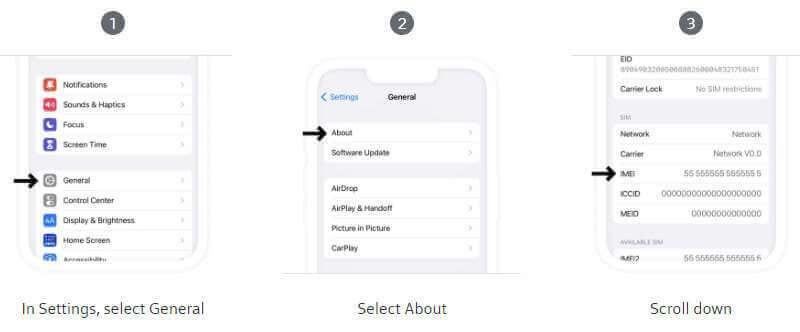
Settings -> General -> About -> IMEI
Galaxy/Pixel:
Settings -> About Phone -> IMEI
Find your phone's IMEI number
Here are a couple ways you can find your phone’s IMEI number.
IMEI Status Check with your phone app:
To do a Status Check, open your phone app and using the keypad simply dial *#06# to get the IMEI for your device.
Settings menu
Or, you can find the number in your phone’s settings. Here’s how:
- iPhone: Go to Settings, tap General, then About
- Android: Go to Settings, tap About Phone, then Status
- Windows Phone: Go to Settings, tap About, then More information
How to find your iPhone’s IMEI number
Your IMEI number is your iPhone’s unique ID determining if your device is compatible with the network.
How to find your iPhone’s IMEI number:
Go to Settings, 1) select General, 2) select About, 3) then scroll down to find the IMEI number listed.
Unlock your phone
If you’re bringing your phone to Astound Mobile, you might be asked to unlock your phone from your previous carrier.
What does unlocking mean?
Many phones are locked to the carrier they were originally purchased from. You can’t bring your phone to a new carrier until it’s unlocked.
There are a few reasons a phone might be locked:
- It’s still financed with your carrier. In other words, you owe device payments each month. Usually, carriers will only unlock your phone once it’s fully paid off
- It’s a prepaid phone. Carriers sometimes treat these kinds of phones differently, so you’ll have to talk to your carrier about their specific policy
- Carrier policies vary in general. Some carriers will automatically unlock their customers’ phones after a period of time. Some carriers will only unlock your phone if you ask them
How do I unlock my phone from my specific carrier?
First, if you still owe money on your phone, you’ll have to pay it off completely before your carrier will complete your unlock request.
Then, you can follow your carrier’s process.
- Verizon: Ask Verizon to unlock your phone by calling them at (888) 294-6804 or dialing *611 from your Verizon phone
- AT&T: Ask AT&T to unlock your phone by following instructions on the ATT website
- T-Mobile: Call T-Mobile at (877) 453-1304 and ask them to unlock your phone
- Other Carriers: Call your carrier’s customer service number and ask them to unlock your phone
What is a SIM?
SIM stands for Subscriber Identity (or identification) Module. It’s the way a mobile device like a phone works on a specific service provider’s network. Without a SIM, or with the wrong one, your phone can’t connect to the mobile network you subscribe to.
SIMs are one of the most important parts of your phone: They let it “talk” to our network so that you can use your phone for whatever you need.
Most phones still use a small SIM card, but a growing number of phones are now using an electronic SIM (eSim) which can make it even easier to switch to Astound Mobile
Video tutorial: How to insert your SIM card into an iPhone
Video tutorial: How to insert a SIM card in your Android phone
Purchase a SIM card to select and activate a plan
Select your plan
The SIM card stores your account information and connects your device to the network. Your phone may have two options for SIM cards, a digital eSIM or a Physical SIM card
Your SIM card will arrive in a few days. Once you receive it you can then activate it online from your Astound account, or by calling Astound.
Choose from either of our cell phone plans, By the Gig or Unlimited Data:
- By the Gig starts at 1GB for $15/month and can be shared with other lines on your account.
- Unlimited Data is as low as $25/month per line when you activate four lines.
- Upgrade your plan by heading to your MyAstound account on the Astound website or in the mobile app.
Activate your plan
Activation usually takes around 10 minutes. We’ve outlined these steps that will make your activation even quicker and easier.
- Update your phone so that it’s running on the latest software
- Back up your phone’s data to an SD card or a cloud storage tool like iCloud or Google Drive
- Know your Apple ID or Google account and password – you’ll need it to log back into your phone later
- If you’re keeping your number, it’ll be helpful to have account information from your current carrier on hand
- Save voicemails with sentimental value – any time you change carriers, you lose your old voicemails
How to save voicemails on an iPhone
Apple support outlines how to save voicemails on your iPhone.
How to save voicemails on an Android phone
Voicemail on Android phones varies by carrier. Go to the voicemail app, select a specific voicemail, and select Save, Download, or Send.
If you need more help, contact your current carrier for support.
Activation and SIM card fees
Your startup charges for mobile service will reflect $3 for a physical SIM card and $0 for eSIM.
Video tutorial: How to activate and keep your current phone number.
Keep your phone and phone number
Keep your phone by bringing your own device to Astound Mobile.
If you want to keep your current phone number, you can do so when joining Astound Mobile. We accept phone numbers from all carriers.
Contact your current service provider and do the following:
- Request a Porting PIN. This is needed to move your number over. Depending on your carrier, this may be a Number Transfer PIN, security PIN, account PIN or passcode. It’s specific to the line/number.
- Confirm your device is unlocked and can be ported to another service provider.
- Request removal of any blocks or requirements on your accounts so you can port.
- Ensure all balances are paid to your current service provider.
To transfer your number, you’ll just need some account details from your previous carrier:
- Your account number
- A transfer PIN (one PIN per account)
- The account holder’s name
- The last four digits of the account holder’s Social Security number (SSN)
- The account billing address
- Confirmation that the account isn’t locked
If you’re having trouble locating this information, find the contact information for your previous carrier and get in touch with them.
If your phone isn't compatible
Carriers and manufacturers use different network technology. As a result, not all devices are made for all networks.
If your phone is not compatible, there are a couple options to consider:
- If your device isn’t compatible with the Astound Mobile network, but you still want to join us, you can purchase a new device
- If your device is locked, you’ll be prompted to contact your previous carrier to confirm your phone is unlocked
Looking for More Support?
Find support topics, quick links, contact information and more.
Not all services, speeds and product features are available in all areas. Taxes & fees apply to all services and are subject to change. All services a governed by Astound Business Solutions Terms and Conditions. Other restrictions may apply. Customer consents to texts, emails & calls by Astound for purposes relating to customer’s account.
All names, logos, images and service marks are property of their respective owners. ©2026 Astound Business Solutions, LLC. All rights reserved.